The Journey Begins ….
Look at any successful individual and/or enterprise. If you try to trace that one common strand that runs through all these success stories you realize that there is tons of passion, almost a kind of mania, that drive such individuals to success. They put their heart and soul (and many times their savings) into the task at hand. That we believe is the only way to sure success. Brian Kernighan and Dennis Richie were two such individuals. They had written an operating system (a computer program). It worked just fine, except for one small irritant-- their program ran only on one machine. They looked for solutions but couldn't find one. They believed that when you cannot find a solution, create one. They decided to write a programming language so that the OS would run different machines.(Mac, PC’s..).This was the guiding philosophy behind the birth of C.
The good thing about C, is that it has been written for programmers who understand the needs, requirements and expectations of fellow programmers. So, it cuts through the shackles of conventional programming languages and gives you, the programmer, more control. The immense success of C can be attributed to the fact that C talks to the computer one-on-one. No wonder then that C is often termed a "hardcore" programming language.
Take the plunge
We are not going to tell you how to run the first C program because Borland C does it in one way, Microsoft C does it in some other way. My advice to you is to go ahead and take the plunge and type this first C program. Type:
program 1
main()
{
printf("Hello")
}
Now if you are using BorlandC, say Alt-B, B. You will get an error. Go ahead and compare your code with what we have given. If you are already getting frustrated we suggest you buy a strip of "anti-frustration tablets" right away because you will need loads of them while learning C. While you are munching on those tablets read this mythological tale.
According to an old jungle saying about C, if you get your first C program running in the first attempt, the gods of C connive against you to ensure that all your future programs are error -ridden. Hence in compliance with the wishes of the C gods, we made sure our first program didn't run. And if you didn't get an error it means two things: one, that you are not following our code exactly (which is not a very smart idea, as you will find in due course) and second that you have already been black listed in the book of records of the gods of C, which is certainly not an auspicious start.
Let us look at each word of the program and understand. The first line says:
main()
Whenever C sees any word with an open and close brace ‘()’, it recognizes the word as a function name. Which should tell you that printf is also understood by C as a function. Within the printf function, whatever is enclosed withim double quotes (" ") is written to the screen. In every programming language there has to a starting point for the code, an entry point from where the compiler knows it has to start compiling. For instance in Dbase the first line of the code is the starting point. In C main() is the starting point of your code. Hence even if main() is not written at the very first line of your code, the C compiler will find it and start executing your program from that point. main() and printf() are both functions, but main() is the first function to be called by the C compiler. A function could display for you just a Hi or it could contain 3 trillion lines of code. What the function is or what it does, we will understand later. For now it is sufficient to say that main() and printf() are both functions where main() is the first function to be called.
Another difference between main() and printf() is that when we say main() we are creating a function main(), when we say printf() we are calling the function printf(). This can be inferred since the word main() has no semicolon (;) following it, while printf has a semicolon at the end. What happens to printf() before or after it is called should not bother you.(unless you want to incur the wrath of the C gods.)
Now that we have created a function main() we need a way to tell the C compiler where it begins and ends. This could be done my using words like Start and End. Here, Kernighan and Richie had a tryst with destiny. One night while they were working, hunger struck. K grabbed a packet of instant noodles. One small piece of this noodle feel on their work book and left a ‘{‘ on the paper. Kernighan and Richie regarded this as a message from heaven and decided to use ‘{‘ to indicate the start of a function and '}' to indicate the end. What we are saying is that this is a part of the syntax of C and when it comes to syntax, we cannot argue. If it is the syntax it has to be followed. Get it? Got it! Good!!
You might now be getting desperate to get your first C program running. Type the following code and we assure you by all the stars in the sky that you will see the correct output :
program 2
main()
{
printf("Hello");
}
Output
Hello
Notice the change? If you have and are mumbling : " But when we see the ‘)’ of printf is’int it obvious that the function has ended? Why do we need a semicolon(;)?". You don’t realize that you belong to the elite group of gifted people who can see through problems. But the C compiler is dumb and needs a semicolon (;) to know that the end of a statement is reached. Give C the semicolon and you will only make your own life peaceful.
Kenighan and Richie didn't like anything visual. In program 2, you have put pressed a carriage return (Enter, in common parlance) at the end of each statement. But the C compiler couldn't care less. It just disregards the spaces which brings us to our next example :
program3
main() { printf("Hell") ;}
Output
Hell
The output of program 3 will be identical to that program 2 except that now you see Hell instead of Hello. (We have chosen to display Hell, not because we are possessed or haunted, but because we know precisely what you are going through at the moment).
Lets look at the next example :
program4
main()
{
printf("HelloWorld");
printf("GoodBye");
printf("No");
}
You have tried your best to display the output on 3 different lines by using 3 different printf’s. But the C compiler does not understand your intentions and goes ahead and displays :
HelloWorldGoodByeNo
C remembers where it printed last (how it remembers is not important). So, it will continue printing at the place it last printed unless you write ‘\n’. This is called a new line tag. Type the following program and you will understand better :
program5
main()
{
printf("hello\nworld");
printf("\n\nhi");
printf("goodbye");
}
Output
hello
world

higoodbye
Each ‘\n’ that C encounters, it will keep jumping to the start of a new line.
Look at this program:
program6
main()
{
printf("hello %d\n",50);
}
In India, we have one particular number that we could have done without, the number 420. Now we as Indians know it means a crook, swindler....! But call an American a 420, he won’t know what you are talking about. ‘%d’ doesn't make any sense to us but when C sees a '%d' it replaces it with a number.
Thus, when C encounters:
printf("hello %d\n",50);
it replaces %d with 50.
Output
hello 50
program 7
main()
{
printf("%d..%d\n",50,100);
}
Now ask yourself: "Is their any unholy relation between the 2 dots separating %d and the fact that we are displaying 2 numbers". Now tell yourself "How can I be so silly?" Use any number of dots, it doesn't matter. If you think 5 dots in the output will make your make your day, go ahead use them.
Output
50..100
program 8
main()
{
int i;
i=10;
printf("%d\n",i);
i=12;
printf("%d\n",i);
i=i+3;
printf("%d\n",i);
i=i+1;
printf("%d\n",i);
i++;
printf("%d\n",i);
}
Never be perturbed by a longish program. We'll explain each statement step by step. Let us first understand what we mean by
int i;
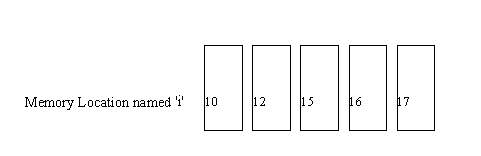
When you say int i we are declaring i as a variable. What we are doing is reserving some location in memory and calling it i. This means that i is a name of a memory location that is used to store integer numbers(hence the int). Notice that the color of int changes which indicates that C understands the word int. We initialize the value of i to 10. In the fifth line of code we change the value of i to 12. Aha! What does this mean? i was 10 initially. Now it has become 12. This means that i is a variable, because its value varies.(Ufff ... how profound). Pictorially, you can imagine it this way :
Then we say:
i=i+3;
This statement should tell you why variables are such a handy thing. Always look at the right hand side of the equal to sign. What we are telling the C compiler is to make add 3 to the current value of i. Thus we are effectively saying:
i=12+3
which makes i 15 and then increment (increase value by 1) again, and again. The output will look like this:
10
12
15
16
17
Notice that i=i+1 and i++ do the same thing. They both increment the value of i by 1. Then why two different ways of doing the same thing?? i++ can be regarded as a short form for i=i+1. There is yet another way of denoting an increment in i, but i wont tell you about it. My problem with these short forms is: they mean more work, more to learn and remember and hence more the chances of error. People regard this as a great feature of C. Personally, we think all this is pretty silly. Keep things as standard as possible, is what we believe in.
We have to do some ground work before we get to the next program.
Take a program in some programming language like Dbase and run it. It will take some time to execute, lets say 10 secs. Now we take this program and submit it to a ‘Dbase to C converter’. Now the original program, without changes has been converted into a C understandable program. Run this program. It will need 1 sec to run. Which brings us to a very important aspect of computing -- speed. Modern computers are supposed to be fast. The moment the computer is asked to access its memory, its speed drops substantially. Till the time the computer does not look at memory, its speed can be pretty amazing.
In any computer, you cannot store a number less than 0 or greater than 255 in a single memory location. This rule is ubiquitous. So when you declare i as a variable and say i=10, you are storing the value 10 in some memory location which you have named i. Now suppose you were to store the value 300 into the computers memory, how would you do it? This value (300) cannot be fitted in a single memory location. Two memory locations will now be needed. We’ll delve into memory management later but it would suffice to say that we can store 2^16 or 655536 numbers in 2 memory locations. In the same way numbers as large as 4 billion (2^24) can be stored in 4 memory locations. But, we need to ask ourselves a simple question: if I need to store a variable whose value is 10, and I have the option of storing them in either 1,2 or 4 memory locations, which of these would result in the fastest retrieval?’. Dbase allocates the maximum memory to each variable. C, however is very stingy about memory. Very stingy!! (and rightfully so, since allocating more memory than required not only slows the computer but also amounts to memory wastage .. and remember what mama said :’Wastage of any kind is wrong’!!)
When a variable is created C will ask you how much memory would be required by the variable. You will have to answer this question. Instead of answering in a cryptic fashion, we declare the variable as either a char, an int or a long. Each of these occupy a different size of computer memory. Don’t believe me? Try this program :
Program 9
main()
{
int i;
char j;
long k;
printf("%d\n", sizeof(i));
printf("%d..%d\n", sizeof(j), sizeof(k));
}
Output
2
1..4
Now we are going to change gear. Look at the following program :
Program 10
main()
{
if(0)
printf("hi\n");
printf("bye");
}
if is a word understood by C, which is obvious since the color changes as you type. if is a decision making tool in C. we have said :
if(0)
When the compiler sees a 0, it understands it as False. Hence this statement simply instructs the C compiler to ignore the next statement. Hence the output is:
bye
Try guessing the output of this one:
main()
{
if(0)
{
printf("hi\n");
printf("bye");
}
}
If you get a blank screen, don’t bang your monitor in disgust. In fact, your program is working just fine. Notice that you have enclosed both the printf's within the if statement, which causes both statements to be comfortably ignored! Hence the blank screen! Simple!!
Try this program:
Program 11
main()
{
if(3)
printf("hi\n");
printf("bye");
}
whenever we have any number, other than 0 in the if condition, the compiler understands it as true and does not ignore the following statement. hence the output here is:
hi
bye
Similarly:
Program 12
main()
{
int i;
i=0;
if (i)
printf("hi\n");
}
we have already explain to you that we can always specify a variable name instead of a number. You will get a blank screen as output.
Still at variables and the if statement try this program:
Program 13
main()
{
int i;
i=0;
if (i)
printf("hi\n");
i=6;
if(i)
printf("bye\n");
}
Here initially i is 0, hence Hi will not be printed, but then we have changed the value of i to 6. Now the statement following the if statement will not be ignored and hence we see
Bye
Operators
Doctors operate on (poor) patients. Operators operate on numbers. Example of operators are: =,<=,>=,!=,>,<.
Now look at this program:
Program 14
main()
{
printf("%d",4>2);
}
Here C will play a game of "Yes" and "No" with you and print out 1 when it thinks the condition is true and 0 when it thinks the condition is false. So the output will be:
1
Try this program:
Program 15
main()
{
printf("%d",4<2);
}
Continuing in the same vein, the output will be 0. (False)
Lets play this game once more to understand completely:
Program 16
main()
{
printf("%d",3>=3);
printf("%d",3!=3);
printf("%d",3!=4);
printf("%d",!0);
printf("%d",!3);
printf("%d",3==4);
printf("%d",3==3);
}
In the second printf we have said:
printf("%d",3!=3);
The != stands for not equal to. Thus here we are saying 3!=3, which is false, hence the output is 0.
In the sixth printf wehave:
printf("%d",3==4)
Whenever C sees a double equal to, it asks a question. ‘Is 3 equal to 4?’ The answer is no and hence the printf prints 0.
The output looks like this:
1011001
Actually we have been a little unfair to you. We should have told you
printf("%d",!0);
Whenever C compiler sees a ‘!’ it will invert the value. Which means:
!0 will return 1
!(any other number) will return 0
You are now about to arm yourself with another weapon from the C artillery. Type this program:
Program 17
main()
{
for(i=1;i<=10;i++)
printf("%d\n",i);
}
Here we have shown the for loop. The for loop takes 3 things each seperated by semicolons. But everything is a thing hence we call them paramaters. Hence we have 3 parameters and 2 semicolons. The first parameter establishes the initial value of i (in our case 0). The second parameter is the condition testing parameter. The third parameter is the action to be taken till the limiting condition is reached. The way the for loop works is:
first the varibale is initialized with the first parameter. Then the condition in the second paramater is tested. If the condition is true the instruction within the for loop are executed. At this time, the action specified in the third paramater is taken. Then the whole cycle is repeated.
Here, initially i=1. C checks if i is <=10. i.e. if 1<=10. Yes it is! It goes to
printf("%d\n",i);
and prints 1
Hence the output is 1. i is now incremented by the i++ part of the for loop. again C checks. is i<=10 i.e. is 2<=10. Yes it is!! It goes to:
printf("%d\n",i); and prints 2
This goes on till the condition i<=10 is met. So the output is:
1
2
3
4
5
6
7
8
9
10
When i becomes 10, it is incremented once more. i now becomes 11. Now the condition i<=10 no longer hold true and we exit out of the for loop.
Make this small change to the code:
Program 18
main()
{
int i;
for(i=1;i<=10;i++)
printf("%d\n",i);
printf("%d\n",i);
}
Here the effect of the for loop is limited only to the first printf statement. (Since the semicolon(;) at the end of the first printf marks the end of the for loop). When we come out of the for loop the value of i is 11, which will be printed by the second printf statement. The output is:
1
2
3
4
5
6
7
8
9
10
11
One more small modification to the above program:
Program 19
main()
{
int i;
for(i=1;i<=10;i++)
{
printf("%d",i);
printf("%d",i);
}
}
Here the both the printf’s are within the for loop. ( This is because of ‘{‘ and ‘}’). This time around the output will be:
1122334455667788991010
Next lets look at the next tool for looping: the while loop.
Program 20
main()
{
int i;
i=1;
while(i<=10)
{
printf("%d",i);
i++;
}
}
while takes just one parameter and that is the condition testing parameter. As long as that condition holds true, looping continues. Every time before entering the loop the condition is checked. If it holds true, the loop is executed. Here I is initialized to 1. Then the condition is tested. Is i<=10. i.e. is 1<=10. Yes it is!! Enter the loop. Here i is printed i.e. 1 is printed. i is then incremented. I now becomes 2. Again the condition i<=10 is checked. Is 2<=10. Yes it is!! Enter the loop again and print the value of i i.e. 2. This
goes on until the condition becomes false.
Output
12345678910
Look at this code and try to figure out what will happen:
Program 21
main()
{
int i;
i=1;
while(i<=10)
{
printf("%d\n",i);
}
}
Here we have not included i++ in the loop. this means that the value of i will not be incremented, i will always be at its initial value (which is 1), the condition i<=10 (i.e. 1<=10) will always be true and hence we will now have an infinite loop. So if you keep waiting for this loop to terminate you will ensure that you will miss the last train back home. Hence press Ctrl-Break to come out of the infinite loop.
Intelligent decision making requires the if statement to behave like a dictator. The if statement has a very simple philosophy in life: only if the condition specified in the brackets of the if statement is true will it execute the statements following it.
Program 22
main()
{
int i;
for(i=1;i<=10;i++)
{
if(i>=3)
printf("%d",i);
}
}
Here i starts of with the initial value of 0. Then the if condition (Is i>=3) is tested. Only when this condition is satisfied (i.e. only when this condition is true) will the value of i be printed. Hence the output of the program will look like this:
345678910
In many instances we would like to make the if statement more restrictive(in other words, making the dictatorship more effective). Look at this program:
Program 23
main()
{
int i;
for(i=1;i<=10;i++)
{
if(i>=3 && i<=7)
printf("%d\n",i);
}
}
&& should be read as 'And'. This is the reason why C is sometimes termed cryptic because a programming language like Dbase would have probably use the word 'and'
instead of '&&'. But given the speed and power of C, I feel it’s a small price to pay. This if statement, in English means only if both conditions (I>=3 and I<=7), print the value of i.
Output
3
4
5
6
7
Now let us take a closer look at the if statement. Type this program:
Program 24
main()
{
int i;
for(i=1;i<=10;i++)
{
if(i>=4)
printf("%d..\n",i);
else
printf("%d\n",i);
}
}
Here we have an if … else construct. Whenever you see an if … else, you should tell yourself mentally that either one of them (if or else) will have to be executed. So if the if condition is false, the else part will have to be true and vice-versa. Make this very clear in your mind as it will help you in future programming examples. Thus, in the above program, i will start with the initial value of 1. The if condition is :
if (i>=4)
Till the time i=3 this condition will not be true and hence the else part will automatically become true. The output will look like this:
1
2
3
4..
5..
6..
7..
8..
9..
10..
The important thing to keep in mind here is the first three numbers in the output (1 2 3) are printed by the printf statement in the else part and the rest of the numbers are printed by the printf statement in the if part of the program.
Now type this example:
Program 25
main()
{
int i;
i=4;
printf("%d\n",i=6);
printf("%d\n",i);
i=8;
printf("%d\n",i==7);
printf("%d\n",i);
}
Initially i has a value 4. Now in the first printf the value of i is changed to 6. Hence the output of the first printf will be 6. Note that assignment statements (like i=6) can be written any where in the code. And since within the printf we have said %d, this %d will be replaced by 6. The second printf will also display 6, since there has been no change in the value of i between the first and second printf. Then once again we are setting the value of i to 8. The third printf statement is interesting. Whenever C sees a double equal to sign(==), it knows it has to ask a question. In the third printf the question being asked is:' Is i (which is now 8) equal to 7?' The answer is 'No' or 'False' which is represented by 0, hence the third printf displays a 0. And since there has been no change in the value of i between the third and fourth printf, the fourth printf also displays 0.
Output
6
6
0
8
Look at this program:
Program 26
main()
{
int i;
for(i=0;i<=10;i++)
{
if(i=4)
printf("%d\n",i);
}
}
Here again, remember that the assignment statement can be put anywhere in the code. Here i has the initial value 0. When it comes to the if statement, the value of i first becomes 4 (due to the I=4). Then the if statement becomes:
if(i)
Which is always true and hence the value 4 is printed. Now i is incremented by 1, becomes 5. But once again when it comes to the if statement its value becomes 4 again, 4 gets printed and this goes on forever, since the value of I never reaches 10, and the for loop is never terminated. Thus, you should now act smart and break the infinite loop. (Ctrl-Break).
A very small modification to the above program will give you a very different output.
Program 27
main()
{
int i;
for(i=0;i<=10;i++)
{
if(i==4)
printf("%d\n",i);
}
}
Here in the if statement we ask: 'Is i equal to 4. This condition is satisfied only once as the value of I goes from 0 to 10 and hence the output will be
4
In the next program we will look at the concept of operator precedence. Operator precedence means a set of rules which dictate which opertaion will be performed first, when C finds two operators in the same statement. This program will tell you more:
Program 28
main()
{
int i;
i=6;
printf("%d\n",i=7!=8);
printf("%d\n",i);
}
Initially i=6. Now in the first printf we have the statement
i=7!=8
Whenever C finds 2 operators in the same line, it stops and ponders. It then processes the statement according to the rules of operator precedence. Just because the equal to (=) comes first in the statement, it doesn’t mean it will be executed first. According to this rule whenever C sees a not equal to (!=) and a equal to (=) in the same line, it executes the != part of the statement first. (the rest of the rules of operator precedence will be covered later). So the above statement is broken as :
7!=8
which is true hence the value returned is 1. Then we have
i=1
Thus the first printf displays 1 and ditto for the second printf.
Output
1
1
Lets play with this same program:
Program 29
main()
{
int i;
i=6;
printf("%d\n",(i=7)!=8);
printf("%d\n",i);
}
The only change here is the parenthesis. Lets look at the following statement closely:
i=6;
(i=7)!=8;
Whenever C encounters a parenthesis it will execute the statement within the parenthesis first. Here initially i has the value 6. Then in the first printf, the value of i is changed to 7, because the statement:
i=7
is executed first. Then the statement becomes:
7!=8
which is true, hence 1 and thus 1 gets printed by the first printf.
The second printf will print the value of i which is now 7, since we have not touched the value of i. Hence the output will be:
1
7
The point to remember here is that whenever C encounters 2 or more operators in a single statement it will first execute that part of the statement which is in parenthesis because in the rules of operator precedence the parenthesis has the highest priority.
If you have followed our examples of precedence so far, you should be able to guess the output of this program:
Program 30
main()
{
int i;
i=6;
printf("%d\n",i=8!=8);
printf("%d\n",i);
}
Here C looks as 8!=8, which is false. Thus I becomes 0 and thus the output looks like this:
0
0
Now, we'll look at something new. Type this program:
Program 31
main()
{
printf("%d\n",65);
printf("%c\n",65);
}
Alright, time to tell you about a funny little rule: Computers all over the world, big or small understand only numbers. Letters of the alphabet do not make sense to these machines. We have told you what '%d' does. On similar lines, '%c', is used to display the character equivalent of a number. character equivalent of a number. Geek!! What's that??? All characters, alphabets, special characters, numbers are stored in the computer as numbers, i.e. all these have values associated with them. These are called the ASCII values. All these ASCII values are collective stored in a place called the ASCII table. The ASCII value of capital A('A') is 65. Why 65?? No answer. All characters have a value, A happens to be 65. So when we say:
printf("%c\n", 65);
C peeps into the ASCII table and displays the character associated with ASCII value 65(which happens to be A.)
Output
65
A
Try this example:
Program 32
main()
{
printf("%c\n",66);
printf("%c\n",67);
printf("%c\n",97);
printf("%c\n",98);
printf("%c\n",99);
printf("%c\n",48);
printf("%c\n",49);
printf("%c\n",50);
printf("%c\n",0);
printf("%c\n",1);
printf("%c\n",2);
}
The output will be:
B
C
a
b
c
0
1
2
Note that the ASCII value of 0 is 48, that of 1 is 49 …! But 0 is the ASCII value of some other character. Don't get confused!
If you have followed our 'discourse' about ASCII values this next program should be a breeze.
Program 33
main()
{
int i;
i='A';
printf("%d..%c\n",i,i);
i='0';
printf("%d..%c\n",i,i);
i='1';
printf("%d..%c\n",i,i);
}
Output
65..A
48..0
49..1
Don't get confused when you see a '%c'. If you think %c should display only a alphabet, you are mistaken. %c is used to represent character equivalent of an ASCII value.
If you are dying to know all the ASCII values type this next program and populate your screen with all the 255 characters and their corresponding ASCII values.
Program 34
main()
{
int i;
for(i=0;i<=255;i++)
printf("%d..%c",i,i);
}
Output
Screen Full of Characters. Check it out for yourself!!
Level II
We feel like giving you a fancy opening paragraph welcoming you to Phase 2 of the Course, but we realize that it is in your best interest if we do not slack and keep the tempo going. So, try this program:
Program 35
main()
{
int *i;
char *j;
long *k;
printf("%d..%d..%d",sizeof(i),sizeof(j),sizeof(k));
}
This program is identical to program 9, except one slight change. All the variables now have a * in front of them. We have not done this to decorate our program. Whenever you see variables declared in such a manner, regard them as "special variables". (Kowtow to them, if you will). These variables are special because if you now run this program you will see that irrespective of the data type (int, char or long), the size of these variables in memory always remains 4. The output will look like this:
4..4..4
These special variables are given a special name. They are called pointers. Let me read your mind. ' Pointers!!!!. Gosh, I have heard they are the craziest and the most complex tings on the face of the earth. They have the capability of doing some weird things to the program. They are dangerously deadly'.
Let me first congratulate for the fact that you keep so much "knowledge" about pointers. Let me further tell you that all your information about pointers is very very wrong. My contention is that pointers are the simplest thing in the entire C arsenal and the best thing about them is that once you know them, you know them. There is no mugging involved, just plain simple understanding. Pointers are like Buddhism, spend time with them, study them and one day Poof … you'll see enlightenment and pointers will become the easiest thing in the world.
Look at this code:
Program 36
main()
{
char i;
*i =10;
}
This will give you a compilation error. Compiler will tell you: Invalid indirection. Reason? Well, you declared the variable as an int (not a pointer) and suddenly you start treating it as a pointer. If i has not been declared as a pointer, you cannot put a * in front of it. C will have none of your inconsistency and will not allow you to proceed further. Make this small change to make C happy:
Program 37
main()
{
char *i;
*i =10;
}
Now, since we have declared i as a pointer, C doesn't mind you treating it as one.
This program should help you clear quite a few cobwebs in your mind about pointers:
Program 38
main()
{
char *s;
s=1047;
*s =64;
}
Whenever, you see a * in front of a variable tell yourself two things:
Here, s is a pointer. So both rules apply. Next we say:
s=1047;
According to rule (2) 1047 is a computer memory location.
Then we say:
*s=64;
Now, read carefully..! This statement is equivalent to saying:
1047=64
Relax, read this as: In computer memory location 1047, we have stored the value 64.
While on the topic of memory locations, let us tell you an interesting feature.
Every computer memory location can be thought of as broken into 8 blocks. IN C we begin counting from 0, because the number remains the same, irrespective of where the count starts. Each of these blocks is weighted according to the following scheme:
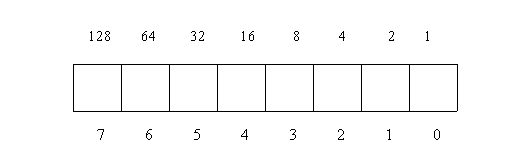
Hence in the above program when we store 64 in memory location 1047, we are simply putting a '1' in the sixth block. The interesting thing here is that memory location 1047 is special in the sense that each block within this memory location has its own special significance as shown:
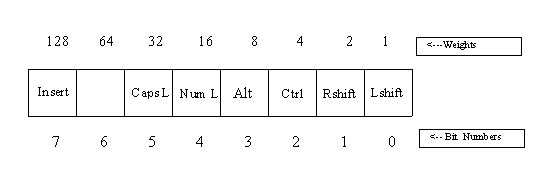
So, now you realize when you press the Caps-Lock key, what actually happens is that the sixth block in memory location 1047 is set to 1. When the Caps-Lock is removed, this value is made 0. It should be obvious that if you store the value 12 in memory location 1047, and then press the Del key, your computer reboots!!! Why?? Because when you store 12 in location 1047 you are setting the Cntrl and Alt key blocks to 1, and the Del is the last straw, because now you have given your machine the 3 finger salute. Result? Relax till your computer reboots.!!
Program 39
main()
{
int i;
FILE *fp;
}
This will give you an error. The error will say:
Undefined Symbol 'fp'
Undefined Symbol 'FILE'
If you wonder why we begin a new concept with an error, it is intentional. Our aim is to drill the right way of writing the code right into your head!
The problem with this program is that:
FILE *fp;
is not understood by the compiler. You will have to make this small change and everything works out just fine:
Program 40
#include <stdio.h>
main()
{
int i;
FILE *fp;
}
Lets try to understand the physce of the C compiler. The C compiler is a smart, intelligent and efficient program. Now, smart intelligent and efficient people tend to throw their weight around. The C compiler refuses to scrutinize the code unless someone else has already checked the code. This 'someone else' is the preprocessor. The preprocessor has only one goal in life and that is to go through the code and look for any # (hash) signs. In our program it finds:
#include <stdio.h>
include is a subdirectory.(c:\borlandc\include). This sub directory contains the file stdio.h and many such files. The file stdio.h contains the statement FILE. If this file(stdio.h) contained 1000 lines of code, our program would appear to the compiler as being 1005 lines long, since the #include <stdio.h> statement is replaced by the entire file.
Let us now play with files or to be more technically correct, lets look at file handling techniques in C. Type this program but don't run it just yet.
Program 41
#include <stdio.h>
main()
{
int i;
FILE *fp;
fp=fopen("z.c","r");
i=fgetc(fp);
printf("%d..%c\n",i,i);
i=fgetc(fp);
printf("%d..%c\n",i,i);
i=fgetc(fp);
printf("%d..%c\n",i,i);
i=fgetc(fp);
printf("%d \n",i);
}
Before you run this program, you need to create a file called z.c in the current subdirectory. For this say: Alt-F Open. Type z.c. You should find yourself staring at a blank screen. This is your file z.c. Save the file (Alt-F Save). Don’t run your program just yet. Read on. We have already looked at the statement FILE *fp. Now let us go further. The next statement is:
fp=fopen("z.c","r");
In the ancient past we had told you that any word followed by a () is understood by C as a function name. Thus, fopen is a function name. We are opening the file z.c for reading or to be more correct we are opening file z.c in the read mode (hence the "r"). From now on, fp stands for file z.c. Whenever we need to refer to file z.c we will use fp. The next statement is:
i=fgetc(fp);
fgetc is another function, which is used to get values from z.c Since this is the first time the function fgetc is encounterd the first character from z.c will be picked.
Now you realize that we have nothing in z.c to read. Hence we go back to z.c and write this:
ABC
Do not press enter after typing the 3 letters. Thus the first character in the file (A) is now in i. Now the first printf is encountered and this character and its corresponding ASCII value are displayed. Now i goes and fetches the next character from the file z.c ( C doesn't seem to forget which character it last picked). So now i contains B which, like before is displayed along with its ASCII value. The same procedure is followed for the third character. Now we have another fgetc statement. But there is no more data in the file z.c. To mark the end of data in a file, C puts a -1. Thus the last printf will display a -1. Thus we have successfully displayed the contains of the file z.c the output looks like this:
A..65
B..66
C..67
-1
If you notice the program we just wrote is not too intelligent. It expects us to know how many characters are present in the file. Also, the picking and displaying of value is being done by separate statements each time. Let us make the same program slightly intelligent:
Program 42
#include <stdio.h>
main()
{
int i;
FILE *fp;
fp=fopen("z.c","r");
while((i=fgetc(fp))!=-1)
printf("%d\n",i);
}
Here the most interesting statement is the while statement:
while((i=fgetc(fp))!=-1)
i picks the first character from the file z.c It compares the value of this character with -1. Since 65 not equal to -1, the ASCII value of the character is displayed. The value -1 is used to represent the state of no more data present in file. Thus, when the ASCII value of C is displayed, I becomes -1 (to indicate no more data is present) and we exit out of the while loop.
There is another important point to note about this while loop. If we said:
while(i=fgetc(fp)!=-1)
We have removed one pair of parenthesis. Will this affect the program?? The answer is :Yes. Reason? By the rule of operator precedence, != is processed first. Thus:
fgetc(fp)!=-1
will be processed first. Since fgetc is A, then B and finally C, the output will look like this:
1
1
1
Want to experiment some more? Make the following changes to the file z.c and see the output each time:
z.c	abc	Output: 97 98 99
z.c	A01	Output: 65 48 49
z.c	A-1	Output: 65 (ASCII value of -) 49
How about transferring the contents of one file to another?? Sounds fun? Lets go:
Program 43
main()
{
int i;
FILE *fpi, *fpo;
fpi=fopen("z.c","r");
fpo=fopen("z1.c","w");
while ((i=fgetc(fpi))!=-1)
fputc(i,fpo);
}
fpi stands for file z.c, fpo stands for file z1.c. z.c is opened in read mode(hence the "r"), z1.c is opened in write mode(hence the "w"). The while loop will read data until such time as there is no more data in the file (z.c), at which point the value of i will become -1. Within the while loop we just have a function fputc which puts this value of I (which is read from fpi, which means effectively read from z.c) into fpo(z1.c). Thus, all we are doing is picking the characters from z.c (1 character at a time) and transferring it to z1.c Thus, at he end of this program both z.c and z1.c have the same contents (ABC)
Now let us be more adventurous and try this program:
Program 44
main()
{
int i;
FILE *fpi, *fpo;
fpi=fopen("z.c","r");
fpo=fopen("z1.c","w");
while ((i=fgetc(fpi))!=-1)
{
if (i>=65 && i<='Z')
i=i+32;
fputc(i,fpo);
}
}
As before, fpi and fpo are computer memory locations. fpi stands for file z.c, fpo stands for file z1.c. z.c is opened in read mode(hence the "r"), z1.c is opened in write mode(hence the "w"). The while loop will read data until such time as there is no more data in the file (z.c), at which point the value of i will become -1. Now, within the while loop we have an if statement that checks to see if i contains a capital letter. Look closely at the if statement:
if (i>=65 && i<='Z')
The ASCII value of A is 65. Hence this statement could also be written as:
if (i>='A' && i<='Z')
If we remembered the ASCII value of 'Z' we could have put that value in the above statement. The point we are trying to make here is that whenever the C compiler finds any character in single quotes (' '), it goes to the ASCII table to find its ASCII value. Now supposing z.c contains:
AaBb
i picks the first character from z.c ('A') sees it’s a capital letter, adds 32 to the ASCII value of A. 32 because, the difference between the ASCII value of capital 'A' and small 'a' is 32. Now, I contains the ASCII value of small .Thus, the capital A has been converted into small a. This new value of i is written to file z1.c by the statement:
fputc(i,fpo);
During the next iteration of the while loop, i picks up the 'a' from z.c. Now the condition in the if statement is false hence i (which is small a) is directly written to file z1.c.
Capital B follows the same pattern as that of capital A, and small b meets the same fate as small a. Hence the file z1.c now contains:
aabb
Thus we have successfully converted all caps in a file to small.
Now we are going to write the same program, this time with a bug. Try to find out the problem:
Program 45
main()
{
int i;
FILE *fpi, *fpo;
fpi=fopen("z.c","r");
fpo=fopen("z1.c","w");
while ((i=fgetc(fpi))!=-1)
{
if (i>=65 && i<='Z')
{
i=i+32;
fputc(i,fpo);
}
}
}
When you write this program, z1.c will contain only:
ab
Reason? If you look closely, we have included both statements:
i=i+32;
fputc(i,fpo);
within the if statement.(due to the braces). Now when i reads small a, the if statement is false, hence we come out of the if statement. There is no
fputc(i,fpo);
outside the if, hence this value of i ('a') does appear in z1.c. z1.c only contains ab, which are actually the capital A and B of file z.c
Thus, never be sure of the proper working of any program, unless you have run it yourself and seen the output. Run each program step by step and you will never go wrong.
If you have followed the previous program, the next program is very similar:
Program 46
#include <stdio.h>
main()
{
int i;
FILE *fpi, *fpo;
fpi=fopen("z.c","r");
fpo=fopen("z1.c","w");
while ((i=fgetc(fpi))!=-1)
{
if (i>=97 && i<='z')
i=i-32;
fputc(i,fpo);
}
}
Here we are converting the small letters to capital. The only change is the if statement which is now:
if (i>=97 && i<='z')
97 is the ASCII value of small a. here we have:
i=i-32;
because of the difference in ASCII values of small and capital letters.
You can use the same files z.c and z1.c. z1.c will now contain:
AABB
Try this interesting program:
Program 47
main()
{
int i;
FILE *fpi, *fpo;
fpi=fopen("z.c","r");
fpo=fopen("z1.c","w");
while ((i=fgetc(fpi))!=-1)
{
if (i>=97 && i<='z')
i=i-32;
if(i>=65 && i<='Z')
i=i+32;
fputc(i,fpo);
}
}
This program is interesting because this program also converts capital letter to small letters. Let us explain how:
i picks A from z.c. The first if statement is false, since it checks only for small letters. Then the second if statement is encountered which is true. Capital A is converted to small a and written to z1.c. Now when i picks small a from z.c, the first if statement is true, small a is converted to capital A. Now the second if statement is encountered, which again is true.(because now i contains capital A). This if statement converts capital A back to small a which is written to z1.c. the net result is that z1.c contains only small letters. Interesting, eh??
Note, 2 programs which look so different do the same thing. (programs 43 and 45). Although, this program is not terribly efficient, the point is, and we repeat, run each program and see the output.
Next, we will make a small change to program 45 and find that capital letters become small and vice-versa.
Program 48
#include <stdio.h>
main()
{
int i;
FILE *fpi, *fpo;
fpi=fopen("z.c","r");
fpo=fopen("z1.c","w");
while ((i=fgetc(fpi))!=-1)
{
if (i>=97 && i<='z')
i=i-32;
else if(i>=65 && i<='Z')
i=i+32;
fputc(i,fpo);
}
}
The only change in this program is the inclusion of the word else. Now when i is a small letter the first statement is true, which converts i to capital. If i is capital to start with, the first if statement is false, the second one is true, and I now contains a small letter. So starting with file z.c which is:
AaBb
z1.c looks like this:
aAbB
Our next endeavor will be to remove all spaces from a file. For this first make the following change to z.c:
A B C
Now run this program:
Program 49
#include <stdio.h>
main()
{
int i;
FILE *fpi, *fpo;
fpi=fopen("z.c","r");
fpo=fopen("z1.c","w");
while ((i=fgetc(fpi))!=-1)
{
if (i!=32)
fputc(i,fpo);
}
}
Enough has been said about the first few statements of this program. Lets look at the if statement:
if(i!=32)
fputc(i,fpo);
32 is the ASCII value of space. (We could have used ' ' instead of 32). So, in English the if statement would mean: only if i does not contain a space, put it into fpo.(z1.c). Thus, all spaces in the file z.c vanish into thin air. z1.c now looks like this:
ABC
Another way to write the same program would be:
Program 50
#include <stdio.h>
main()
{
int i;
FILE *fpi, *fpo;
fpi=fopen("z.c","r");
fpo=fopen("z1.c","w");
while ((i=fgetc(fpi))!=-1)
{
if (!(i==32))
fputc(i,fpo);
}
}
Here, the if statement is slightly different. It says:
 if(!(i==32))
fputc(i,fpo);
Let us remind you, that whenever you see a double equal to (==), it means you are asking a question. So here, if i indeed contains a space( ASCII 32), (I==32) will be true, or 1, hence the if statement now becomes:
if(!(1))
fputc(I,fpo);
!1 is 0. Hence the statement now becomes:
if(0)
fputc(i,fpo);
This will cause the statement:
fputc(i,fpo);
to be ignored. Hence the spaces in z.c will not figure in z1.c
Yet another way of accomplishing the same task is:
Program 51
#include <stdio.h>
main()
{
int i;
FILE *fpi, *fpo;
fpi=fopen("z.c","r");
fpo=fopen("z1.c","w");
while ((i=fgetc(fpi))!=-1)
{
if (i==32)
;
else fputc(i,fpo);
}
}
Here the if statement says:
if (i==32);
which in simple English means: if I contains a space do nothing. That’s right nothing. If that is not the case(i contains anything else except a space), we jump to the else statement which is:
else fputc(I,fpo);
meaning, write it to z1.c. Again, spaces won't find any space in z1.c
Three different programs, three same outputs. Is that a coincidence?? No sir! No way!! We have taken the pain to demonstrate just one thing: Different people have different styles of coding. It is imperative that you understand the code in plain and simple English. Never, we repeat never, try to remember a program. Write your own code. Syntax is just one aspect of learning a programming language. The real challenge is in understanding and developing the logic for the program. And logic unfortunately cannot be taught, it can only be discovered. Its like a cricket batsmen's timing of shots. Let him read a trillion books on batting, only if he practices hard and long will he find his touch. Ditto for logic.
We suddenly feel the urge to remove all numbers from our file. So here we go. Before we write the program, make the following changes to z.c:
A19B
Here is the program:
Program 52
#include <stdio.h>
main()
{
int i;
FILE *fpi, *fpo;
fpi=fopen("z.c","r");
fpo=fopen("z1.c","w");
while ((i=fgetc(fpi))!=-1)
{
if ((i>='A' && i<='Z') || (i>='a' && i<='z'))
fputc(i,fpo);
}
}
Run this program. The output in file z1.c will look like this:
AB
Happy aren't you. But there is a small problem. The if statement within this program only checks if z.c contains capital or small letters:
if ((i>='A' && i<='Z') || (i>='a' && i<='z'))
What if my z.c contains:
A19,B
Now the aim of our program is to remove all numbers from z.c. the comma(,) in z.c is not a number. So, it should appear in the output file z1.c. here our program fails. But, never give up till the fight is over. We will modify out code to solve our problem. Here goes:
Program 53
#include <stdio.h>
main()
{
int i;
FILE *fpi, *fpo;
fpi=fopen("z.c","r");
fpo=fopen("z1.c","w");
while ((i=fgetc(fpi))!=-1)
{
if (!(i>='0' && i<='9'))
fputc(i,fpo);
}
}
Aha! Run this program and z1.c looks like this:
A,B
The change here is in the if statement:
if (!(i>='0' && i<='9'))
Here we search for numbers(0 -9) in the file z.c. Upon finding one, we invert the condition hence we have:
if (!(1))
fputc(i,fpo);
As, explained above, this will ignore:
fputc(i,fpo);
And hence no numbers figure in z1.c
Remember, ! (not) inverts the condition, True becomes False, False becomes True.
Why not remove all numbers from a file and replace them with spaces. Are you game? Lets go:
Program 54
#include <stdio.h>
main()
{
int i;
FILE *fpi, *fpo;
fpi=fopen("z.c","r");
fpo=fopen("z1.c","w");
while ((i=fgetc(fpi))!=-1)
{
if (i>='0' && i<='9')
i=32;
fputc(i,fpo);
}
}
here again the trick is in the if statement:
if (i>='0' && i<='9')
i=32;
If i contains a number, it is changed to a space and then written to the output file, otherwise the value of i is directly written to the output file.
Alright, next task. We want to convert space in out input file z.c into five spaces in the output file z1.c
Go ahead, get your fingers moving:
Program 55
#include <stdio.h>
main()
{
int i;
int j;
FILE *fpi, *fpo;
fpi=fopen("z.c","r");
fpo=fopen("z1.c","w");
while ((i=fgetc(fpi))!=-1)
{
if (i==32)
{
for (j=0;j<=4;j++)
fputc(32,fpo);
}
else
fputc(i,fpo);
}
}
The if statement here is interesting:
if (i==32)
{
for (j=0;j<=4;j++)
fputc(32,fpo);
}
Thus, when a space is encountered, the if statement becomes true, and we enter the for loop. Here we step through the for loop 5 times, each time putting a space in the output file. Thus when we come out of the if statement, bingo we have converted the single space into 5 spaces. Of course, i contains any other character(except a space), that character is directly written to the output file.
Lets tamper with our code and check. Just replace the for loop to look like this:
for(j=1;j<=5;j++)
Same output.
Lets not stop here:
Program 56
#include <stdio.h>
main()
{
int i;
int j;
FILE *fpi, *fpo;
fpi=fopen("z.c","r");
fpo=fopen("z1.c","w");
while ((i=fgetc(fpi))!=-1)
{
if (i==32)
for (j=0;j<=4;j++)
fputc(32,fpo);
fputc(i,fpo);
}
}
We have just removed the word else. Now, run this program and hey, we have 6 spaces replacing the single space. But how did this happen? My friend, you have committed this heinous crime with your own little fingers. The for loop is executed 5 times, as before, each time writing to the output file. Now when the C compiler exits out of the for loop, the next statement it encounters is :
fputc(i,fpo);
Aha! This statement is the culprit. This statement causes the sixth statement to appear in the output! (Smart work Sherlock!!). This should cause your creative juices to flow and you should now look for a way to print 5 spaces even when this statement is present. How do you do it? Type this:
Program 57
#include <stdio.h>
main()
{
int i;
int j;
FILE *fpi, *fpo;
fpi=fopen("z.c","r");
fpo=fopen("z1.c","w");
while ((i=fgetc(fpi))!=-1)
{
if (i==32)
for (j=0;j<=3;j++)
fputc(32,fpo);
fputc(i,fpo);
}
}
Good, now the for loop is executed 4 times, causing 4 spaces to be written to the output file. The fifth space will be taken care of by the culprit statement (thereby absolving it from it's earlier crime).
Now Mr. Detective make the following change to file z.c:
A B
and deduce the output of this program:
Program 58
#include <stdio.h>
main()
{
int i;
FILE *fpi;
FILE *fpo;
fpi=fopen("z.c","r");
fpo=fopen("z1.c","w");
while((i=fgetc(fpi))!=-1)
{
if (i==32)
{
while ((i=fgetc(fpi))==32)
;
}
fputc(i,fpo);
}
printf("%d\n",i);
}
Lets see how this one works: i picks up A from z.c. This is not a space hence the if statement is false and A is written directly to z1.c. Next i picks a space from z.c. It enters the if statement. Here the statement:
while ((i=fgetc(fpi))==32)
causes the next character in file z.c to be picked, which also happens to be a space. When a semicolon is encountered, you are telling the C compiler to do nothing. Then the close brace('}') is encountered. This causes the compiler to go to the if statement again. The if statement is true (this time due to the second space). Again, the while loop causes the third space to be picked up, again discovers that no action is to be taken, comes back to the if statement again. Once again the if statement is true(since now contains the third space). This time the while statement picks up the last character from z.c(B). No action hence the compiler goes back to the if statement. Now, since i contains B(not a space), the if condition is false, the program jumps to the statement:
fputc(i,fpo);
and writes B to the output file.
So, like before we have removed spaces from our file. Phew!!!
We will now write a program which will scrutinize your file and tell you if your file is an ASCII file or not. An ASCII file is one which contains any characters whose ASCII values are in the range 1 to 128.
Here goes:
Program 59
#include <stdio.h>
main()
{
int i;
int j;
FILE *fpi;
j=0;
fpi=fopen("z.c","r");
while((i=fgetc(fpi))!=-1)
{
if (i>=128)
j++;
}
if (j!=0)
printf("not an ASCII file");
else
printf(" an ASCII file");
}
Here the first if statement is:
if (i>=128)
j++;
Here in the if loop we check to see if any of the characters in file z.c has an ASCII value between 1 and 128. If it does we increment the value of j by one.(j is initialized to 0).
if (j==0)
printf("not an ASCII file");
else
printf(" an ASCII file");
Now, at the end of this if loop j contains value 0, it only means that z.c does not contain any ASCII characters, hence we display "not an ASCII file". If j is not equal to 0, the file is ASCII.
File Compression and Decompression
We as a human race are a species of impatient creatures. No wonder then that "instant" food is such a big success these days. Computers are no different.(after all we humans invented this mean machine). There is such a lot of talk about the revolution of the Internet, the information superhighway and all that. But do you realize that all these "super" technologies still rely on our "super" slow telephone systems which are meant for voice transmission not data transmission. Hence there is a constant need to convert our files into smaller sized files, commonly termed as compressing or zipping files. Presented below are a few basic techniques of file compression and decompression, which can be considered the basis of all these current complex compression/decompression techniques.
We have written these programs on the basis of the assumption that a space is the most commonly occurring character in a file. Also, our program will work only in case of ASCII files. Let us understand the compression program: Make your z.c look like this:
A BAD CAT
Now, run the following program:
Program 60
#include <stdio.h>
main()
{
int i;
int j;
FILE *fpi;
FILE *fpo;
fpi=fopen("z.c","r");
fpo=fopen("z1.c","w");
while((i=fgetc(fpi))!=-1)
{
if (i==32)
{
i=fgetc(fpi);
i=i+128;
}
fputc(i,fpo);
}
}
The first character picked from z.c is A. This does not satisfy the condition in the if statement which is:
if (i==32)
{
i=fgetc(fpi);
i=i+128;
}
hence A gets written to z1.c
Now the next character is a space. Now the condition in the if statement is true. Within the if statement we pick the next character from z.c (in our case B) and add 128 to the ASCII value of this character (66+128). This results in the display of the character corresponding to ASCII value 194. Thus we have reduced two characters (space and B into one character in the output file z1.c. Continuing in the same way, the A and D of BAD get picked from file z.c and are written to z1.c directly. Again when the space is encountered the next character is picked from file z.c (in our case) and 128 is added to the ASCII value of this character (67+128). The output file now has the character corresponding to 195. The A and T are written directly to z1.c.
Hence we you notice that our input file z.c was 9 bytes long. Z1.c is only 7 bytes long, a sure sign of file compression. (To find the size of the files go to the directory in which the files are present, do a dir and you will see the size of the file corresponding to the name of the file.)
Now we will look at a program for decompressing or inflating our file. For this we will take our compressed file z1.c and put the uncompressed file into z2.c. Creating files has been explained already.
Program 61
#include <stdio.h>
main()
{
int i;
int j;
FILE *fpi;
FILE *fpo;
fpi=fopen("z1.c","r");
fpo=fopen("z2.c","w");
while((i=fgetc(fpi))!=-1)
{
if (i>=128)
{
i=i-128;
fputc(32, fpo);
}
fputc(i,fpo);
}
We will now write a program which works much better when the input file contains a string of identical successive characters. In our example we have assumed the input file contains successive spaces. For this make your file z.c look like this:
A BAD CAT
Program 62
#include <stdio.h>
main()
{
int i;
int j;
FILE *fpi;
FILE *fpo;
fpi=fopen("z.c","r");
fpo=fopen("z1.c","w");
while((i=fgetc(fpi))!=-1)
{
if (i==32)
{
j=1;
while((i=fgetc(fpi))==32)
j++;
fputc(j+128, fpo);
}
fputc(i,fpo);
}
}
Here the if statement is more intelligent:
if (i==32)
{
j=1;
while((i=fgetc(fpi))==32)
j++;
fputc(j+128, fpo);
}
Inside the if statement we count the number of successive occurrences of spaces. This value is stored in variable j. We enter the if statement only when we encounter a space. Hence j is initialized to 1. Then the next character is picked. If this happens to be a space, j is incremented. All consecutive occurrences of space are recorded in j. Thus if we have 5 spaces, j would be 5. Then we have the statement:
fputc(j+128, fpo);
Here the ASCII value corresponding to 5+128 i.e. 133 is written to the output file z1.c. Thus the 5 spaces have now been replaced by a single character. The 3 spaces between BAD and CAT are similarly replaced by a single space.
Thus, the input file has been compressed from 15 bytes to only 9 bytes.
Now that we have compressed our file, lets write a program for decompressing or inflating our file. For this we will take our compressed file z1.c and put the uncompressed file into z2.c. Creating files has been explained already.
Program 63
#include <stdio.h>
main()
{
int i;
int j;
int k;
FILE *fpi;
FILE *fpo;
fpi=fopen("z1.c","r");
fpo=fopen("z2.c","w");
while((i=fgetc(fpi))!=-1)
{
if (i>=128)
{
k=i-128;
for(j=1;j<=k;j++)
fputc(32,fpo);
}
else
fputc(i,fpo);
}
}
Here when C encounters any character in file z1.c with an ASCII value greater than or equal to 128, it knows that compression has taken place at that particular location. Hence we have the statement:
k=i-128;
This statement is used to record the number of spaces at this location. Now we use this value of k as the limiting value in the for loop:
for(j=1;j<=k;j++)
fputc(32,fpo);
Thus, from our previous example k would be 5, the for loop would go on 5 times and 5 spaces would be written to file z2.c. Any character other than the space will not enter the if statement and will be written directly to z2.c by the else statement.
Arrays
We will now talk about a very handy concept in C. Look at the following code:
Program 64
main()
{
int i;
char a[5];
a[0]=1;
a[1]=2;
a[2]=3;
a[3]=4;
a[4]=10;
i=0;
printf("%d\n",a[i]);
i=1;
printf("%d\n",a[i]);
i=4;
printf("%d\n",a[i]);
}
int i, takes 2 memory locations and names them 1. i is thus a variable. Then we see:
char a[5];
Aha! What have we done here? We have, in one stroke created 5 variables of type char. C starts counting from 0, hence these variables are: a[0], a[1], a[2], a[3], a[4]. Then we have 3 printf's that look exactly the same. The important thing to note here is that a[i] is not a variable. a[0] …..a[4] are variables. When i=0, a[i] = a[0]. Thus when we write a[I] we are not writing the name of a valid variable. Some other variable (i) decides the name of the variable, hence the value. Thus, we have added a new level of abstraction into our code. It is concepts such as these that come in very handy when writing complex examples.
a[i] is an array. Arrays are one of the most powerful tools of any programming language. The good thing about arrays is that they can be put into loops, like any other variables. This as you realize will greatly simply tasks which would otherwise be long and tedious. Let us demonstrate this point with two programs:
Program 65
main()
{
int a[5];
int i;
for (i=0;i<=4;i++)
a[i]=i*2;
for (i=0;i<=4;i++)
printf("%d\n",a[i]);
}
Here we have defined a array of type int of size 5. Then we put this array into a loop. Within this loop we conviniently put this array and manipulate the array at the same time. Thus the output is:
0
2
4
6
8
How many letters in the English alphabet?? Twenty six!! What if we were to write a program that counted the number of occurrences of each alphabet in our file!! Possible? Yes, but wouldn't we need 26 variables for storing the occurrence of each alphabet. Along with these 26 variables, we would have 26 if statements. Since we are using 26 variables, each of these would have to be initialized. Sounds a long and boring program to write, right? Look at the following program to realize how helpful arrays can be in simplifying matters. Before writing the program make sure your file z.c looks like this:
AABBBCCDDEFFFF
Program 66
#include <stdio.h>
main()
{
int i;
long a[26];
FILE *fp;
for(i=0;i<=25;i++)
a[i]=0;
fp=fopen("z.c","r");
while((i=fgetc(fp))!=-1)
{
if (i>='A' && i<='Z')
a[i-65]++;
}
for(i=0;i<=25;i++)
printf(" %c..%d",i+65,a[i]);
}
Here we create an array a of size 26 (equal to number of alphabets) and of type long. Remember, long reserves 4 memory locations and can thus store 4 billion occurrences of each letter. The first for loop is just to initialize all the 26 variables, a[0] ….a[25] to zero. Then the if statement checks for capital letters in the file. (We are limiting our program to capital letters only, small letters can also be counted with just another if statement). Now pay close attention: The first letter picked up is A. The ASCII value of A is 65. Hence the statement:
a[i-65]++;
We will break this statement. First consider:
a[i-65]
This now becomes a[65-65] i.e. a[0]. Thus the occurrence of A is recorded in a[0]. Following the same logic when a B (ASCII value 66) is encountered, we have: a[66-65] i.e. a[1]. Thus the occurrence of B are recorded in a[1]. Following the same logic, a[3] will contain the occurrence of C … a[25] will contain the occurrence of Z. Now, if any of the alphabets is encountered again, we are able to keep track of it by this statement:
a[i-65]++;
Thus the second time A is encountered a[0] is incremented to 2. Thus, the 26 variables, a[0] to a[25] are used to store the occurrences of the 26 letters A through Z. Then the for loop is used to display the output:
for(i=0;i<=25;i++)
printf(" %c..%d",i+65,a[i]);
i+65 will actually be 0+65, 1+65 … as i gets incremented. Since we have a ‘%c’ corresponding to I+65, the character equivalent of the ASCII values will be printed. A[i] will be a[0] a[1] .. a[25] as i gets incremented. Thus corresponding to ASCII value 65 (A) we have a[0] which contains nothing but the number of occurrences of A in the file. Hence the complete output looks like this:
A..2 B..3 C..2 D..2 E..1 F..4 G..0 H..0 I..0 J..0 K..0 L..0 M..0
N..0 O..0 P..0 Q..0 R..0 S..0 T..0 U..0 V..0 W..0 X..0 Y..0 Z..0
As kids, we were introduced to the decimal form of numbers. The decimal form of numbers is so called because it contains 10 symbols:
0 1 2 3 4 5 6 7 8 9
Since we run out of symbols, we combine the first two symbols ( 0 and 1) to create the next number: 10.
Computers prefer the hexadecimal form of numbers. Here there are 16 symbols:
0 1 2 3 4 5 6 7 8 9 A B C D E F
As before, the next number is created by combining the first two symbols: 10
Illustrated below is a program which plays around with numbers of these types:
Program 67
main()
{
int i;
i=20;
printf("%x\n",i);
i=0x15;
printf("%d\n",i);
i=0x14;
printf("%d..%x\n",i,i);
i=0x10+10;
printf("%d..%x\n",i,i);
}
In the first printf we will display the hexadecimal equivalent of 20. (%x displays the hexadecimal equivalent of a number). Then we have:
i=0x15;
Whenever the C compiler comes across any number with a 0x in front of it, it understands the number as a hexadecimal number. Thus I now contains the hexadecimal number 15. The second printf displays the decimal equivalent of hex 15 (because of %d). Then we have:
i=0x14
Now the value of I is hex 14. The third printf displays the decimal equivalent of hex 14 as well as the hex value itself (because of the %d and %x).
The next statement is interesting:
i=0x10+10;
Here we want to add the hex number 10 with the decimal number 10. When C comes across such a statement it gets pretty upset. It yells at you: ' Hey why can't you make your mind on which type of numbering system you want to use'. But then C is like a traditional Indian woman who does her duty in spite of her discomfort. So the last printf faithfully reflects the numbers in both decimal and hex forms.
Output
14
21
20..14
26..1a
In this world full of pretence, the way you look can often decide how far you go in life. Unfortunate, but true!! This trend is not just limited to the social circles, it has affected the software industry too. A software with a good looking interface can often tilt the scale in its favor. Realizing the importance of being able to talk to the display device directly, Kernighan Richie, decided to give programmers the ability to directly talk to the screen. In this section we will explore this aspect of C.
Look at this piece of code:
main()
{
char *s;
}
Lets be honest with ourselves. Whenever, we see a * in front of a variable, there is a sense of uneasiness. Its like examination time. No matter how well you are prepared, the moment the question paper comes to you, you feel extremely uneasy, almost fidgety. Here we see s with a *. s is a variable and like all other variables it has to be initialized. So we add this line to our code above:
s=0xb8000000;
We have already told you that a number preceded by a '0x' is understood by C as a hexadecimal number. Thus, what we mean by the above statement is that s now contains the address of memory location b8000000. The reason we have used hexadecimal is that it is a more convenient way of representing a number. Representing this hex number with a decimal we would have been a nightmarish task. As far as the computer is concerned, it really doesn't care about the way you represent numbers(decimal or hex).
Now, we will add another statement to our code:
*s=65;
This means that we are putting the value 65 in memory location b8000000. Our final program looks like this:
Program 68
main()
{
char *s;
s=0xb8000000;
*s=65;
}
Now run this program and see the output. You will see an 'A' on the top left corner of your screen. If you were a detective (with a computer background) you would smell foul play. You know that 65 is the ASCII value of A. But what about memory location 0b8000000. Hmmm, something tells you this guy is the bad guy. You decide to make him your top suspect and probe further.
You decide to delve deep into the case. For this you decide to understand the following programs so that you have enough evidence to nail your suspect. You decide to run the following programs:
Program 69
main()
{
int i,j;
for(i=1;i<=50;i++)
{
for(j=0;j<=3998; j=j+2)
printf("A");
}
}
In the course of your investigation you find out that the screen has 80 characters/row and 25 rows
: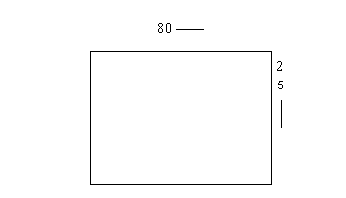
Hence, the second for loop starts from 0 and is executed 2000 times, each time being incremented by two. The output of this program is: 1 screen with 2000 A's and 50 such screens.
Now you follow your second lead. You run this program:
Program 70
main()
{
int i,j;
char *s;
s=0xb8000000;
for(i=1;i<=50;i++)
{
for(j=0;j<=3998; j=j+2)
*(s+j)=65;
}
}
Hmmm, now you seem to be getting somewhere. The *s and memory location b8000000 have figured again. This program gives you the same output as the previous program, the only difference being that this program is perceptibly faster than the previous program. Now what does this mean?? It means that by using *s we are able to communicate directly with the memory location b8000000 and this is the reason this program runs faster. Thus, you now understand the power and utility of the special variables with a * in front of them.
You are now close to solving the mystery.
The human eye has a limitation. If the screen is not refreshed fast enough, we tend to see a blurred image. Thus, it is imperative to refresh the screen constantly at a certain minimum rate. Now if our 'main' computer which does all the processing, input output had to do the screen refreshing bit too, it would obviously become slow. Because the screen has to be refreshed or redrawn very often. Thus, if we could have another small computer within my main computer whose only function would be to redraw the screen at the required rate, my main computer would be less burdened and thus work faster. This small computer would have to be given a area of memory and be told to constantly refresh only this area of memory. Then we would store our screen in this same memory area, and thus the small computer would constantly keep refreshing the screen at the required rate. That would then stop the blurring effect. Now that you are ready with the arrest warrant, you begin to track the suspect.
Try this program:
Program 71
main()
{
char *s;
s=0xb8000000;
*s=65;
*(s+2)=67;
*(s+4)=48;
}
The output of this program is:
AC0
Now it is easy for you to understand that somewhere in memory the following scenario exists:
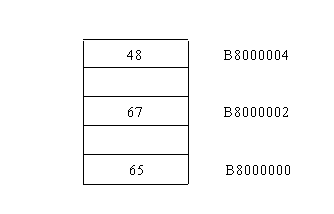
Now the small computer goes to the first of this memory location (b8000000) and sees a 65 (A). Then it goes to memory location b8000002 and sees a 67 (C) and finally encounters 48 in memory location b8000004. We have ignored the odd memory location here. We will explain them soon.Time to understand the structure of the computer memory.
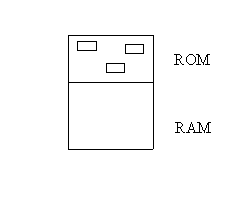
It has 2 basic parts: ROM and the RAM. ROM: stands for Read Only Memory. Contents of this part of memory are not lost if the power is switched off. The part of memory can only be read from, not written to.
RAM: stands for Random Access Memory. Contents of this part of memory are lost once the power is switched off. This part of memory can be read from and written to.
RAM is random access, which means that if we need to go to the tenth record in RAM we do not need to start reading from the first record. We can directly jump to record number 10. ROM is also random access. In that sense, ROM is also RAM!! Thus the name ROM is misleading and hence it would be more correct to call ROM, RWM which stands for Read Write Memory.
Operating systems have a peculiarity: they do not like to communicate with the hardware. This is because an OS recognizes one type of hardware. If you install new hardware, the OS will have to recognize this new hardware. This amounts to work, and like everyone in this universe, the OS shuns work. They need some other programs to talk to hardware. ROM is a collection of small programs, which can talk to the hardware. It is for this reason that ROM is also called ROM BIOS, where BIOS stands for Basic Input Output System. Thus whenever you say:
printf("hi");
printf doesn't know how to print hi, it expresses its inability to DOS. DOS says: 'But I cant talk to hardware. I can't print hi. Then DOS negotiates a deal with one of the small programs in the ROM BIOS to print hi. This program then goes to memory location b8000000 and prints hi. This, quite obviously is an extremely slow and inefficient method of doing things. By directly talking to memory location b8000000 we are bypassing all these intermediate steps and thereby increasing program execution speeds.
Now that we are in talking terms with the screen memory lets be naughty:
main()
{
char *s;
int i;
s=0xb8000000;
for(i=1;i<=3998;i=i+2);
*(s+i)=32;
}
Here, when i=0, *(s+i) becomes (*S) which is effectively * b8000000 and in this location we put a space( ASCII 32 is a space). Then, when i=2, (s+i) becomes *(s+2) which is effectively * b8000002 and there again we put a space. This process is repeated 2000 times and the end result is that we clear the screen. (all spaces).
Continuing in the same spirit, run this program:
Program 72
main()
{
char *s;
int i;
s=0xb8000000;
for(i=1;i<=3998;i=i+2);
{
if(*(s+i)>='A' && *(s+i)<='Z')
*(s+i)=32;
}
}
Here, within the for loop (which again goes on 2000 times) we have an if statement which checks for capital letters on the screen. When a capital letter is encountered, it is replaced by a space.
Alright, one last program:
Program 73
main()
{
char *s;
int i;
s=0xb8000000;
for(i=1;i<=3998;i=i+2);
*(s+i)=*(s+i)+32;
}
Here, whenever we encounter a capital letter on screen, we are converting it into a small letter.
Till now, we have only talked about even memory locations. Let us now turn our eyes to the odd memory locations within the screen memory.
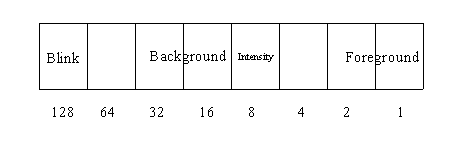
If you remember we had told you about a certain memory location 1047, where the status of the keyboard (shift, alt,….) was stored. In memory location b8000000, we have a similar concept. Look at the following diagram:
The first 3 bits (0,1,2) are for setting the foreground color. Thus we can have 8 different foreground colors. The fourth bit (bit 3) is the intensity bit. The next three bits (bits 4,5,6) are for setting the background color. Thus we have a choice of 16 background colors. The last bit (bit 7) is for setting the blinking feature ON. Now let us use this new found knowledge to add color to our life:
Program 74
main()
{
int i;
char *s=0xb8000000;
for(i=1;i<=3999;i++)
*(s+i) =2;
}
A few things to notice in this program. One: it doesn't matter if you declare the int I first or you declare char *s first. Not an issue. Second: You can initialize the variable at the time of declaration, C doesn't mind. And finally the output: by saying 2 you have set the foreground color. We don' remember what color 2 stands for. But we don’t mind you changing this value (from 0 to 7) and checking all colors. We personally feel there are more important things in life than being choosy about colors. Now run this program:
Program 75
main()
{
int i;
char *s=0xb8000000;
for(i=1;i<=3999;i++)
*(s+i) =2+8;
}
By saying:
*(s+i) =2+8;
you have kept the foreground color 2, but have set the intensity bit. What happens by this is best explained by seeing the change on your monitors. The intensity bit is 8, because all these bits have been given weights.
A little more experimentation:
Program 76
main()
{
int i;
char *s=0xb8000000;
for(i=1;i<=3999;i++)
*(s+i) =2+8+48;
}
Now we have foreground color2, intensity bit on and background color 48 (i.e. we are making bits 4 and 5 one) Look at the color, if it doesn't go with your trousers or skirts, feel free to make any change. You can try setting the foreground color by changing 48 to 64 or 16 .. go ahead experiment.
Another variation:
Program 77
main()
{
int i;
char *s=0xb8000000;
for(i=1;i<=3999;i++)
*(s+i) =2+8+48+128;
}
here the foreground color is 2, intensity high, background color 48, and the blinking bit set. Statutory Warning: Staring at a blinking screen (with all sorts of weird colors) is injurious to health.
And finally, the icing on the cake:
Program 78
main()
{
char *s;
int i,j;
s=0xb8000000;
for(i=1;i<=3998;i=i+2);
{
if(*(s+i)>='A' && *(s+i)<='Z')
*(s+i+1)=2;
if(*(s+i)>='0' && *(s+i)<='9')
*(s+i+1)=3;
if(*(s+i)>='a' && *(s+i)<='z')
*(s+i+1)=4;
}
}
Here all the capital letters will have color corresponding to 2, numbers will have a color corresponding to 3, small letters will have color corresponding to 4.
File handling and screen manipulation --- two great features incorporated into the same program. Lets look at some such programs:
Program 79
#include <stdio.h>
main()
{
char *s;
int i,j;
FILE *fp;
s=0xb8000000;
fp=fopen("z1.c","w");
for(i=0;i<=3999;i++)
{
j=*(s+1);
fputc(j,fp);
}
}
We will talk about the for loop only:
for(i=0;i<=3999;i++)
{
j=*(s+1);
fputc(j,fp);
}
We execute the for loop 4000 times. First we capture the on screen character, put it into variable j, then the characters attribute is captured and put into variable j. At each step we transfer the contents of j into file z1.c which is in write mode. The end result is that we have successfully captured the entire screen and transfers it to file z1.c. open z1.c for proof.
Now we will do the opposite of the previous program. Transfer the contents of file z.c onto the screen:
Program 80
#include <stdio.h>
main()
{
char *s;
int i,j;
FILE *fp;
s=0xb8000000;
fp=fopen("z.c","r");
for(i=0;i<=3999;i++)
{
j=fgetc(fp);
*(s+i)=j;
}
}
Here the for loop is:
for(i=0;i<=3999;i++)
{
j=fgetc(fp);
*(s+i)=j;
}
we pick the characters from file z.c, store it into variable j and then write them onto the screen one at a time. The first character will be displayed at memory location b8000000(top left), followed by its attribute, then the second character, its attribute and so on…! We could have saved a statement by writing:
for(i=0;i<=3999;i++)
{
*(s+i)=fgetc(fp)
}
But, remember that the Income Tax department is so far kind enough to not tax us on the number of variables we use in our C code. Hence don't shy away from using as many variables as possible. It just adds to the clarity of the logic and helps avoid errors.
One last program on file handling and screen memory:
Program 81
main()
{
char *s;
int i;
char a[4000];
s=0xb8000000;
for(i=0;i<=3999;i++)
a[i]=*(s+i);
for (i=0;i<=100;i++)
printf("%d\n",i);
for(i=0;i<=3999;i++)
*(s+i)=a[i];
}
This program saves the scren and then restores the screen. This program captures the screen into an array, then changes the display and in the end revert back to our old screen. Here we have defined an array of data type character of size 4000.
In the first for loop:
for(i=0;i<=3999;i++)
a[i]=*(s+i);
we are storing each of the character and its attribute into the array a[I]. This for loop goes on 4000 times, hence we have an array of size 4000.
In the next for loop:
for (i=0;i<=100;i++)
printf("%d\n",i);
we change the display and display the first 100 numbers on screen. Here we are struck by nostalgia and we feel like looking at our dear old screen. The third for loop gets the old screen back:
for(i=0;i<=3999;i++)
*(s+i)=a[i];
Functions
C provides us with a bag full of functions. In addition to that we can also create our own functions, and call them as and when we like. The next few programs will demonstrate just that:
Program 82
main()
{
abc();
}
abc()
{
printf("abc");
}
Here within the main we are calling function abc(). abc() is not a function provided by C. It is a user defined function. Hence it is the duty of the user to create the function. For this we have:
abc()
{
printf("abc");
}
Whenever you see a function name with no semi-colon (;) following it, you should know that this is where the function is being created. Here the function abc() just prints abc. Hence the output of this program is:
abc
To drill the point into your brain, look at the next program:
Program 83
main()
{
printf("confusion");
main();
}
Here we are first creating main (absence of semi-colon). Then in the last line we are calling main(). Output: A screenful of confusion The reason is the function main() keeps is called over and over again. Your computer might even give you some funny error messages.
Now, lets play with functions:
Program 84
main()
{
abc();
pqr();
}
abc()
{
printf("abc\n");
}
pqr()
{
printf("pqr\n");
abc();
}
Here, we first call function abc(). Function abc() prints for us abc. Then we call function pqr(). In pqr() we first print pqr and then from within pqr() we call abc(). Thus abc is printed again. Hence the output is:
abc
pqr
abc
Lets get more adventurous. Don’t run this program just yet:
Program 85
main()
{
abc();
pqr();
}
abc()
{
printf("abc\n");
pqr();
}
pqr()
{
printf("pqr\n");
abc();
}
Lets first understand: first we call function abc(). Within abc() we call pqr(). The compiler now jumps to function pqr(). Here it finds function abc() being called again. It jumps to abc(), only to find function pqr() being called. End result: not too pretty. The C compiler is stuck. Your computer might hang, you might have to restart the machine. You might have to press Ctrl-break to get out of the vicious circle.
All our previous examples had functions with no parameters. Let us go one step forward and look at functions with parameters:
Program 86
main()
{
abc(100,200);
}
abc(x,y)
int x,y;
{
printf("%d .. %d\n",x,y);
}
Here we call function abc with 2 parameters:
abc(100,200);
Thus we also have to create the function abc with two parameters which we have done in this statement:
abc(x,y)
The C compiler will have to be told about the data type of these two parameters. Hence we say:
int x,y;
Then the printf will display:
100 .. 200
Another program with functions and parameters:
Program 87
main()
{
int i=20;
int j=40;
abc(100,200);
abc(i,j);
abc(i*50,j*20);
}
abc(x,y)
int x,y;
{
printf("%d .. %d\n",x,y);
}
The way we have created the function is identical to the previous program. The point we are trying to demonstrate is that when functions are called, the parameters to be are fixed first. If this involve some calculation, these calculations are performed first. In our program, the first call to abc() has two parameters 100 and 200 which are explicitly specified. Then abc() is called with parameters i and j. These variables have been initialized to 20 and 40. In the last call to function abc() a calculation is involved to determine the parameters. The calculation is performed first and then the call is completed. Hence the output will be:
100 .. 200
20 .. 40
1000 .. 800
The Seemingly Endless Sea Of pointers
You are now in the second week of the course and know quite a few things about C. Everything nice and interesting. Now, you need to change levels. You are now about to enter the twilight zone. Here things are not so rosy, hard work is called for. It is here that the men will be separated from the boys. And from here on the distance will only keep increasing. So, don't loose out. Work hard, more importantly, work smart.
You have been introduced to pointers. But that was just the tip of the iceberg. Pointers is perhaps the most powerful feature of C, and consequently the most dangerous. After all power and danger go hand in hand. We suggest that you go through the pointer part of the notes extremely carefully and meticulously. If you haven't understood a line, don't go ahead. Pointers is not your daily bread and butter.
Take a deep breath and try this program:
Program 88
main()
{
int i;
printf("%p\n",&i);
}
One statement at a time:
int i;
Here we are reserving two memory locations and calling them i. These locations are reserved somewhere in memory. You and me don’t know where. But the curious creatures that we are, we would like to know. C grants you this wish when it sees the next statement:
printf("%p\n",&i);
This printf is different from any of the printf’s we have seen so far in two respects. One: we have a %p and second is the ‘&’ before variable i. The %p is to tell the C compiler that the value that will be displayed by this printf is a computer memory location. ‘&’ (ampersand) can be put only in front of a variable. When C sees the ‘&’ followed by the variable name, it faithfully displays the memory location where this variable is stored. Aah, but the smart Alecs among you will say: ‘Hey, but int occupies 2 memory locations. So what will be displayed, the first memory location or the second?’ Good question!! Answer: the first memory location will be displayed. Thus, if we assume that i is stored at memory location 515,516 the above printf will display 515. Let us repeat, we are assuming i to be stored at location 515, it could be anything.
Sometimes, we just wonder, how is that the smallest of programs need the lengthiest explanations?? Its just uncanny.
Program 89
main()
{
char *i;
int *j;
long *h;
i=0;j=0;h=0;
printf("%p..%p..%p\n",i,j,h);
i++; j++; h++;
printf("%p..%p..%p\n",i,j,h);
i++; j++; h++;
printf("%p..%p..%p\n",i,j,h);
i++; j++; h++;
printf("%p..%p..%p\n",i,j,h);
}
Does this program remind you of some program we have encountered in the past?? Here we have 3 pointers i,j,h of data type char, int, long respectively. We are initializing the values of these 3 variables to 0. Just to check at the scenario, we have the first printf which tells us:
0000:0000..0000:0000..0000:0000
Then we go on to increment the value of each variable. Now, let us give you some food for thought: Pointers are of size 4. So, when we increment the values of these variables will they increase by 4?? The answer is No!! Why? All the 3 variables are pointers of different data type. Thus the next printf will prove to you that i, which is of type char is incremented by 1, j which is of type int is incremented by 2 and h, which is of type long, is incremented by 4. Thus the output of the second printf is:
0000:0001..0000:0002..0000:0004
Think we are kidding with you? Increment the variables once again and check their values with the third printf. The output is:
0000:0002..0000:0004..0000:0008
Thus, the combined output looks like this:
0000:0000..0000:0000..0000:0000
0000:0001..0000:0002..0000:0004
0000:0002..0000:0004..0000:0008
You all have heard of how in Karate, we have levels of expertise. They are called ‘belts’ and are given name of colors (why colors, we don’t know. Maybe it is something to do with the ‘syntax’ of karate). The more badly punch the guy, the higher your belt (and you thought C was weird!!). The next 3 programs that we will write are pretty interesting. If you understand them, consider yourself a ‘black belt’ in pointers. Ready to fight?. Lets go:
Program 90
main()
{
int i;
char *p;
printf("Memory location of i= %p\n",&i);
i=300;
printf("Value of i= %d\n",i);
printf("Memory location of p= %p\n",&p);
p=&i;
printf("Value of p= %p\n",p);
*p=10;
printf("Value of i= %d\n",i);
p++;
printf("Value of p= %p\n",p);
*p=10;
printf("Value of i= %d\n",i);
p++;
printf("Value of p= %p\n",p);
*p=100;
printf("Value of i= %d\n",i);
}
It is imperative that you follow this program, because the next two programs are similar. To help you understand the program really well, we have exploded the program into lines, explaining one line at a time.
Now if you are ready, we'll start:
Line 1 main()
You know this.
Line 2 {
Do you want us to repeat the same story …. again.
Line 3 int i;
We are reserving 2 locations in memory and calling them i. Two locations, since size of an int is 2. (Refer program 9). For the sake of understanding, we assume that the memory locations reserved are locations 100 and 101. Pictorially:
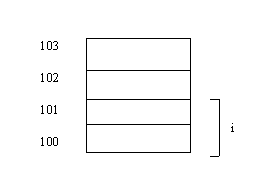
Line 4 char *p;
Hmmm … interesting statement. p is a pointer. What does that mean? It means it represents 4 memory locations. Here to make our life simple we assume p occupies locations starting from 200. What does it also mean? It further means, that the value of p is treated as a computer memory location. Also, p is a pointer of data type char. The significance of this will be clear shortly.
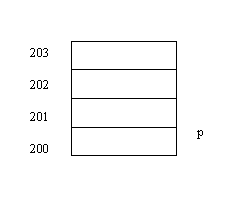
Line 5 printf("%p\n",&i);
Tell yourself: " '&' means address of memory location of variable i. %p means that the output will be a computer memory location. This statement will display the actual address of memory location that is named i. But we have two memory locations under i. So what does this printf display? The first memory location: 100.
Line 6 i=300;
When C sees a value assigned to a variable, it first finds out the location of that variable in memory. In this case, when C sees 300, it looks for the location of I. It finds it be 100. It then divides 300 by 256. (why 256? Because in a single memory location we can only store values 0 to 255). The quotient is 1, the remainder is 44. This it then puts in the memory locations 100 and 101 as follows:
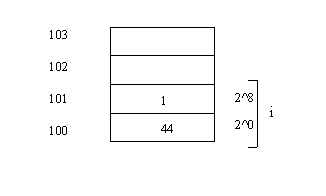
We are just making the value of i 300. Period.
Line 7 printf("%d\n",i);
Simple printf statement. We do not trust our computer to be responsible enough so we check to see if i is actually stored as 300. This statement will make you trust the computer more. The value displayed is indeed 300.
Line 8 printf("%p\n",&p);
Aha! Inquisitive, aren't we? We now want to know the address of p in memory. Your trusted companion (the computer) will faithfully tell you the where in memory does p get stored. Anything else worth noting?? Yes!! Don't you see a %p, indicating that the output is a computer memory location! People who are paying real attention to what we are saying would ask : "p is a pointer, hence it occupies 4 memory locations, but the size of char is 1, so isn’t this a contradiction?" Good question! Great Question!! Answer? Read on, there is light at the end of the tunnel.
Line 9 p=&i;
&i is a computer memory location! Right or wrong? Right! We also know (from Line 3) that p is a pointer, which means the value stored in it is understood as a computer memory location. "So what?" So, in this line we are simply putting the address of i into p.
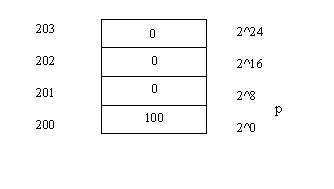
Line 10 printf("%p\n",p);
Checking never hurt anyone. So why not be sure of what is happening! This printf will tell you exactly what the value of p is. Satisfied that it is 100, we take one more step.
Line 11 *p=10;
Wake up! Wake up!! Understand this right now or it will give you sleepless nights for a long time to come. This small statement packs quite a punch. Time to ask ourselves questions! What is p?? A variable which occupies 4 memory locations and whose value is understood by C as a computer memory location. What is the current value of p?? From line 9 we know it is 100. So when we type this line what happens?? The compiler runs to p (memory location 200) finds out its value (100), goes to memory location 100 and puts the value 10 in memory location 100. So what is effectively happening is:
*100=10
We suggest you read the previous statements again and again and again … until it is absolutely clear.
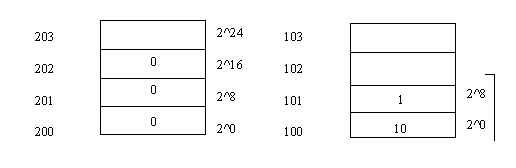
Value of i: (2^8)*1 + (2^0)*10 = 256*1 + 1*10 = 266
We are not biologists but we can see that your gray cells are in a state of high activity. Good! Keep them that way! That’s the only way you will understand.
Line 12 printf("%d\n",i);
Checking time again. We ascertain if the value of i has really changed. This printf tells you it has become 266.
Line 13 p++;
You see the ++ sign after a variable and you say : " I know this one. You are incrementing the value of the variable." But don't stop at that. Ask: "By how much is the value being incremented?". Stop and ponder. Are you in a position to answer this question. Yes you are! How?? Fleet back to line 4. Remember, we defined p as a pointer of data type char. You know that size of char is one. (program 9). So, the value of p now becomes 101.
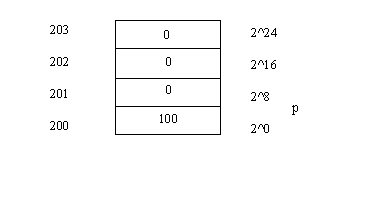
Line 14 printf("%p\n",p);
You know our habit. We make a change and check, if all is fine. This printf tells you all is indeed fine, and that the value of p is indeed 101.
Line 15 *p=10;
Now this should not be too difficult. Go to p (memory location 200). See what it contains (101). Go to that memory location and put the value 10. Effectively it means:
*101=10
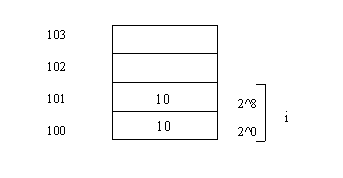
Value of i becomes: (2^8)*10 + (2^0)*10 = 256*10 + 1*10 = 2560 + 10 = 2570
Line 16 p++
Similar to line 12, the value of p now becomes 102.
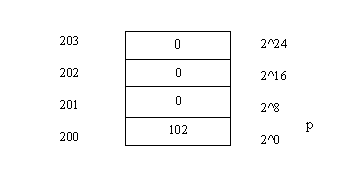
Line 17 printf("%p\n",p);
Checking to see the value of p. It is 102.
Line 18 *p=100;
Similar to lines 10 and 13 we now have:
*102=100
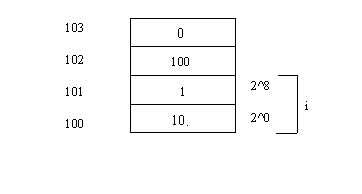
If you notice that we have been taking great pains in the diagrams to show you the position of i. Now, the time has come for you to know the significance of our labor. When we put 10 into memory location 102, do you think that i changes? One look at the diagram will tell you, NO! i represents the memory locations 100 101. What we do to other memory locations does not have any affect on i. So, the value of i is still 2570.
Line 19 printf("%d\n",i);
Just confirming the value of i. Guess what! Its still 2570.
Line 20 }
What a pretty sight. Just a close brace!! What could be better!
Actual Output:
Memory location of i= 1BD9:0FFE (we assumed it be 100)
Value of i= 300
Memory location of p= 1BD9:0FFA	(we assumed it to be 200)
Value of p= 1BD9:0FFE		(this is the location of i)
Value of i= 266
Value of p= 1BD9:0FFF		(after first increment of p)
Value of i= 2570
Value of p= 1BD9:1000		(after second increment of p)
Value of i= 2570
If you have understood the above program, you need to give yourself a treat. Go in front of the mirror and now the person you see is a transformed person. A person who understands pointers. A person who has proved that when the going gets tough, he/she gets going! Good work! Take a deep breath and try this program:
Program 91
main()
{
int i;
int *p;
printf("Memory location of i= %p\n",&i);
i=300;
printf("Value of i= %d\n",i);
printf("Memory location of p= %p\n",&p);
p=&i;
printf("Value of p= %p\n",p);
*p=10;
printf("Value of i= %d\n",i);
p++;
printf("Value of p= %p\n",p);
*p=100;
printf("Value of i= %d\n",i);
}
"Another program. Another pointer program. Not fair!!" Relax! We have made just made one change in the program. Line 4 now says:
int *p;
instead of:
char *p;
We are intentionally copying the exact words of the explanation that we just gave you. (In fact even the wisecracks are the same). This should not be considered as a sign of lack of originality, but should be appreciated because now you can understand this program all by itself. No flipping pages. In other words, we have given you a "stand alone" explanation. Also, comparing programs is a lot easier.
Line 1 main()
You know this.
Line 2 {
Do you want us to repeat the same story …. again.
Line 3 int i;
We are reserving 2 locations in memory and calling them i. Two locations, since size of an int is 2. (Refer program 9). For the sake of understanding, we assume that the memory locations reserved are locations 100 and 101. Pictorially:
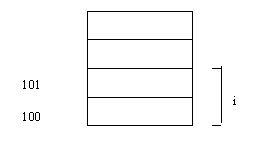
Line 4 int *p;
p is a pointer. What does that mean? It means it has 4 memory locations. Here to make our life simple we assume p occupies locations starting from 200. What does it also mean? It further means, that the value of this variable is treated as a computer memory location. Also, p is a pointer of data type int. The significance of this will be clear shortly.
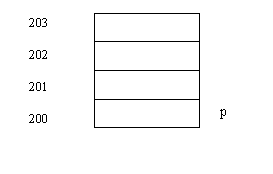
Line 5 printf("%p\n",&i);
Tell yourself: " '&' means address of memory location of variable i. %p means that the output will be a computer memory location. This statement will display the actual address of memory location that is named i. But we have two memory locations under i. So what does this printf display? The first memory location: 100.
Line 6 i=300;
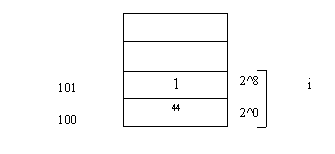
i is stored as follows: (2^8)*1 +(2^0)*44 = 256*1 + 1*44 = 300. Phew!!
We are just making the value of i 300. Period.
Line 7 printf("%d\n",i);
Simple printf statement. We do not trust our computer to be responsible enough so we check to see if i is actually stored as 300. This statement will make you trust the computer more. The value displayed is indeed 300. Understand another thing: whenever you want to call a variable you call it by its name. This causes the C compiler to go that memory location and pick or place the value according to what the statement asks it to do. So:
Variable name ------------------------ Memory Location
Translated to
Line 8 printf("%p\n",&p);
Aha! Inquisitive, aren't we? We now want to know the address of p in memory. Your trusted companion (the computer) will faithfully tell you the where in memory does p get stored. Anything else that worth noting?? Yes!! Don't you see a %p, indicating that the output is a computer memory location! People who are paying real attention we are saying would ask : "p is a pointer, hence it occupies 4 memory locations, but the size of int is 2 so isn’t this a contradiction?" Good question! Great Question!! Answer? Read on, there is light at the end of the tunnel.
Line 9 p=&i;
&i is a computer memory location! Right or wrong? Right! We also know (from Line 3) that p is a pointer, which means the value stored in it is understood as a computer memory location. "So what?" So, in this line we are simply putting the address of i into p.
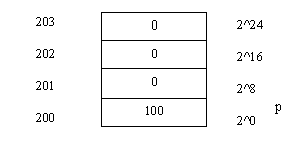
Line 10 printf("%p\n",p);
Checking never hurt anyone. So why not be sure of what's happening! This printf will tell you exactly what the value of p is. Satisfied that it is 100, we take one more step.
Line 11 *p=10;
Wake up! Wake up!! Understand this right now or it will give you sleepless nights for a long time to come. This small statement packs quite a punch. Time to ask ourselves questions! What is p?? A variable which occupies 4 memory locations and whose value is understood by C as a computer memory location. What is the current value of p?? From line 9 we know it is 100. So when we type this line what happens?? The compiler runs to p (memory location 200) finds out its value (100), goes to memory location 100 and puts the value 10 in memory location 100. Now, the significance of Line 4:
int *p;
will be clear. Since p is a pointer of data type int, and we know that int has of size 2, the number 300 stored in i will now be replaced by 10.
So what is effectively happening is:
*100=10
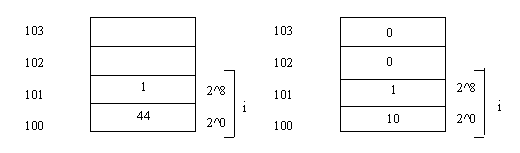
Before Line 13: i is 300 After line 13: i is 10 (because of int *p)
(Compare this with previous program)
The important thing to note here is that, since p is a pointer to a int, the value 10 is written to 2 memory locations, 100, 101 (since size of int is 2)
We suggest you read the previous statements again and again and again … until it is absolutely clear.
We are not biologists but we can see that your gray cells are in a state of high activity. Good! Keep them that way! That’s the only way you will understand.
Line 12 printf("%d\n",i);
Checking time again. We ascertain if the value of i has really changed. This printf tells you it has changed to 10.
Line 13 p++;
You see the ++ sign after a variable and you say : " I know this one. You are incrementing the value of the variable." But don't stop at that. Ask: "By how much is the value being incremented?". Stop and ponder. Are you in a position to answer this question. Yes you are! How?? Fleet back to line 4. Remember, we defined p as a pointer of data type int. You know that size of int is two. (program 9). So, the value of p now becomes 102.
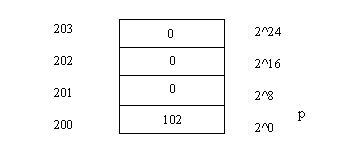
Line 14 printf("%p\n",p);
You know our habit. We make a change and check to see if all is fine. This printf tells you all is fine, and that the value of p is indeed 102.
Line 15 *p=10;
Now this should not be too difficult. Go to p (memory location 200). See what it contains (102). Go to that memory location and put the value 10. Effectively it means:
*102=100
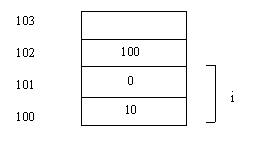
Line 16 printf("%d\n",i)
If you notice that we have been taking great pains in the diagrams to show you the position of i. Now, the time has come for you to know the significance of our labor. When we put 10 into memory location 102, do you think that i changes? One look at the diagram will tell you, NO! i represents the memory locations 100 101. What we do to other memory locations does not have any affect on i. So, the value of i is still 10.
Line 17 }
Actual Output
Memory location of i= 1BDA:0FFE	(we assumed it to be 100)
Value of i= 300
Memory location of p= 1BDA:0FFA	(we assumed it be 200)
Value of p= 1BDA:0FFE		(this is the location of i)
Value of i= 10
Value of p= 1BDA:1000		(after first increment of p)
Value of i= 10
Value of p= 1BDA:1002		(after second increment of p)
Value of i= 10
Abnormal program termination (We have written to locations that do not belong to us, i.e. locations that have not been reserved by us. Writing to locations which have not been declared by us can lead to undesirable results. This is what we mean by the danger of pointers. One mistake and the computer might hang.)
"How are you feeling sir?" We just hope that the pointers in your brain haven't gone haywire. If you haven't followed the previous 2 examples sit with them, sleep over them, do whatever but get it absoluuutely clear. This is the last program in this marathon series. Jump right into it:
Program 92
main()
{
long i;
char *j;
int *k;
long *l;
printf("%p\n",&i);
i=65536+515;
printf("%ld\n",i);
printf("%p\n",&j);
j=&i;
printf("%p\n",j);
*j=10;
printf("%ld\n",i);
j++;
printf("%p\n",j);
*j=10;
printf("%ld\n",i);
i=65536+515;
k=&i;
printf("%p\n",k);
*k=10;
printf("%ld\n",i);
k++;
printf("%p\n",k);
*k=10;
printf("%ld\n",i);
i=65536+515;
l=&i;
printf("%p\n",l);
*l=10;
printf("%ld\n",i);
l++;
printf("%p\n",l);
*l=20;
printf("%ld\n",i);
}
Phew!! But, hey who is scared of long programs, anyway? We will assume here, that you have grown up from being 'pointer-kids' to 'pointer adults'. For kids we need break the dose into small doses, adults can take it all at once. So enough of spoon feeding lets, act like grown-ups.
Here we define i as a long, which means we are reserving 4 locations somewhere in memory and calling them i. We will assume that these locations begin from 100.
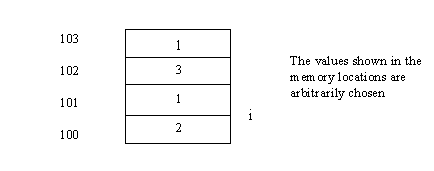
Then, we have a flood of pointers. j is a pointer to a char, k is a pointer to an int and l is a pointer to an long.
In the first printf we display the actual address of i. We have assumed it to be 100.
Then, i is given a value of 65536+515. Don't you dare our mathemetical prowess. We have left the addition incomplete because that way our representation of memory makes more sense. Thus:
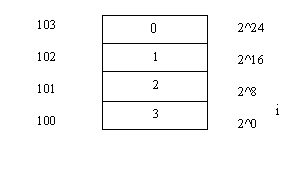
Value of i= (2^16)*1 +(2^8)*2 + (2^0)*1 = 65536*1 + 256*2 + 1*3 = 66051
The next statement is:
printf("%ld\n",i);
Here we display the value of i. Notice that we have used '%ld' in the printf, since i is a long.
Now we check on j and find its location in memory. The next printf displays the memory location of j. Let us assume it to be 200.
In the next statement, we innnocently put the location of i into j. To check if the location of i has indeed reached i, we have the next printf, which displays the value of j.
The next statement is:
*j=10;
This statement is equivalent to saying:
*100=10;
Thus, we put the value 10 into memory location 100. Note, that since j is apointer to a char, the value 10 has gone into 1 memory location only. i.e 100. Now the memory location represented by i looks like this:
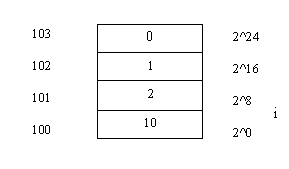
Value of i= (2^16)*1 +(2^8)*2 + (2^0)*10 = 65536*1 + 256*2 + 1*10 = 66058
The value of i displayed in the next printf tells us this new value of i.
Next, we increment j. Again, the data type of the pointer (char) will ensure that the value of j is incremented only by 1. In the next printf we check the value of j after the increment and find it to be 101. Then we gain have the statmenet:
*j=10;
which now is like saying:
*101=10;
Thus, we put the value 10 into memory location 101. Note, that since j is apointer to a char, the value 10 has gone into 1 memory location only. i.e 101. Now the memory location represented by i looks like this:
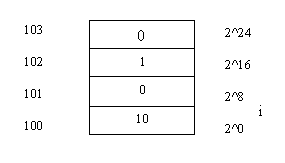
Value of i= (2^16)*1 +(2^8)*10 + (2^0)*10 = 65536*1 + 256*10 + 1*10 = 68106
Thus i now has a new value which is displayed by the next printf.
Now, we make the value of i the same as what we started with, i.e 65536+515. We, then put the location of i into k. Thus, k now has a value 100. We display the value of k as a cross check.
Then, we have:
*k=10;
which is equivalent to saying:
*100=10;
Aah, but k is a pointer to an int. Thus, we are effectively putting the value 10 into 2 memory locations (size of int is 2), 100 and 101. Thus, a snaphot of the location i like this:
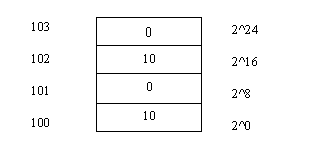
Value of i= (2^16)*1 +(2^8)*0 + (2^0)*10 = 65536*1 + 1*10 = 65546
The next printf tells us that the value has changed. Then, we increment k. Since k is of type int, incrementing k results in a jump of 2. Thus value of k now becomes 102. Then we again have the statement:
*k=10;
which is equivalent to:
*102=10;
This will result in change of memory locations 102 and 103, since k is a pointer to type int. Thus, location i will now look like this:
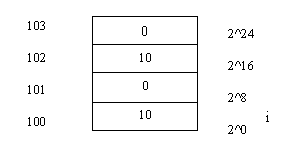
Value of i= (2^16)*10 +(2^8)*0 + (2^0)*10 = 65536*10 + 1*10 = 655370
The value of i is displayed by the printf.
Lie before, we make the value of i equal to 65536+515. Then we put the location of i into l. Thus, l now contains 100. Then we have the statement:
*l=10;
This means:
*100=10;
Now, l is a pointer to a long, thus the value 10 has gone into 4 memory locations. i.e 100,101,102,103. Now the memory location i looks like this:
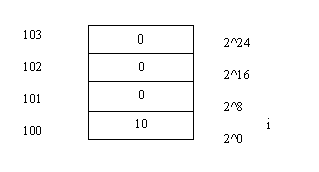
Value of i= (2^16)*0 +(2^8)*0 + (2^0)*10 = 10
The printf gives us this new value of i.
Then we increment l. i is now incremented by 4, since it is a pointer to a long. Thus the value of i now becomes 104. Then, when we have the statement:
*i=20;
It is understood as:
*100=20;
20 is assigned locations 104, 105, 106, 107. Thus, location i looks like:
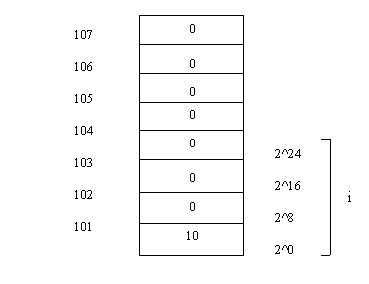
The value of i reamains unchanged since i represents locations 100, 101, 102 and 103. But we haveen't touched these memory ocations. Thus, i still has a value 10. But now, since we are writing into memory locations not reseved by us, there is always the danger of the computer hanging. (PS: when we ran the program the putput just would'nt stop scrolling)
Actual Output:
1BDE:0FFC
66051
1BDE:0FF8
1BDE:0FFC
66058
1BDE:0FFD
68106
1BDE:0FFC
65546
1BDE:0FFE
655370
1BDE:0FFC
10
1BDE:1000
The output of the last printf could not displayed
The other side of C
In this section we will introduce you to a five letter word that will soon become a part of your life. It is a word, is it a concept? Its both! Its the stack. So what’s so special about the stack and what is made of? There are two components of the stack: the stack and the stack pointer. Stack is an area of memory which everybody knows about and can use. The stack pointer tells us the position of the stack. There is a list of things that the stack does. For now, we will look at only one aspect of the stack and that is: the stack acting as a facilitator in the exchange of parameters between functions. When one function calls another function, parameters have to be passed between the two functions. Its like 2 people meeting for the first time at the workplace. They have to work together, but they don’t know anything about the other. Some information has to be passed between the two, which tells each person about the other. Once this is done the two work better.
Before we start talking about the stack, we warn you that some of the things that happen on the stack, will simply stump you. Not because of the complexity, but on the contrary, because of the sheer stupidity of the whole concept. If after reading about the stack you say: "How can the stack be so stupid?", consider yourself a master of the stack. This is where you will realize that the awe that you had about C and its nitty gritty begin to vanish and the truth about how it really works comes to the fore.
We will treat the stack as a cake and learn it bite by bite (or should we say byte by byte). Remember, too much at one time, will only cause indigestion.
The first bite:
Program 93
main()
{
int i,j;
i=300;
j=515;
abc(I,j);
}
abc(x,y)
int x,y;
{
printf("%d..\n",x,y);
}
We wil use this program as the beacon for all our future function programs. So, easy does it. One line at a time.
main()
Here we create a function main().
{
indicates the start of main().
int i,j:
Here we reserve 2 memory locations for i and 2 memory locations for j, somewhere in memory. Let us assume that i is allocated 2 memory locations starting from 900 j is allocated 2 memory locations starting from 950.
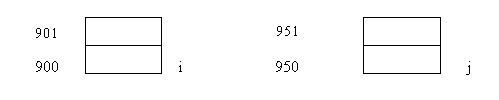
i=300;
j=515;
These statements are assignment statements where I and j are assigned values. C divides 300 by 256, puts the remainder (44) in 900 and the quotient (1) in 901. Similarly 515 is divided by 256, the remainder (3) is put in location 950 and the quotient is put into location 951.
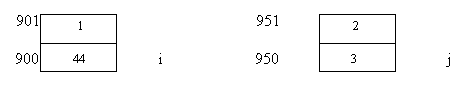
abc(i,j);
This is a call to functions abc(). How do we know? Because of the semicolon(;) at the end of the line. This function is called with 2 parameters i and j. Now, C does not like variables and hence replaces the variables i and j with their respective values. To find the value of i, C finds out its location in memory. It finds it to be 900. It runs to location 900, and picks the value of i. Similarly, C picks up the value of j from 950.
In calling functions, parameters have to be placed on the stack. We will assume that the stack points to location 104. When variables are pushed on the stack, the stack pointer moves backwards. Thus, main() puts j on the stack first. What locations will j occupy on the stack? Since j is an int, it has size 2 and hence j is put into locations 103 and 102.
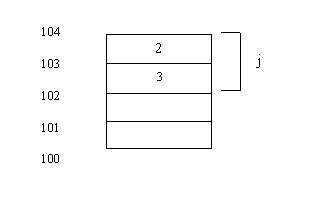
Now the stack pointer points to 102. Then I is pushed on the stack by main() at locations 101 and 100. The end result is that the stack pointer points to location 100. 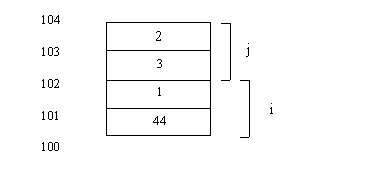
Now, main () beats a graceful retreat and abc () enters the scence. abc() does not know what has been happening in the program. Thus, the first question abc() asks:`Pray tell me where is the stack pointer?’ 100 is the reply. abc() has very sharp eyes. It sees that within its () there are parameters x and y. Thus, abc() now knows that 2 numbers have to be removed from the stack. What are the values of x and y? For parameters of functions the stack looks forward. X is of type int. Thus it gets its value from location 100 and 101 Satisfied by its two bytes (size of int is 2) it’s now time to assign a value to y. y is also of type int. Int gets its value from location 102 and 103:
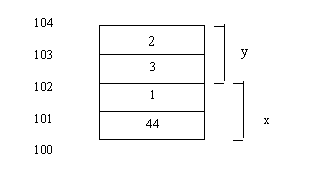
The printf displays the values of x and y as:
300..515
Note, the stack pointer still points to 100. That has not changed.
Now, that abc() has done its job, main() comes back. When the `}’ of main() is encountered main() knows its time to restore the stack pointer where it found it. Thus the stack pointer moves up by 4 and points to location 104. (4 locations since we pushed 2 variables i, j of type int, in main(). This should tell you that if we created 3 variables in main() we would have moved up by 6 at the `}’ of main() ).
One more:
Program 94
main()
{
char I, j;
I=1;
j=2;
abc(I,j);
}
abc(xy)
int x,y;
{
printf("%d..%d",x,y);
}
This is very similar to the above program except for the statements:
char i,j;
i=1;
j=2;
Alright, time to tell you a secret: "Psst .. Did you know that when we told you that the size of a char was 1 byte, we were actually talking about 4 bit operating systems. In 16 bit operating systems (like MS DOS), the minimum that stack pointer can move is 2 bytes (16 bits). Thus, the size of a char become 2 bytes (16 bits). But only 1 byte (8 bits) is used. Its like, you have a 500 rupee note. Your friend asks for 250 rupees. (A friend in need…) You decide to give him the entire 500, (hypothetically), but since he needs only 250, he uses only 250. Ditto for char!
abc() is called with the two parameters i and j. Assuming that the stack pointer is at 104, the variables i and j (which are stored in some memory locations) are put on the stack, in reverse order, j first and then i. Since the stack pointer can move only by 2, j (which is a char) is put into locations 103, 102 and i (which is also a char) is put into locations 101, 100. Thus: 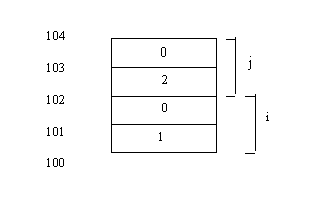
When abc() comes in, it has no idea of the what is going-on. So, it asks in a polite manner: "Pray, tell me where is the stack pointer?" It is told 100. Now, abc () has 2 parameters x and y of type int. x gets the value that is stored in locations 100 and 101, y gets the value stored in locations 102, 103. Note again, that the stack pointer hasn’t moved. It is still at 100. Thus the printf in abc() will now display the output as:
1..2
But, our understanding of the program should not halt at this. We should also understand that when the `}’ of abc() is encountered the stack pointer is unmoved, since we have not changed the position of the stack in abc(). It is only when the semicolon (;) in the statement:
abc(i,j);
is encountered main() restores the stack pointer from where we started i.e. 104.
Program 95
main()
{
int i,j;
i=300;
j-515;
abc(i,j);
}
abc(x,y)
char x,y;
{
printf("%d..%d",x,y);
}
This program is similar to the above program except for this statement:
char x,y
in abc(). When abc (I,j) is called the stack looks like this:
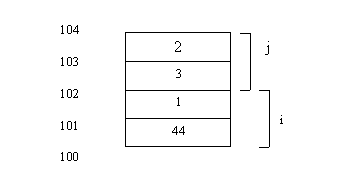
Now, within abc() has 2 parameters x and y of type char. Now, we face a dilemma. We have told you that the minimum that stack can move in a16 OS is 2 bytes (16 bits). But we also know that a char uses only 1 byte (8 bit). So, when abc() comes in and looks at the stack, it finds numbers in locations 100,101,102 ,103. But, the x, which is char is very clear in its mind that it can accommodate only 1 byte. Hence it will looks at only the first byte, i.e. looks at memory location 100. After that the next byte (location 101) is ignored by x. Now, it is the turn of y to be assigned a value. Y, which is also a char, gets the value present in location 102, it simply ignores the next memory location. Thankfully, variables are not like humans, they take what they want, not a penny less, not a penny more. Thus:
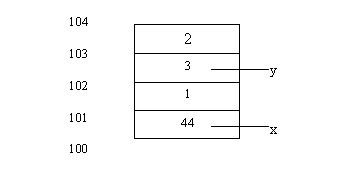
The output is:
44..3
Lets probe further:
Program 95
main()
{
abc();
}
abc(x,y)
int x,y;
{
printf("%d..%d",x,y);
}
Here main() calls function abc() with no parameters. Thus, main() puts nothing on the stack. We will assume that the stack pointer points to location 100. Then we have a call to abc(). Main() walks away and hands over the baton to abc(). Now, abc() does not know that main() has put nothing on the stack, neither does it care. This is what we meant when we said the stack is stupid. It comes in and asks in the same polite fashion: "Pray tell me where is the stack pointer?" The reply it gets is 100.
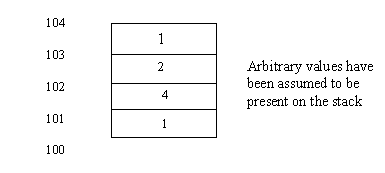
Within abc() we have 2 variables x and y of data type int. What values do these variables get? In assigning values to variables within functions, the stack looks forward. Thus, x which is an int (size 2) gets its the value from location 100, 101 and y which is also an int gets its value from location 102,103.
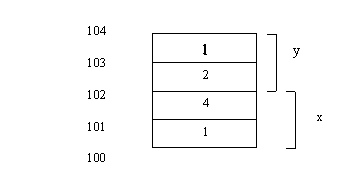
Note, the values of x and y are arbitrary, since what is on the stack is unknown to us. In other words since we did not put anything on the stack, we have no control over what is picked from the stack. The stack pointer is unmoved.
Hungry for more? Sink your teeth into this:
Program 96
main()
{
abc(10,20);
}abc()
{
printf("Hi")
}
Aha! A small variation. Here, main() calls abc() with 2 parameters 10 and 20. Assuming the stack pointer is at location 104,20 is pushed on the stack at locations 104, 103 and 10 is pushed at locations 102, 101. At this point your mind is working overtime. "But why 2 memory locations? Where have we specified that 10 and 20 are int’s?". The reason is that unless otherwise specified, a number is always considered an int.
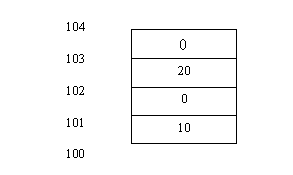
Now, as always main() fades away and abc() comes into the limelight. Does abc() ask the same polite question again: "Prey tell me where is the stack pointer?". No!! It does not! Reason?? Abc() does not have any variables. It only has a single printf which displays Hi. Thus, it does not have to bother about the stack or its contents. Why ask, when it doesn’t matter! Thus the output is simply:
Hi
A long piece:
Program 97
main()
{
long I;
I=65536+515;
abc(I);
}
abc(x,y)
int x,y;
{
printf("%d..%d",x,y);
}
Here within main() we have a variable I of type long. Thus, we reserve 4 memory locations somewhere in memory and call them I (say, at address 200). Then we put the value 65336+515 into i. This is followed by a call to abc() with parameter i. Since C does not like variables it picks the value of I and put it on the stack as follows:
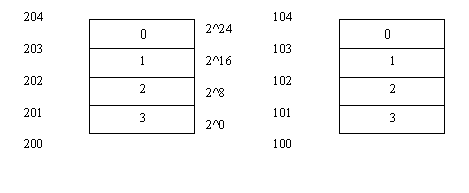
Here we have assumed the stack pointer to be at 100. Within abc() we have two variables x and y of type int. The stack looks forward when assigning values to variables in a function. Thus, the value of x and y are obtained from locations 100, 101 and 102, 103 respectively the stack pointer is unmoved. Still at 100.
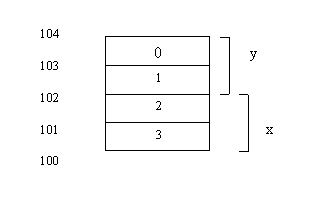
Values of x and y are then displayed by the printf statement as:
515..1
Another one:
Program 98
main()
{
int x,y;
x=10;
y=1;
abc(x,y);
}
abc(I)
long I;
{
printf(%ld,I);
}
Interesting program! This program does the reverse of our previous program. Here main() has 2 variables x and y of type int. Assuming the stack pointer points to location 100, when abc() is called, the stack looks like this:
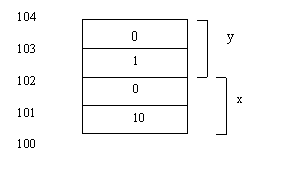
Within abc() we have a variable I which is a long. While assigning values to a variable in a function, the stack looks ahead and since long has size 4, I gets its value from location 100,101,102 and 103. Pictorially:
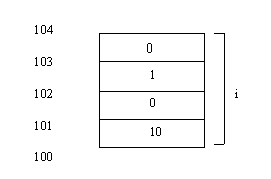
Thus, the value of I is now 65546, which is displayed by the printf in abc(). Notice the `%ld’ in the printf, since I is a long.
Output:
65546
The icing on the cake:
Program 99
main()
{
abc();
pqr();
xyz();
abc();
}
abc()
{
int I,j;
printf("%p..%p\n",&I,&j);
}
pqr()
{
int p,q;
printf("%p..%p\n",&p,&q);
}
xyz()
{
int I,j;
printf("%p..%p\n",&I,&j);
}
In this program, we concentrate on just one aspect of stack operations and that is the way the stack pointer is restored at the end of a function call. Here main() first calls function abc() with no parameters. We assume the stack pointer points to location 100. To assign values to variable within functions, the stack looks forward. Thus, I is assigned the value present in location 100, 101(since I is of type int), and, since j is also an int, it is assigned values present in locations 102,103. Does the stack pointer move? No! It is still at 100.
Now, abc() walks away and main() comes back into the picture. The next call is to function pqr(). Within pqr() we have 2 variables. Pqr() asks: `Where is the stack pointer?’ , finds out it 100 and as before assigns values present at locations 100,101 to p and values present at 102, 103 to q. The stack pointer remains at 100.
Next xyz() comes in, finds out the stack pointer is at 100, picks values stored at 100, 101, assigns it to I, picks values at 102, 103 and assigns it to j. The stack pointer remains at 100.
Thus, the important thing here is that all functions find the stack pointer at the same address, hence all parameters are stored at the same location on the stack, the pervious values being overwritten by the recent values.
Thus, all the 3 printf’s produce the same address.
Actual output:
13B6:0FF8..13B6:0FF6
13B6:0FF8..13B6:0FF6
13B6:0FF8..13B6:0FF6
13B6:0FF8..13B6:0FF6
Here is a variation on the above program:
Program 100
main()
{
int I;
printf("%p\n",&I);
abc();
}
abc();
{
int I;
printf("%p\n&I);
}
In main() we have a variable I which is of type int. Thus, somewhere in memory we have 2 memory locations that are named i. Let us assume it to be at location 200 and 201. In the next statement which is a printf we display this location of i. Within abc() we hae created a variable I of type int. Assuming the stack pointer to be a t 104, I reserves 2 memory locations on the stack at locations 103 and 102. In the next print we display this address of i. If, you see the output of this program, you will find that the addresss of the variable I is different, which brings us to a very inportant point and that is: variables are known not by their names, but by their memory locatuons. Thus, even though we have given the same name to the variable(I), because their memory locations differ, they are regarded as different variables by C.
Actual output:
13B1:0FFE
13B1:0FF6
Program 101
main()
{
int I,j;
abc(10,20);
pqr(I,j);
pqr(10,j);
abc(I+10,j);
}
abc(p,q)
int p,q;
{
printf("%p..%p\n",&p,&q);
}
pqr(x,y)
int x,y;
{
printf("%p..\n",&x,&y);
}
xyz(p,q)
int p,q;
{
printf("%p..\n",&p,&q);
}
Assuming that main() finds the stack pointer at 104. When abc (10,20) is called the stack pointer is pushed down 4. 20 is stored in locations 103, 103; 10 is stored in locations 101, 100. The stack pointer is now at 100. Now, when abc() finishes its work, we encounter the semicolon (;) of the statement:
abc(10,20);
This results in the stack pointer to move up to address 104 again. Then we have a call to pqr(). Thus pqr() also finds the stack pointer at 104. In passing parameters to pqr() the stack pointer again goes down to 100, but is restored again when the semicolon(;) of the statement:
pqr(i,j);
is encountered.
This continues, even when pqr() is called again, followed by abc(). Thus, the important thing here is that all functions find the stack pointer at the same address, hence all para meters are stored at the same location on the stack.
Acutal output:
13B8:0FF8..13B8:0FFA
13B8:0FF8..13B8:0FFA
13B8:0FF8..13B8:0FFA
13B8:0FF8..13B8:0FFA
For the artistically inclined ….
Our next endeavor will be box on screen. This program is a great program to understand the unwritten rules about writing code. A great learning opportunity.
Lets get going: We want to write a function called box which will draw for us a box on the screen. The question is: How do we do it?
main()
{
box (1,2,23,79)
}
Here box is a function with 4 parameters. This function as the name suggests, will draw for me a box.
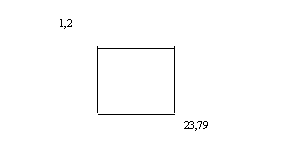
Can it be so simple? We'll find out.
You know, we have already committed a mistake. The numbers which we have chosen are too big. Too big for us to hand run the program. Hand run means running the program step by step on paper in the absence of a computer.
You should realize that whether we write code for a small box or a big box, a box is a box. So we make the following change:
box (5,8,9,12);
C has to be told about the function box looks like. Thus we have:
box (x1,y1,x2,y2);
int x1,y1,x2,y2;
{
}
Always ask yourself: 'Is their a smarter way of doing things?' We wish to create a box. Can we use a different approach? We take inspiration from the British Raj and their policy of Divide and Rule. We now realize that drawing a box is a problem, because the box is too big an exercise to complete in one shot.
Times change. Today people all over the world are realizing that writing the program is the easiest part. The problem is that of maintaining the code. That is the difficult part. The classic example of maintenance is the Year 2000 problem. We have software written in the 60's which is going to stop working. This software has run for 40 years. Thus, when people say that most of the programs written do not work, ask them: ' Then how come we have the Year 2000 problem?'
This is where good design comes in. You can read a trillion books on good program design and there are so many books available with not a single line of code. However, we believe that the best way to design code is to write it yourself. Before we start writing code we need to think. Programmers have a tendency to directly start writing code with no thoughts involved.
Taking a cue from what we just said, we seek a more systematic approach to writing the box program. We realize that the box is made up of horizontal and vertical lines. So if we write a function hline() which gives us a horizontal line a function vline() which gives us a vertical line, and then plug the 4 corners, don’t we have a nice good-looking box?? Now just because you thought of this, don't jump to writing code, just like that. Weigh the pros and cons. A careful consideration tells us that by dividing our program into smaller programs, will give us better focus and understanding.
In our function hline(), we realize that we will have a variable x1 and x2. But our y will remain same.
box (x1,x2,y)
int x1,x2,y;
{
hline(x1,x2,y);
}
Now, we suddenly realize that dealing with variables might hamper our understanding, so we will first understand with numbers. So, we set x1 to 5, x2 to 9 and y to 12. Thus we aim to want a line starting from 5 to 9 (in the x direction) at y position 12.
Guess what, we actually need to draw a line from 6 to 8? Reason? We will draw the corners with special ASCII characters. Then, what is the point in redrawing the line over the corners again.
hline (6,8,12);
In choosing of numbers to replace variables we need to careful. If we choose numbers that will give us a big box, we will have to use a ruler to check if the dimensions are what we want. Also, a small aberration, might go unnoticed. Now that we have decided to go from 6 to 8, should we also not make this change:
hline (x1+1,x2-1,y);
How have we obtained these coordinates? Remember, at the end of the line we will have special ASCII characters.
Everytime we write a program we need to use variables. Always ask: ' What is the value of the variable?' Its like writing a fiction novel. The author's first task is to sketch the characters of the novel. Without this, there will not be a novel (at least it wont be worth reading).
Another aspect: We want to display the box, i.e. we need to write to the screen. If we used printf() wouldn’t it make matters slow, as opposed to writing directly to screen memory? Valid point? So we now have:
char *s;
and as every variable needs to be initialized we have:
*s=0xb8000000;
At this location we put the ASCII value of a horizontal line. Thus:
*s = 196;
We see a horizontal line at 0,0. But is this what we want? No! We want to draw a horizontal line from 6 to 8. For this we need to get our gray cells working again.
Memory location |
X |
Y |
B8000000 |
x0 |
y0 |
B8000002 |
x1 |
y0 |
B8000004 |
x2 |
y0 |
We probe further by asking ourselves a simple question. How many characters on one line of screen? 80!! How many memory locations per character: 2 (one for the character and the other for its attribute). Thus, when we move by 2 screen memory locations x changes by 1. When we move by 160 screen memory locations y changes by 1. Thus, we realize that at memory location 160 from b8000000 we will have position x0,y1. At 320 we have x0,y2. How do we get this? All this brain racking gives us a conversion formula:
where = x1*2 + 160*y
where is a variable of data type int.
This variable tells us with reference to location b8000000 where will our horizontal line be displayed. For y =10, we need to move 160*10 memory locations, for x=4 we need to move 4*2 memory locations!!
Thus, we modify our statement to look like this:
*(s+where) = 196;
We now have a single horizontal line. We want quite a few. We will thus use a loop. We say:
for (i=1;i<= ;i++)
If you think our printer stopped working for a second while printing this statement … you are mistaken. Notice we have used very ambiguous words. We said we need to loop 'quite a few times'. What does that mean? Computers demand definite commands.
We think. How many horizontal lines do we need? If we wish to draw a horizontal line at 6 we would need 1 horizontal line, if we want to draw a line at 6 to 7, we need 2 horizontal character. Thus, in our case we need 3 horizontal lines (6 to 8). Tabulating our observations:
starting location ending location number of horizontal character(s)
6 6 1
6 7 2
6 8 3
To be more generic, we need to loop: x2- x1+1 times
Thus, our for statement now becomes:
for (i=1;i<=x2-x1+1;i++)
We have successfully set up the for loop. But alas, we are still not there. We realize that this will draw the horizontal character at the same position. We need to move ahead each time, before we write the next horizontal character to the screen. We will take the aid of another variable j of type int.
Thus we have:
*(s+where+j)=196;
You pat yourself on the back for showing such depth in thinking. But are you home yet? Not quite! You should realize that every time we need to move ahead by 2 positions, and put the next horizontal character at the next character. We shouldn’t touch the attribute position. Thus, we include the following statement in the for loop:
j=j+2;
Now, if you are unlucky you would get the see the line at the desired location. But, haven’t you committed a cardinal sin of using a variable without initializing it? j has to be initialized to 0 outside the for loop.
Users like your program, but would like to see some color. You decide to oblige. For this we have to make a fundamental change:
hline (x1,x2,y,col)
int x1,x2,y,col;
This change will also reflect in the box function. Thus:
box (x1,y1,x2,y2,col)
This variable is used to change the color of the horizontal line. So we have to put it in the attribute location. For this we do:
*(s+where+j+1)=col;
Users insist on more variety. 'Give us an option of the type of line, single or double. ' How do you do that?
hline (x1,x2,y,col,ty)
int x1,x2,y,col, ty;
We need to add this parameter ty into box as well. Thus:
box (x1,y1,x2,y2,col,ty)
Then we say:
if (ty=0)
k=196;
else
k=207;
Where 196 and 201 are the ASCII values of a single and double line respectively.
The hline function so far looks like this:
hline (x1,x2,y,col,ty)
int x1,x2,y,col, ty;
{
char *s;
int where;
int i,j,k;
if(ty=0)
k=196;
else
k=201;
s=0xb8000000;
j=0;
where=x1*2+160*y;
for (i=1;i<=x2-x1+1;i++)
{
*(s+where+j)=196;
*(s+where+j+1)=col;
j=j+2;
}
We are moments away from getting this program up and running! So hang in there!!
The statement:
*(s+where+j)=196;
defeats the purpose of giving users the choice of a single line or double line. Thus we change this statement to say:
*(s+where+j)=k;
Also, look closely at the if..else statement:
if(ty=0)
k=196;
else
k=201;
here by saying
if(ty=0)
we are making the value of k zero all the time, consequently we are ensuring that we only see a single line. We need to ask a question:
if(ty==0)
k=196;
else
k=201;
So the final version of our program to draw the horizontal line is:
main()
{
box(5,8,9,12,6,0);
}
box (x1,y1,x2,y2,col,ty)
int x1,y1,x2,y2,col,ty;
{
hline(x1+1,x2-1,y1,col,ty);
}
hline(x1,x2,y,col,ty)
int x1,x2,y,col,ty;
{
char *s;
int where;
int i,j,k;
s=0xB8000000;j=0;
if(ty==0)
k=196;
else
k=207;
where=160*y + x1*2;
for(i=1;i<=x2-x1+1;i++)
{
*(s+where+j)=k;
*(s+where+j+1)=col;
j=j+2;
}
}
On similar lines, the vline function will look like this:
vline(x1,x2,y,col,ty)
int x1,x2,y,col,ty;
{
char *s;int where;
int i,j,k;
s=0xB8000000;j=0;
if(ty==0)
k=179;
else
k=207;
where=160*y + x1*2;
for(i=1;i<=x2-x1+1;i++)
{
*(s+where+j)=k;
*(s+where+j+1)=col;
j=j+160;
}
}
Thus, the entire box program looks like this:
Program 102
main()
{
box(5,8,9,12,6,0);
}

box (x1,y1,x2,y2,col,ty)
int x1,y1,x2,y2,col,ty;
{
hline(x1+1,x2-1,y1,col,ty);
vline(x1+1,x2-1,y1,col,ty);
}
hline(x1,x2,y,col,ty)
int x1,x2,y,col,ty;
{
char *s;
int where;
int i,j,k;
s=0xB8000000;j=0;
if(ty==0)
k=196;
else
k=207;
where=160*y + x1*2;
for(i=1;i<=x2-x1+1;i++)
{
*(s+where+j)=k;
*(s+where+j+1)=col;
j=j+2;
}
}
vline(x1,x2,y,col,ty)
int x1,x2,y,col,ty;
{
char *s;int where;
int i,j,k;
s=0xB8000000;j=0;
if(ty==0)
k=179;
else
k=207;
where=160*y + x1*2;
for(i=1;i<=x2-x1+1;i++)
{
*(s+where+j)=k;
*(s+where+j+1)=col;
j=j+160;
}
}
Learning the Strings
Now, that you have your stack and pointers all sorted out, we will shift our focus to another building block: strings.
Look at this program:
Program 103
main()
{
char *p;
printf("%p\n",&p);
p="ABC";
printf("%p\n",p);
printf("%s\n",p);
while (*p)
{
printf("%c\n",*p);
p++;
}
}
p is a pointer to a char. At 100, C allocates 4 memory locations to p. Why 100? That’s where C found 4 memory locations at that particular moment. Could be anything. Thus, when we say:
printf("%p\n",&p);
we get 100.
Then we have:
p="ABC";
Whenever C sees the equal to (=) sign, it looks at the right hand side. It sees ABC in double inverted commas. This causes C to reserve memory for ABC at some memory location, say 200. Thus, if we were to take a snapshot of the memory starting at address 200 it looks like this:
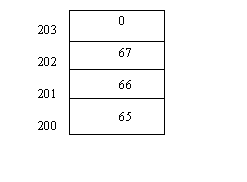
Why is the 0 present at the end of the string? One can put as many characters in the double inverted commas as he/she wishes. C has to deal with people of all levels of intelligence. Thus, you might know only ABC, but someone else could go and put all letters of the English alphabet in the inverted commas. Thus, whenever C finishes putting the ASCII numbers for the strings, it goes and puts a zero.
The next statement is:
printf("%p\n",p);
In the statement p="ABC", the "ABC" got replaced by the address in memory where ABC is stored, i.e. 200. Hence, when C goes to location of p (i.e.100), it finds the value 200. This printf displays for us, 200.
Now, we say:
printf("%s\n",p);
Remember p is 200. When C sees a ‘%s’ in the printf, it goes to 200 and prints for us ABC. It stops when it encounters the 0. Thus, this statement gives us:
ABC
Time for some looping. We have a while loop, with the condition:
while (*p)
{
}
Now, if we stop here, the while loop will go on forever. We will make a few changes to the while loop to make it look like this:
while (*p)
{
printf("%c\n",*p);
p++;
}
When we enter the while loop value of p is 200. *p represents A. Thus, the printf will print: A. Next, p is incremented and p now becomes 201. *p now represents 66. Thus, the printf displays: B. In the same way C is displayed. Now, when p becomes 203, *p becomes 0. C knows that the end of the string is reached and exits out of the while loop.
Thus, this while loop does precisely what the statement:
printf("%s\n",p)
accomplishes.
Actual Output:
13B4:0FFC		(address of p, we assumed it to be 100)
1374:0098		(value of p or address of ABC, we assumed it to be 200)
ABC			(output of third printf)
A			(Output of printf in the while loop)
B
C
Next program:
Program 104
main()
{
char *p;
p="ABC";
printf("%p\n",&p);
printf("%p\n",p);
printf("%s\n",p);
*(p+1)=48;
printf("%s\n",p);
*(p+1)=0;
printf("%s\n",p);
p++;
printf("%p\n",p);
printf("%s\n",p);
p++;
printf("%p\n",p);
printf("%s\n",p);
p++;
printf("%p\n",p);
printf("%s\n",p);
p++;
printf("%p\n",p);
printf("%s\n",p);
}
The initial part of this program is identical to the above program. Here again we assume that address of p is 100, "ABC" is stored at location 200. Thus the statements:
printf("%p\n",&p);
printf("%p\n",p);
printf("%s\n",p);
display
100
200
ABC
Then we have:
*(p+1) = 48;
p is 200. p+1 becomes 201. Thus, when we say: *(p+1) we are putting the value 48 into
location (p+1) i.e. 201. Thus the statement:
printf("%s\n",p);
prints for us: A0C
Then, we have :
*(p+1) = 0;
p is still 200, p+1 becomes 201. Thus, in location (p+1) i.e. 201 we are putting the value 0. Aah, but C understands 0 as the end of string. So, the next printf:
printf("%s\n",p);
displays: A
Then we say:
p++;
Now, since p is a pointer to a char, p is incremented by 1 and it now becomes 201. This is what the next printf displays. Then we have the statement:
printf("%s\n",p);
Unlike us, C remembers precisely what we put into memory locations. It knows that location 201 contains a 0. Thus, it claps its hands in glee and says ‘End of String’ and prints nothing. The actual output is a blank line.
Now we increment p again and check the new value of p. It is 202. In location 202 we have the value 66. Hence the statement:
printf("%s\n",p);
displays: C
We don’t stop and increment p again making it 203. Here again C comes face-to-face with a 0, and gives us a blank line.
We ask: "Now, if we were to increment p again, what would happen? Why not try!" We make p 204. Then when we say:
printf("%s\n",p);
What should we expect? This is one of those times in life, when we know what is going to happen and yet don’t know. A perfect antithesis. What we know is that, starting at location 203, this printf will keep displaying characters, until a 0 is encountered, signaling the end of string. What we don’t know is, when this 0 will be encountered. This statement could print 1000 characters, before stopping or might stop after printing 1 character.
Actual Output:
13C3:0FFC	(address of p. we assumed it be 100)
1380:0094	(address of ABC. we assumed it be 200)
ABC		(result of the first printf)
A0C		(result of the second printf)
A		(result of the third printf)
1380:0095	(value of p after first increment)
		(blank line)
1380:0096	(value of p after second increment)
C
1380:0097	(value of p after third increment)
		(blank line)
1380:0098	(value of p after fourth increment)
%p		(this could have been any number of characters)
Don’t we all have a intense desire to be in control? Control over ourselves, control over our surroundings. But, this desire takes quite a beating when we try to write to a specific location on the screen. If we were to use printf’s to write to a particular location, it would involve multiple printfs with ‘\n’ and other types of formatting galore. Then is there an alternative? Yes, there is, and you know it. Why don’t we write directly to the screen memory? Smart idea?
The next program uses quite a few things that we have already talked about in the box program.
We make use of a function called say. Initially this function has 3 parameters:
say (x,y,p)
where x represents the x coordinate of the start of the string, y represents the y coordinate of the start of the string, p represents the string itself.
Thus we say:
say (1,3,"ABC")
if we want to display the string ABC at position x position 1, y position 3.
We define p as a pointer to a char. p contains the address of where ABC is stored in memory. Since, we use the screen memory we have:
char ‘tis;
where s is initialized to 0xb8000000.
Like in the box program, we have a variable where of type int which is:
where = 160*y +2*x;
Refer to the box program to refresh your memory about the formula.
Thus we have:
*(s+where) =*p;
s represents location 0xb8000000, where gives us the relative position from b8000000. p contains the address of string ABC. Let us assume address of ABC is 200. Thus *p is now understood as *200. The while loop is:
while (*p)
within which we increment p, so that we keep reading the next character of the string. Now, we wish to display all the characters of the string on the screen. When we say:
*(s+where)=*p;
we get the same character position. Thus, we need a mechanism by which we can write to the next character position. For this we use a variable j, initialized to 0. We increment j by 2 each time because we want to write to the next character position. The above statement now becomes:
*(s+where+j)=*p;
Why not jazz up the output!! Add color? Make the following changes:
say (x,y,p,col)
int x,y,col;
say could now look like this:
say (1,3,"ABC",6)
and then in the while loop say:
*(s+where+j+1) = col;
This puts col into the attribute position of the output.
Want some more control? How about being able to display the output horizontally and vertically too. Make the following changes:
say (x,y,p,col,ty)
int x,y,col,ty;
say could now look like this:
say (1,3,"ABC",6,1)
and then put the if statement:
if (ty==1)
k=2;
else
k=160;
k is a variable of type int. Then also make this change:
j=j+k;
Thus, if ty is 1, k is 2, j is incremented by 2 and we write to the next location in the x direction otherwise j is incremented by 160 and we write to the next location in the y direction. So the final version of the program looks like this:
Program 105
main()
{
say(5,15,"ABC",1,1);
}
say(x,y,p,col,ty)
int x,y,col,ty;
char *p;
{
int j; char ‘tis; int where;
int k;
j=0;
s=0xb8000000;
where=160*y+x*2;
if (ty==1) k=2; else k=160;
while (*p)
{
*(s+where+j)=*p;
*(s+where+j+1)=col;
j=j+k;
p++;
}
}
The value of arguments
All sane people of the world are unanimous in deploring arguments. ‘Its just not worth it.’ But the computer begs to differ. The computer looks at arguments as a necessary part of interaction with the program. A program with no arguments is not acceptable. If you are wondering what are these arguments that we are talking about, then read on...
To begin with, lets look at a program which we have already discussed:
Program 106
main()
{
abc(10,20);
}
abc(x,y)
int x,y;
{
printf("%d..%d",x,y);
}
We only want to extract one point from the above program and that is: When C calls the function abc(), it sees that two parameters are to be passed to abc(). This, it finds out by looking at the () following the function name. Now, C is curious. It wants to know the type of parameters to be passed. For this, it goes to the function abc(), notices the variables x and y. In the next line it finds out that x and y are of data type int. Now C knows that when abc() is called, it is its moral responsibility to push two int’s on the stack. The output of this program is : 10..20
With this refreshed knowledge, lets tackle this code:
Program 107
main(argc)
int argc;
{
printf("%d\n",argc);
}
Now, we dare you to look at the this next program and answer a question:
Program 108
main(z)
int z;
{
printf("%d\n",z);
}
Are programs 107 and 108 identical? Or, to be more specific .... do the 2 programs produce the same output?
This is how you should think: ‘ If we can establish that argc and z are identical, we know the 2 programs are identical! In situations like this, remember: Seeing is believing! Don’t we see argc and z after the word int? Yes! Then are they both not variables of type int?? Yes!! As simple as that!
Thus, both programs give us absolutely the same output. "Why, tell me, why do we use a cryptic variable like argc, why not plain and simple x or y?" We claim no responsibility for this. All textbooks of the world use this variable name and we are not the ones to rebel against the system. Remember variables can be called by any name.
Now, what is the common strand running through all the 3 programs (program 106, 107, 108). In program 106 , function abc() was called with 2 parameters. So, why should main() be treated any differently. main() is also a function. In program 107 we call main() with one parameter i.e. argc and in program 108 we are calling main() with parameter z. Like abc(), the data type of the parameter is declared in the next line. argc and z are both int’s.
Now, if you save program 107 as aaa.c, then the name of the .exe produced, when you say: Alt-C, Build is aaa.exe. Now, understand one very simple thing: Whenever you write any program you will have to pass words to your program. To be technically correct, you will have to pass command line arguments to the program. (These arguments are given at the command line, hence the name). Without these command line arguments the program becomes useless. Its like a car with no wheels. The car exists, but is of no use.
For instance, when we say:
bc z.c
BorlandC opens z.c. Here z.c, which is a filename, is the only command line argument to bc. There could have been more. Similarly, when we say:
type z1.c
DOS shows you the contents of the file z1.c. The type command in itself can do nothing, unless the arguments are specified. Here, filename z1.c is a command line argument to the program type.
One more example: When we say,
copy z.c z1.c
DOS copies the contents of file z.c to file z1.c. Here we are giving 2 command line arguments to the copy program i.e. z.c and z1.c. Thus, always remember that programs that do not accept command line arguments are of little or no use.
Now that we have established that command line arguments are extremely important, we want a mechanism by which we will be able to record the command line arguments. What we do with these arguments and how we add functionality to our code can be thought about later.
Returning to our program aaa.c, when the exe file (aaa.exe) is made and we type:
aaa 2.c a.c b.c
DOS sees 4 words separated by spaces. DOS counts the number of words at the prompt and puts this value (4) on the stack. aaa is the name of the program, while 2.c, a.c and b.c are the command line arguments for the program aaa. Thus when we say:
aaa 2.c a.c b.c
and press enter, the stack pointer moves down and the number 4 is pushed on the stack. Thus, if the stack points to location to 104 we have:
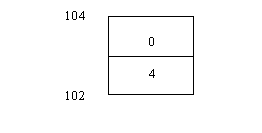
Why 4? Because there are 4 words at the command prompt i.e. aaa , 2.c, a.c, b.c. Why is the stack pushed by 2 memory locations? Because argc is of type int.
Hmm... now your gray cells should be stimulated to ask us a question: "What if we just say: aaa?"
Good question! 1 will be pushed on the stack and will be displayed. Similarly, if we say:
aaa 2.c
2 will be pushed on the stack.
When we say:
aaa 2.c a.c
3 will be pushed on the stack.
So, if you have understood the discourse so far, answer this question: Is there a minimum number of words that you can pass to a program? If yes, what is this minimum number? Whenever we wish to run a program we will have to write the name of the program at the bare minimum. Thus, the minimum number of words that have specified is 1.
The next offering:
Program 109
main()
{
char a[3];
printf("%d\n",sizeof (a));
}
This program displays the value 3 . That is because we have 3 variables a[0], a[1], a[2] each of type char. Now, try this small variation in the above program:
Program 110
main()
{
char *a[3];
printf("%d\n",sizeof (a));
}
Here, we have defined 3 variables a[0], a[1], a[2] as pointers to char. Pointers have size 4. Thus this program will display for us: 12.
Program 111
main()
int argc;
char *argv[];
{
printf("%s\n",argv[0]);
printf("%s\n",argv[1]);
}
Now, that you are enlightened abut the need for command line arguments, lets look at how they work. When you type:
aaa ab pqr xyza
and press enter, DOS wakes up, (doesn’t yawn like you) and gets to work immediately. DOS knows that you have typed 4 words. The first thing that DOS does is, that it recognizes the words as strings. What does that mean? It just means that DOS allocates memory locations for each of the words. Thus, this is a probable snapshot of memory:
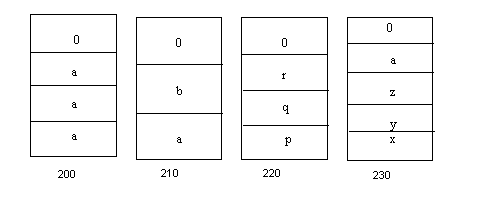
Thus, aaa is stored at location 200, abc at location 210. Address of pqr is 220, address of xyza is 240. These locations are randomly chosen. Since DOS regards them as strings, it puts a 0 to indicate the end of string. DOS realizes that instead of 4 such words, there could be 400. DOS would do the same thing even then. Then, an intelligent thought comes to DOS. It says: ‘I have stored each of the words (aaa, ab, pqr, xyza) in different memory locations. Thus, for instance if I want to access pqr, I know it is at location 220. So effectively, these memory locations can be regarded as pointers to the start of each of the words in memory.’ Thus 200 is a pointer to aaa (actually the entire filename is stored in this location i.e c:\borlandc\bin\bc\aaa but to space constraints we are not calling it by the full name), 210 is a pointer to ab, 220 is a pointer to pqr and 240 is a pointer to xyza.
The next crucial question is: How are we supposed to read these memory locations? Answer: as chars, one by one. So, DOS takes a giant step forward by storing all these memory locations (200, 210, 220, 240) at memory location 300. Observe the moves made by DOS, and ask yourself a simple question: ‘In doing so, hasn’t DOS created an array of pointers to chars. After all, the 4 words are strings that will be read one character at a time. Is array the right word to use? Yes, because an array is a collection of similar multiple entities and in this case all these multiple memory locations have the same data type (char). In fact, 300 can also be regarded a pointer since it tells us where in memory does this array begin.
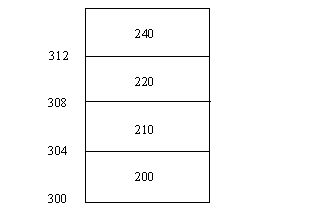
Right now, DOS knows 2 things. One, is that there were 4 words typed at the command prompt and two, it knows that address of this array in memory (300). DOS now stores this information on the stack. Assuming the stack is at 106, DOS first puts 300 (address of array) on the stack and then the number of words at the command prompt. Thus:
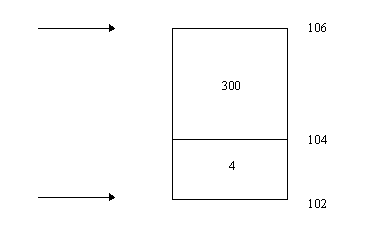
We have 4 locations for the address of the array, since it is a pointer. The stack pointer is now at 102. With this groundwork ready, we try this program:
Program 112
main(argc, argv)
int argc;
char *argv[];
{
int i;
printf("%s\n",argv[0]);
printf("%s\n",argv[1]);
}
main(argc, argv) is a function. When main() comes in, it will ask: "Where is the stack?" It is told 102. C has to be told about the data type of the parameters in the () of main. The next 2 statement say:
int argc;
char *argv[];
main allocates locations 100 and 101 to argc and locations 102, 103, 104, 105 to argv. Thus, argc represents 4 and argv represents 300. Thus, we have:
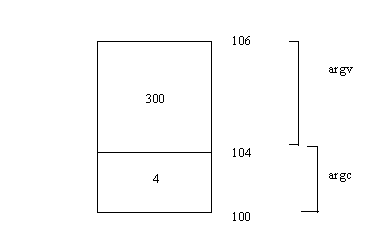
Let us look at the evolution of this highly interesting statement:
char *argv[];
Let us make mince meat of the statement and understand. argv, contains 300, which is the starting address of an array in memory. Thus we have the [] in the above statement.
Next: who created this array? None of us. DOS did the creation. Hence, we put nothing in the []. Lastly, what does the array contain? Pointers to chars. Hence the char *.
When you call an array a with 4 parameters, a[0], a[1], a[2], a3] are the members. We have now called the array argv, starting at 300. Thus, we would be doing no wrong, if we said:
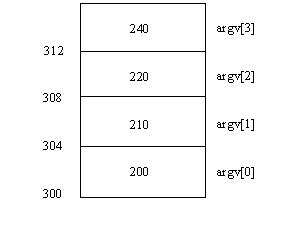
What is argv[0]? It is the physical value 200. So, when we say:
printf("%s\n",argv[0]);
won’t we see the full name of the program? i.e. aaa. Similarly, argv[1] is the physical value 210. Thus, if we say:
printf("%s\n",argv[1]);
we go to the location 210 and display the first parameter ab.
Thus, now we can write this program, which will display all the command line arguments:
Program 113
main(argc, argv)
int argc;
char *argv[];
{
int i;
for(i=1; i<argc; i++)
printf("%s\n",argv[i]);
}
The thing of interest here is the for loop which says:
for(i=1;i<argc;i++)
printf("%s\n",argv[i]);
In our example, argc is 4. Thus, the for loop goes on 4 times and each of the command line argument is printed out. This, program can thus be used to print out all the command line arguments irrespective of many there are.
Actual Output:
ab
pqr
xyza
Ladies and gentlemen, we will now actually write a program that does exactly what the type command does. A program that will tell you how simple the things, that you are in awe of, really are.
We will call the program aaa.c
Program 114
#include <stdio.h>
main(argc, argv)
int argc;
char *argv[];
{
FILE *fp;
int i;
fp = fopen (argv[1],"r");
while ((i=fgetc(fp))!=-1)
printf("%c", i);
}
The exe file for this program will be aaa.exe
The while loop displays the whole file. The most interesting statement here is:
fp=fopen (argv[1],"r");
Here, instead of giving the name of the file we have said argv[1]. Thus, when we say:
aaa z1.c
z1.c is the first command line argument, which gets stored in argv[1]. Thus, now the above statement becomes equivalent to:
fp=fopen ("z1.c","r");
We have accomplished precisely what the type command does for us. Simple?!!
One commom trait among all successful enterprises is that they always are on the look out for making things better. Tomorrow should be one better then today, two better then yesterday. Things should change, only for the better.
Long, long back, when we were still novices of C we had written a program to display the contents of a file. The heart of the program was:
fp = fopen (" name of file", "r");
while ((i=fgetc(fp))!=-1)
printf("%c",i);
Now, if we name this file aaa.c and say Alt-C, Build, we will have the file aaa.exe. This program displayed for us the contents of the file specified.
Now, at the prompt if we say:
aaa z1.c z2.c z3.c z4.c
we wish to see the contents of all the files (z1.c, z2.c, z3.c, z4.c) displayed one after another. With the above program we would only be able to display the contents of the filename specified in the statement:
fp = fopen (" name of file", "r");
Now, isn’t this restrictive? We want to give as many filenames as we wish. Why can’t we write a program that breaks these restrictions. Of course, we can and we’ll show just how. The first change that we need to make is:
for(i=1; i<argc; j++)
In the case of the statement:
aaa z1.c z2.c z3.c z4.c
argc is 5, hence the for loop is executed 4 times. We will make one more change. Instead of the statement:
fp = fopen (" name of file", "r");
we will now say:
fp = fopen (argv[j], "r");
With these changes the for loop looks like this:
for(i=1; i<argc; j++)
{
fp=fopen(argv[j],"r");
while ((i=fgetc(fp))!=-1)
printf("%c",i);
}
The full program is:
Program 115
#include <stdio.h>
main(argc, argv)
int argc;
char *argv[];
{
int i,j;
FILE *fp;
for(j=1; j<argc; j++)
{
fp=fopen(argv[j],"r");
while ((i=fgetc(fp))!=-1)
printf("%c",i);
}
}
Now in our example arg[1] is z1.c, arg[2] is z2.c, arg[3] is z3.c, arg[4] is z4.c. Hence, the contents of all the 4 files will be displayed, one after another, just as we want.
A small detail to note: the number of words passed to the program are 5 (zzz, z1.c,z2.c, z3.c, z4.c ... hence argc is 5) but the number of command line arguments passed are 4 (z1.c,z2.c, z3.c, z4.c ... hence argv is 4). Thus, if you notice the limiting condition in the for loop (j<argc) causes it to be executed only 4 times.
Output:
Iam the best.Atleast,thats what I think. (z1.c contains I z2.c contains am the best. z3.c contains Atleast, z4.c contains that is what I think)
Comparisons in life are inevitable. Comparison between peers, comparisons between DNA molecule structures. We are a specie which loves to compare. Why should our programming languages be any different? the next program illustrates the comparison statement of C.
Program 116
main()
{
int i;
i=strcmp("Hi","Bye");
printf("%d\n",i);
i=strcmp("Hi","Hi");
printf("%d\n",i);
}
strcmp (read as string compare) is the command used by C to compare. Whenever C sees anything in a double inverted comma (""), it first allocates memory to the string within the "". In our case, suppose Hi gets stored at memory location 100 and Bye gets stored at location 200. This is how the 2 memory locations look like:
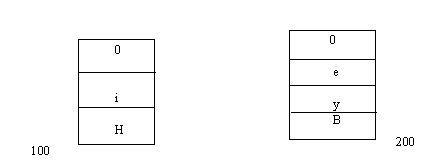
End of the string is denoted by a 0. Thus the "Hi" and " Bye" of the strcmp statement are replaced by address in memory, where they are stored. Thus, the above statement effectively becomes:
i=strcmp(100,200);
In response to this statement, C goes to memory locations 100 and 200 and checks whether the string present at these memory locations, before the 0 is the same. If the strings match, the value of i becomes 0 otherwise i gets a non-zero value.
Output:
6 0
Just to understand the strcmp better we now have, let us add a few more lines of code to the above program:
Program 117
main()
{
int i;
char *p;
i=strcmp("Hi","Bye");
printf("%d\n",i);
i=strcmp("Hi","Hi");
printf("%d\n",i);
p="ABC";
i=strcmp(p,"ABC");
printf("%d\n",i);
}
Here p is a pointer to a char. We have the statement:
p="ABC";
As always, C allocated some memory for ABC. The value of p becomes ABC. Then the next statement is perfectly valid:
i=strcmp(p,"ABC");
Thus, effectively we are saying:
i=strcmp("ABC",ABC");
This will return the value 0, which is assigned to i. Thus the final output is:
6 0 0
As we move up the programming ladder, we get to know the tricks of the trade. One of the most painful moment in a programmers life is when someone else takes credit for his/her code. (Isn’t that a fact of life?). But the "oh-so-knowledgeable" programmers that we are, we find a way to sabotage any such attempts by people to take the limelight away from us. In this next program, we are dealing with one such specific attempt. Suppose you have a program named after you. If someone, in trying to take he credit away from you, changed the name of the program, the program will not execute. "Code- snatchers" of the world, beware!!
Program 118
main(argc, argv)
int argc;
char *argv[];
{
int i;
i=strcmp(argv[0],"C:\Borlandc\bin\strc1.exe");
if(i==0)
printf("Hi");
else
printf("Bye");
}
When you create a file and name it aaa.c, the exe file produced will be aaa.exe. Thus, to run this program you will say:
aaa
Aha! This is where the culprit is caught, red handed. In the above program we have this statement:
i=strcmp(argv[0],"C:\Borlandc\bin\aaa.exe");
This is the statement that does the trick for us. argv[0] represents the first word that is typed at the command line. If someone changed the name of your file from aaa.c to anything else, the exe file will no longer be aaa.exe. Thus, the strcmp statement will result in a non zero value. You can use this value in the if statement and display any caustic message that you want it to. As for this program, we just display Hi if result of strcmp is 0, and Bye if its non-zero.
But, to your dismay, you find that in the program the string compare the does not work the way you want it to. What could be the problem? To find out, we digress for a moment and try this code:
Program 119
main()
{
printf("A\bC");
}
What will be the output of the program? Not A\bC. ‘\’ can be considered a special character in C. Thus, ‘\n’ takes us to the next line. \b has the same effect as a backspace. Thus, in the above program the \b will cause A to be deleted and thus, the output displayed will be: C
Now look at your strcmp statement again:
i=strcmp(argv[0],"C:\Borlandc\bin\strc1.exe");
Here we have 3 ‘\’. Our intention was to specify the path to our file. but, C does not see it in that light. It knows ‘\’ as a special character and treats it that way. Thus, for instance, the ‘\’ before the B of bin will remove the ‘c’ of BorlandC. To make C understand what you want it to do, you will have to give C a double dose of ‘\’. Thus, we now say:
i=strcmp(argv[0],"C:\\Borlandc\\bin\\aaa.exe");
Thus, by putting 2 ‘\’ we are neutralizing the special character effect of ‘\’.
Program 120
main()
{
int i;
i=abc();
printf("%d\n",i);
}
abc()
{
}
A function should return a value. Thus, when we say:
i=abc();
abc() does nothing, it has no code. Thus, what is the value of i, we don’t know, you don’t, know, KR don’t know. Its an unknown. To remove this ambiguity we include the statement:
return 100;
within the open and close brace of abc().
Now you realize that, in a function whenever you say the word return followed by a number, the function name followed by () will be replaced by that number. Stated simple, in the above example, abc() is replaced by 100. Thus the statement:
i=abc();
becomes:
i=100;
i thus becomes 100 and is printed out in the next line.
Thus, the important thing to remember is that return values functions and they return values only by using the word return. No lines after return get called. In other words, the last line of code to be executed is the line:
return 100;
Thus, if you think we are pulling your leg (like on so many earlier occasions), make this change to the code:
return 100;
printf("Will print the line");
Sorry sir! The message Will print the line does not printed.
If you are a perfectionist, you can write:
int abc();
Functions can return values which may be treated as char’s, int’s, long’s, or even pointers. By writing the word int in front of abc() you are making sure that the value returned by abc() is an int. If we do not specify a data type in front of a function name, by default C assumes the function to return an int.
Program 121
main()
{
int i;
i=abc(10,20);
printf("%d\n",i);
}
int abc(x,y)
int x,y;
{
return x+y;
}
Simple example, looks familiar. Here we have function abc with 2 parameters. The value returned by this function is the current value of x+y. Thus, abc() figures out the current value of x+y and returns it to main() where the printf displays it.
30
Program 122
main()
{
printf("confusion");
main();
}
The output of this program reflects the state of our country. Here we create main(). Within main() we have the printf statement which display for us : Confusion. In the next line, we call main(), thus our screen is populated with the word confusion.
Program 123
int abc();
main()
{
printf("%p\n",abc);
}
abc()
{
printf("hi");
}
Let us break a small program into still smaller pieces and understand precisely what is happening.
Program 124
main()
{
printf("%p\n",abc);
}
Error Time! This program gives you a depressing error which says:
Undefined Symbol ‘abc’ :-(
Understand this: we can read your mind and know that you are talking about the function abc. But C is not as smart as you and me. It needs to be told, what the hell is abc. So, you say: "your wish is my command" and tell C about abc(). Now we have:
Program 125
main()
{
printf("%p\n",abc);
}
abc()
{
printf("hi");
}
Do we see you beaming, now that you have countered the error so tactfully. Say ALtC- Build. Now do we see a rather disgusted face? The error persists. Reason? C believes in the principle of : ‘Look no further’. So when we say:
printf("%p\n",abc);
C does not look ahead in the code and consequently knows nothing about the function abc. Hence the error persists. So, we play a small trick on C:
Program 126
abc()
{
printf("hi");
}
main()
{
printf("%p\n",abc);
}
What we have done is to simply place the code of function abc() before main(). How does this help? Now when we say:
printf("%p\n",abc);
C knows all about abc and thus lets you go scot free (no errors).
Question time, yet again: What is abc in the statement:
printf("%p\n",abc);
abc is the name of the function, which will tell you where the function starts in memory. Thus if function abc() is stored from memory location 100 onwards the above printf will display 100.
"Hey, but is there no other of avoiding the error? I mean, do we have to move to the function code?" valid Question! We will answer this at two levels: Philosophically, speaking we will tell you, ‘Find the purpose, the means will follow’. Second: you can keep the code of abc() after main() but add one statement at the start. Thus:
Program 127
int abc();
main()
{
printf("%p\n",abc);
}
abc()
{
printf("hi");
}
The first line of the code is interesting:
int abc();
here we have function name followed by (), followed by semicolon (;). This is understood by C as a function prototype. Geek!! What’s that? It means that you are telling C, "Listen buddy, from now on, whenever you see abc, don’t regard them as the first 3 letters of the English alphabet, but as a name of a function."
Simple? Thus:
General form Example Meaning
data type function name(); int abc(); function prototype
function name(); abc(); Call to function
function name () abc() { } Code of function
{
}
Lets quiz you. Convert this C statement into a simple English statement.
int *p();
Here we have 2 operators * and () on the same line. This in simple English would mean: function p returns a pointer to an int.
Whenever you see the words ‘pointer to’ , ask yourself, ‘pointer to’ what?
Try this one: int (*p)();
Tricky one. Here we again have 2 operators * and () on the same line. To help C make up its mind as to which operator to process first, we enclose *p in parenthesis. Thus, *p is now processed first. Hence this is read as: p is a pointer to a function that returns an int.
To check the validity of the above statement, we write a small program:
Program 128
main()
{
int (*p)();
printf("%d\n",sizeof(p));
}
The printf will display 4, thus confirming our claim that p is a pointer. "This statement is in English all right, but is certainly not simple." Agreed! So, lets explain: If the function p starts at location 100, C runs to location to execute the code of the function. After the function finishes execution it returns a an int. Simple?!!
Now look at this program:
Program 129
int abc(); int pqr();
main()
{
int (*p)();
printf("%d\n",sizeof(p));
p=abc;
printf("%p..%p\n",p,abc);
abc(); p();
p=pqr;
printf("%p..%p\n",p,pqr);
}
int abc()
{printf("abc\n");}
int pqr ()
{printf("pqr\n");}
Here, we have two function prototypes :
int abc(); int pqr();
Within the code we say:
p=abc;
abc is the name of the function. This represents the memory location of abc in memory. Thus, if abc starts at location 500, p gets the value 500. Now abc and p have the same value (500). The next printf statement will display: 500..500
Then we say:
abc(); p();
These are calls to functions abc and p respectively. Take a closer look at the statement:
abc();
Just the ‘abc’ part of the above statement tells us the location of function abc in memory. Thus, its like saying:
location of abc in memory ();
or in other words
500();
p contains the location of abc in memory. Thus, when we say:
p();
it is equivalent to saying:
500();
which is the same as calling abc.
Phew!!
Thus:
int abc()
{printf("abc\n");}
gets called and we see
abc abc
as output.
Similarly, when we say:
p=pqr;
the address of function pqr is assigned to p. assuming pqr() starts at 600, p becomes 600. Thus when we say:
p();
C understands it as: ‘ Execute a function, the location of which will be told to you by p.’ C thus, executes the function starting at 600, which, surprise, surprise, is pqr.! :-)
Program 130
void abc();
main()
{
abc();
}
void abc()
{
printf("hi");
}
The first line is a function prototype for the function abc(). It has one new words: void. void, means that the function cannot return a value. If nothing is specified, then abc() is assumed to return an int.
Time to add one more word to your vocabulary:
Program 131
void interrupt abc();
main()
{
abc();
}
void interrupt abc()
{
printf("hi");
}
The words interrupt distinguishes function abc() from a normal function. abc() is now an interrupt function. Whenever we have a function that needs to talk to hardware, we will call that function n interrupt function. Thus, this line should be read as follows: abc() is an interrupt function that does not return a value. The word interrupt appears in the same color as the word void, indicating that it is understood by C.
Turn your attention to this program:
Program 132
#include<dos.h>
main()
{
void interrupt (*p)();
p=0xffff0000;
p();
printf("Do not print");
}
From now on we will always have the statement:
#include <dos.h>
as the first statement of our program, the reason for which will be clear shortly.
First a look at the interesting statements of the program:
void interrupt ((*p)()
This is read as follows: p is a pointer, not to a normal function but to an interrupt function that returns no value. In the next line we initialize p to FFFF0000. The next statement:
p();
calls to function beginning at FFFF0000.
When you run this program, you will be disappointed to find that the printf statement will not be executed. So, you don't see: Do not print as the output. Now, there could be 2 explanations for this: one is that since you said Do not print, C does not print. The second and probably the more credible explanation can be based on what happens when the statement:
p();
is executed. As soon as you run this program, out of the blue, the computer reboots! Huh? Lets face it, once the machine reboots the chances of seeing Do not print are very slim.
How? Why? Questions galore. To answer them, we need to dig deep. Lets take you back in time and revisit the memory scheme in the computer:
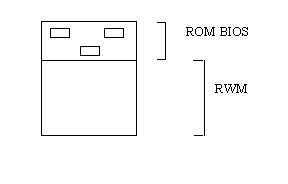
ROM is called the ROM BIOS, because it is in this area of memory that we have small programs that talk to hardware. One of these programs could talk to the keyboard, the other could write to screen etc. We will turn our attention to that program which talks to the keyboard.
The keyboard program is identified by a number, the number 9. This is just a number, don’t think too much about it. The code of the keyboard is in the ROM BIOS. Now, if the guys who designed the PC decided to fix up this address, then we would have a small problem. Suppose the code of the keyboard was fixed to start from 1 million, it would obviously mean that code to write to screen memory would have to start somewhere else. Now, one fine day, if, for some reason, we needed to increase the code of the keyboard, we would not be able to do so. Now, isn’t this an unclad for restriction? Programmers just hate to be bound by restrictions... and why should they? After all they are trained enough to program their way out of a predicament. Shortly, we’ll tell you how the designers of the PC broke this shackle.
All computers when they start up, irrespective of configuration, model...., go to the memory location FFFF0000. Here there is a program called the POST (Power On Self Test). This memory location is in the ROM BIOS starts. The function of this program is to check the keyboard, checking to see if everything is working fine. Thus, if you disconnect the keyboard, the machine does not start. The POST is responsible for this. The POST knows that the keyboard is identified by 9. So the last thing that the POST does is 9*4 = 36. So the POST goes to memory location 36 37 38 39 and here it puts 9, 60, 0000. Why? Because it is at location 9,60, 000 that the code for the keyboard begins on your machine. Why 4? Because all pointers are of size 4. The sequence of events, when a key is pressed on the keyboard is: first the keyboard goes to the microprocessor (the brain within the computer) and yells "STOP". The microprocessor gives the keyboard a rather disgruntled look and asks "Who are you?" The keyboard says " I am 9." The microprocessor takes 9, multiplies it by 4, goes to 36 37 38 39. Here the microprocessor sees 9,60,0000. The microprocessor (the brain that it is ) now knows that at 9,60,000 there is a program that knows how to handle the keyboard. The microprocessor calls that program. Now, the keyboard program wakes up, figures out what key is pressed, does whatever it is expected to do and then tells the microprocessor: " I am done." This happens every time a key is pressed.
One small program:
Program 133
main()
{
long i;
i=36;
*i=0;
}
This program, quietly makes the locations 36 37 38 39 zero. Now, when a key is pressed, the keyboard stops the microprocessor and identifies it as 9. The microprocessor multiplies 9 by 4, goes to locations 36 37 38 39. This time around it sees the address 00000000. Now, the microprocessor innocently calls the program residing at 00000000, thinking that this program knows how to handle the keyboard. Now, what is present at these memory locations is unknown. But, there will be some bytes present. These bytes are considered as a program. Thus, if these bytes are for formatting the had disk, pooffff, all data on your hard disk becomes history. The minimum effect that will have is that your machine will hang.
Program 134
#include <dos.h>
main()
{
void interrupt (*p)();
p=getvect(9);
printf("%p\n",p);
}
getvect() accomplishes a very simple task. It see 9 in the bracket, multiplies by 4. It gets 36, 37, 38, 39. What does it see their? 9,60,000. Thus, when this program is run, the output is 9,60,000 where the code for the keyboard starts on your machine.
Output:
CBB2:0028
Program 135
#include <dos.h>
void interrupt (*old)();
void interrupt new();
main()
{
old = getvect(9);
getvect(9,new);
void interrupt new()
{
}
old is a pointer to an interrupt function that returns no value.
new() is an interrupt function that return no value.
Now, lets assume that the code of DOS gets over at 20,000. Within, this we will have locations 36, 37, 38, 39 containing 9,60,000. So, value of old will be 9,60,000. Since, DOS gets over at 20,000 the code for the above program will load somewhere else. This program will contain a function main() and a function new() at the bare minimum. Assuming new() starts in memory at 24,000. Thus, when we say:
setvect(9,new);
setvect simply multiplies 9 by 4, goes to memory location 36, 37, 38, 39 and puts the value 24,000 in these memory locations. Now, run this program and press your keyboard. The keyboard identifies itself to the microproceesor as 9. The microproceesor multiplies 9 by 4 goes to location 36 37 38 39 and executes the program present at those locations. Here it sees the code for new(). Right now, we have put no code in new(). The microproceesor is waiting for new() to tell him to accept more input from keyboard. Thus, new() has not told the keyboard that the work with the keyboard is over. Thus, the machine continues to work fine, only the keyboard goes dead. To get things moving, we add the following code:
void interrupt new()
{
old();
}
old() is 9,60,000. Thus, each time the microprocessor calls new(), it calls code in the original program area, i.e. 9,60,000. Thus, what we type is faithfully reflected on the keyboard. A capital A will indeed look like ‘A’. Now, we get more adventurous and do this:
void interrupt new()
{
old(); old();
}
Here we are calling old() twice. The effect of this will be that, now whenever you type any character once, it will be displayed twice on the screen. Thus, bc now becomes bbcc. Similarly, we do this:
void interrupt new()
{
old(); old(); old();
}
old() is now called thrice. The keyboard is stuck. Each time you will have to reboot to get things back to normal.
Program 136
#include <dos.h>
void interrupt (*old)();
void interrupt new();
char *s=1047;
char *s1=0xb8000000;
int i,j,k;
main()
{
old = getvect(9);
getvect(9,new);
void interrupt new()
{
old(); old(); old();
}
void interrupt new()
{
old();
*s=64;
}
*s=64 will ensure that whatever you type will be displayed as capital letters. Now, if you wanted to display small letters, your only hope will be to press the shift key and type the characters.
The next program is yet another way of converting CAPS to small. A totally different approach. Its just reiterates our point that there is no one way of writing code, approaches may differ, the end result is still the same.
Program 137
#include <dos.h>
void interrupt (*old)();
void interrupt new();
char *s=0xb8000000;
int i;
main()
{
old=getvect(9);
setvect(9,new);
}
void interrupt new()
{
old();
for(i=0; i<=3998; i=i+2);
{
if(i>='A' && i<='Z')
*(s+i)=*(s+i) + 32;
}
}
This next program is for those who love to paint the town red, but will settle with a lot of color on the screen. Here each time a key is pressed, the color of the screen changes. Cool?
Program 138
#include <dos.h>
void interrupt (*old)();
void interrupt new();
char *s=0xb8000000;
int i,k;
main()
{
old=getvect(9);
setvect(9,new);
}
void interrupt new()
{
old();
for(i=1; i<=3999; i=i+2);
*(s+i)=k;
k++;
}
Technology has made life easier. This is a statement of fact. So, we ask ourselves: 'why can't we have color changes on the screen without even touching the keyboard, like …. like magic. Just like that!
Program 139
#include <dos.h>
void interrupt (*old)();
void interrupt new();
char *s=0xb8000000;
int i,k;
main()
{
old=getvect(8);
setvect(8,new);
}
void interrupt new()
{
old();
for(i=1; i<=3999; i=i+2);
*(s+i)=k;
k++;
}
Notice the '8' in the program … a very crucial element.
Magic is nothing but a bag full of tricks. Lets get to the bottom of this colorful puzzle.
The RAM on your machine is called Dynamic RAM. The reason for this is that if you don't constantly give it electricity it just goes phut! (sound effect) Somebody has to refresh this RAM. So, who will take up the responsibility of refreshing RAM? This is analogous to the human need of food, water, sleep…! We don't get these in enough quantities, we run into trouble. If the RAM is not refreshed at a constant predetermined rate, it might loose its contents.
Take a moment to look at your wrist. Are you wearing a watch? A quartz watch? If you know, this has a quartz crystal inside it, which oscillates and keeps the watch ticking over. Similarly in computers there is a quartz crystal that keeps oscillating. This crystal interrupts the microprocessor 18.2 times a second. (Still not as good as our exuberant members of parliament). Thus, the microprocessor is interrupted 18.2 times a second.
Let us refresh the chronology of events when a key is pressed: The keyboard identifies itself as 9. The microprocessor goes to location 36, 37, 38, 39 and finds the address 9,60,000. This is where the code for the keyboard starts. All this is done by the POST. POST knows that the number 8 is the timer. Thus, when the microprocessor is interrupted by the timer (8), it does 8*4, goes to locations 32, 33, 34, 35 and finds the address 9,40,000. 9,40,000 is where the code for the timer starts, which means that in the above program the microprocessor is interrupted 18.2 times a second. Each timer the microprocessor asks: "Who are you?". The reply it gets from the timer is. "I am 8." So, 18.2 times a second the code beginning at 9,40,000 is called. In the above program we have said:
setvect(8,new);
Thus, in our case, 18.2 times a second the code of new() gets called. Thus diagramatically:
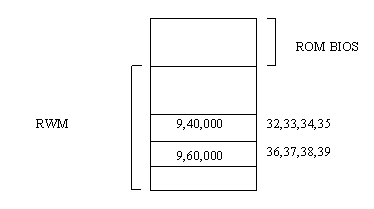
Now, within new() we have code which changes the color of the screen. Thus, since new() is called 18.2 times a second, the color of the screen changes 18.2 times a second. When you run this program there is a good chance of eye damage, so beware.
Run any of the numerous programs that had the functions: getvect() and setvect(). As an example run program 137. Like before, we assume that our DOS code gets over at 20,000. From address 20,000 onwards the program 137 will be loaded. At the prompt type bc again. Your machine will hang. Huh?! No, we are not kidding you and there is a perfectly valid explanation for this: This time bc starts loading starting from 20,000.
DOS is not a multitasking operating system. It is capable of handling only one task at a time. Thus, when program quits out and another is loaded, all the memory is made available to this program. DOS does not have the intelligence or the inclination to clean up memory. To be more specific, when bc is loaded and we press a key, the microprocessor goes to address 36, 37, 38, 39 to find code for the keyboard. What does it find here? Not 9,60,000 but the address of new() put there by program 137. Why? Because program 137 had put the address of new() in locations 36-39 and since DOS did not clean up memory this address still resides in those locations. But now, some part of the code of bc is present at that location. what that code does is unknown. DOS says, "I will not have any of this uncertainty", and refuses to move. The result: a hung computer a long-faced user.
Finding solutions to problems is what we are here for. So we dig deep into the "instruction rich" repository of C and come up with the statement:
keep(0,1000);
When C encounters the keep statement, it now knows that the user wants it to reserve some memory for his/her program. But how much? C does the following: it multiplies the second parameter of the keep statement by 16. Thus, by saying:
keep(0,1000);
in program 137we are reserving 1000*16 = 16,000 bytes of memory for our program. But 16,000 bytes from where? From where the code for DOS gets over, i.e. 20,000. The bytes from 22,000 to 38,000 will be reserved for program 137.
So why don’t we write a program that incorporates our new found knowledge.
We will now rewrite program 137_ with these modifications:
Program 140
#include <dos.h>
void interrupt (*old)();
void interrupt new();
int i,j,k;
main()
{
old = getvect(9);
setvect(9,new);
keep(0,1000);
}
void interrupt new()
{
old();
*s=64;
}
A small program:
Program 141
main()
{
keep(0,1000);
printf("hi");
}
The output of this program is a blank line. When C encounters the keep statement it quits out of the program and hence no statement after the keep statement get executed. Thus the printf statement will not be executed.
When the going gets tough... (Program 142)
Now, we are going to attempt to write a real real program. Our approach to explaining this program will be very different. What we have done is to break up the program into 3 parts. This segregation is to aid in understanding the program. For your own sake, we request you to add code into the right part as and how we have done here. Otherwise, there is little chance of you cracking this code. Remember we are on a mission!
Mission: This program will save and restore the screen. Sounds simple ... lets get cracking.
Groundwork: The monitor that we see (and so often abuse) has a gun that sprays electrons. These can be in 3 different colors, red, blue, green. So, if the green hits the monitor we see a green spot. While you are reading this, the green gun (onomatopoeia intended) is writing to the screen at the same spot. When this continues for some time, the green dots on the screen loose their shine and after a while we stop seeing green.
The basic scheme on which we will work is that if we have the same screen for 10 seconds we proceed to blank the screen. The moment the user presses a key, the original screen will be restored.
Part I
void interrupt new9(); void interrupt (*old9)();
The first line is a function prototype for function new9(), the second is a pointer called old, to an interrupt function that returns no value.
Names of functions and variables should be meaningful. Since we need to trap interrupt 9 we use the names new9() and (*old9)().
Another issue. We have to trap the keyress on the keyboard (interrupt 9). Also, if for 10 seconds, a key is not pressed, we need to blank the screen. This should tell you that we now need to keep track of time. No prizes for guessing what will help us in tracking time. It will be the timer (interrupt 8). For this we have:
Part I (contd)
void interrupt new8(); void interrupt (*old)();
Thus Part I now looks like this:
void interrupt new9(); void interrupt (*old9)(); void interrupt new8(); void interrupt (*old8)();
Part II will contain the code of new8(). Thus, as of now, in Part II we can will only write:
void interrupt new8()
{
}
We will keep adding code here as things crystallize.
Part III will contain the code of new9(). Thus as of now, in Part II we can will only write:
void interrupt new9()
{
}
We will keep adding code here as things crystallize.
Now we return to Part I and add this line:
old9=getvect(9);
For the umpteenth time the microprocessor will do a 9*4=36, go to locations 36 37 38 39, see 9,60,000 and call code starting at that address.
Now, we add the following lines to Part I:
setvect (9,new9); old8=getvect(8); setvect (8,new8);
setvect(9,new9) put the address of the function new9 into memory location 36,37,38,39. setvect(8,new8) put the address of the function new8 into memory location 32,33,34,35.
Thus, Part I at this stage looks like this:
void interrupt new9();
void interrupt (*old9)();
void interrupt new8();
void interrupt (*old)();
main()
{
old9=getvect(9);
setvect (9,new9);
old8=getvect(8);
setvect (8,new8);
Notice that the code is symmetric. Still at Part I, we say:
keep (0,1000); keep (0,1000);
Part I now looks like:
void interrupt new9();
void interrupt (*old9)();
void interrupt new8();
void interrupt (*old)();
main()
{
old9=getvect(9);
setvect (9,new9);
old8=getvect(8);
setvect (8,new8);
keep (0,1000);
keep (0,1000);
}
Now that all is in order in Part I of your code, you review what we have written so far. Your eyes halt at the keep statements. Is everything indeed in order? If you think so, it can mean only 2 things. Either, you don’t have faith in what we say, or, you have just had a nasty bout of amnesia. Remember, we told you that no lines of code after the keep statement get called. So when we said:
keep (0,1000);
for the first time, it doesn’t matter how many statements you write after this. It doesn’t matter. If we wanted these notes to run into thousands of pages we would have probably kept putting keep statements.
The smart alecs among you might justify that we have two keep statements, one for each setvect statement. For those bunch of people we suggest that you go through the previous paragraph again. There is no such correlation.
We, now go to Part II and write:
old8();
This means that Part II now looks like this:
void interrupt new8()
{
old8();
}
Look at the following lines from Part I:
old8=getvect(8); setvect (8,new8);
setvect(8,new8) put the address of the function new8 into memory location 32,33,34,35. These lines ensure that whenever the timer interrupts the microprocessor, the code of new8() gets called. We know that the timer interrupts the microprocessor 18.2 times a second. This means that the code of new8() gets called 18.2 times a second. We have included the function old8() in the ‘{‘ and ‘}’ of new8(). Thus old8() gets called 18.2 times a second.
Next we turn our attention to Part III. Here we have:
void interrupt new9()
{
old9();
}
Everytime a key is pressed new9() gets called. By including the function old9() in the ‘{‘ and ‘}’ of new9(), we ensure that old9() gets called whenever a key is pressed.
Back to Part I. We say:
int k;
In Part II, we can now safely use the variable k. Since k is a global variable it is initialized to 1. Then we say:
k++;
Thus Part II now is:
void interrupt new8()
{
old8();
k++;
}
Time for a quick recap. new8() gets called 18.2 times a second. old8() gets called 18.2 times a second. k will be incremented by 18.2 each second. Ask a school kid and he/she will tell you that that in 10 secs the value of k will be 182.
Still on Part II we say:
if (k>=182)
{
}
Part II is now:
void interrupt new8()
{
old8();
k++;
if (k>=182)
{
}
}
This if statement will not be true in the first 10 secs. At the end of 10 secs value of k becomes 182 and from then on the code in the if statement will be executed.
Within the if statement we say:
k=0;
By doing this, we are ensuring that the if statement will be called every 10 secs. How? At the end of 10 seconds, the if statement becomes true, and within the if statement the first thing that we do is to make k=0. Thus, in effect we are resetting the timer.
The subtlty of this program dawns on us when we say:
k=0;
in Part III. Thus, Part III is now:
void interrupt new9()
{
k=0;
}
By making k=0 here, we have plugged a small loophole in our logic. When we made k=0 in the if statement of Part II we ensured that k becomes 0 every 10 seconds. But is that what we want? No! What we really want is that the if statement should be called, every 10 seconds the user does not press a key. Get the difference?? Thus, if a key is not pressed for 5 seconds, k becomes 91 (18.2*5). Now if a key is pressed, the timer needs to be reset.
That is what the k=0 in Part III accomplishes.
Aah! There is a sense of relief because now we have ensured that the if statement is called only when 10 secs have elapsed since the user pressed a key.
The next thread of thought tells us that when these 10 secs have elapsed, the first thing that we need to do is to save the screen. Where do we save the screen? An array! Good suggestion. For this we add the following code in the if statement of Part II:
for (i=0 ; i<=3999; i++) a[i] = *(s+i);
Of course to avoid being caught in a sea of errors we add the following statements to
Part I:
int i; char a[4000]; char *s=0xb8000000;
Thus, till reports last came in this is how Part I looks:
void interrupt new9();
void interrupt (*old9)();
void interrupt new8();
void interrupt (*old)();
int i; char a[4000]; char *s=0xb8000000;
main()
{
old9=getvect(9);
setvect (9,new9);
old8=getvect(8);
setvect (8,new8);
keep (0,1000);
keep (0,1000);
}
Part II is:
void interrupt new8()
{
old8();
k++;
if (k>=182)
{
for (i=0 ; i<=3999; i++)
a[i] = *(s+i);
}
}
No wonder then that people with experience in programming pip inexperienced applicants in a job interview. Over the years the experienced programmer has written a lot of code, which stands him in good stead when there is need to reuse code.
Pay real close attention to our next statement: The screen that we have stored in the array has to be blanked out. Right? How can this be done? What if we add these lines to the if statement of Part II:
for(i=0;i<=3998;i=i+2)
a[i]=32;
If we stop now what will happen? Do you smell something fishy? Let us repeat what we said: The screen that we have stored in the array has to be blanked out. Is this statement correct? Grammatically yes, but is this what we want to do? Nope! What we really should be looking to so is to blank the screen that the user sees.
Thus we should actually say:
for(i=0;i<=3998;i=i+2) *(s+i)=32;
Aah! Now, now you see the light!!
Now that no key is pressed for 10 secs we have blanked out the screen. Is it not our responsibility as programmers to restore the users screen when he/she presses a key. How do we do that? We make this statement:
ss=1;
and add this statement at the end of the second for loop of Part II:
void interrupt new8()
{
old8();
k++;
if (k>=182)
{
for (i=0 ; i<=3999; i++)
a[i] = *(s+i);
for(i=0;i<=3998;i=i+2)
a[i]=32;
ss=1;
}
}
So, now we know that when ss=1, the screen is saved, when ss=0 the screen is not saved.
Only when the screen is saved do we need to restore the screen.
One thing leads to another. The addition of this statement has stimulated our gray cells and now we say:
if (ss==1)
{
for(i=0; for I<=3999; I++);
*(s+i)=a[i];
}
This code checks to see if the screen has been saved. Only if the screen is saved, do we need to restore it. The above for statement results in the screen being restored. But, where do we add this code? Answer? For this we ask another question. When does the screen need to be restored? When the screen has been saved and a user presses a key. Because Part III contains the code for new9(), which is the function to be called when a key is pressed, we will include the above code in Part III. Thus:
void interrupt new9()
{
k=0;
if (ss==1)
{
for(i=0; for i<=3999; i++);
*(s+i)=a[i];
}
}
Another aspect: Each time the user presses a key we need to check whether ss is 0 or 1. If ss is 1, we have to restore the screen. If we don’t have the if statement, then each time a key is pressed we are writing the contents of the array onto the screen.
All right, time for some code inspection. Here we have a situation where, if 10 seconds elapse without a key being presses, we save the screen and blank out the screen as seen by the user. Now when a key is pressed, the original screen, i.e. the screen we saved 10 secs ago is restored. But what if we press a key again? ss is still 1. The if statement of Part III will be executed and we will restore the screen that we saved 10 seconds ago. So, we need to add another line in Part III and that is:
ss=0;
Making ss=0 is tells C that the screen that was saved has now been restored, so now when a key is pressed the if statement of Part III will not be called.
Part III is now:
void interrupt new9()
{
k=0;
if (ss==1)
{
for(i=0; for i<=3999; i++);
*(s+i)=a[i];
ss=0;
}
}
This program brings the importance of programming logic to the fore. How the statement k=0 in different parts of the code had totally different meanings. And remember this is not a very large program.
Does this program work?? Does it really work?? Subject your program to a small test.
Run the program and for 10 seconds don’t press a key. The original screen will be saved and a blank screen takes its place. So far so good! What is happening in the program? k value has been reset to 0. As seconds pass, the value of k keeps increasing constantly. At the end of another 10 secs k will become 182, the if statement of Part II will be called. Within the if statement we have an array that will save the screen. But, what screen will be saved now? The blank screen!! So, what has happened is that the original screen that was stored in the array 20 secs ago is now overwritten by this blank screen. The array in Part II now contains the blank screen. So, now if you press a key, what do you see? A blank screen!!
What is the remedy? Ask yourself: ‘In which part of the code, do we need to make he change?’ After a lot of ‘gray cell investment’ we realize that the Part II of the program is where the problem lies. We need to execute the if statement in Part II only if 10 secs have elapsed without a key being pressed and the screen has not been previously saved. Converting this English statement to its C equivalent we have:
if (k>=182 && ss == 0)
{
for (i=0 ; i<=3999; i++)
a[i] = *(s+i);
for(i=0;i<=3998;i=i+2)
a[i]=32;
}
}
Part II now finally looks like this:
void interrupt new8()
{
old8();
k++;
if (k>=182 && ss == 0)
{
k=0;
for (i=0 ; i<=3999; i++)
a[i] = *(s+i);
for(i=0;i<=3998;i=i+2)
a[i]=32;
}
}
Crucial question. Is there any line in this program that you don’t understand? All statements have been discussed and explained. Yet, writing the program is no mean task. The reason for this is that programming is not just knowing the syntax and what each line does. Programming is abstract. The amount of C involved in this program is not too much. It is how you the string it all together!! That is the real challenge. Also, you should realize that this program has to run systematically in parts. Otherwise, the essence, the beauty of the program is lost.
Files -- Under control
Program 143
#include <stdio.h>
main(argc,argv)
int argc;
char *argv[];
{
FILE *fp;
int i; int j=1;
fp = fopen(argv[1],"rb");
while ((i=fgetc(fp))!=-1)
{
printf("%c",i);
}
}
Name this program aaa.c. When you run this program by saying:
aaa z.c
this will print the contents of file z.c. We will worry about the "rb" in the statement:
fp = fopen(argv[1],"rb");
a little later.
Next, we write a program and name it cc.c
Program 144
main(argc,argv)
int argc;
char *argv[];
{
int i;
i=atoi(argv[1]);
printf("%d\n",i);
printf("%s\n",argv[1]);
}
We run this program by saying:
cc 123
When we press enter here, C allocates memory for c:\borlandc\bin\cc.exe. The more important question that we need to ask ourselves is, how will it allocate memory for the first argument 123? Diagramatically:
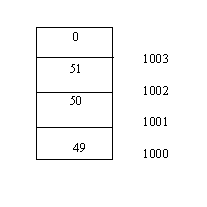
(ASCII value of 1 is 49, 2 is 50, 3 is 51)
Look at this statement:
i= atoi (argv[1]);
The memory location of the first argument, i.e. argv[1], i.e. 123 is assumed to be location/address 1000. So C goes to location/address 1000 and multiplies the contents of the memory locations as follows:
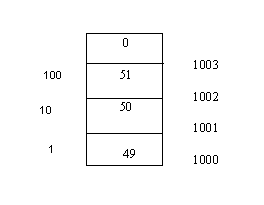
In command line arguments everything is treated as ASCII. Also, the arguments are considered as strings. For instance, if you typed: cc ABC, this ABC would be stored as 65 66 67 0. Thus, 123 gets stored as 49 50 51 0. Aren’t you curious how this ASCII representation is converted to the actual value? Very simple. C does:
49-48 = 1 50-48 = 2 51-48 = 3 1*100=123 2*10 = 20 3*1 = 3
All this number crunching will give you 123. But why all the fancy multiplication? The reason for this is that atoi converts a number that looks like a string into an actual number. Understand a subtle difference. When you say:
int i; i=123;
assuming that i is stored at location 500 we have:
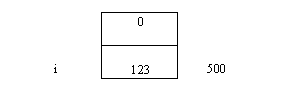
Thus, there is a difference when 123 is stored as a string and when it is stored as a number. We have specified 123 as a string, but we want convert it into an actual number. Hence we use the atoi statement.
Program 145
#include <stdio.h>
main()
{
FILE *fp;
int i;
fp=fopen("z.txt","r");
i=fgetc(fp);
printf("%d..%c\n",i,i);
fseek (fp,3,0);
i=fgetc(fp);
printf("%d..%c\n",i,i);
fseek(fp,7,0);
i=fgetc(fp);
printf("%d..%c\n",i,i);
fseek(fp,0,0);
fseek(fp,4,1);
i=fgetc(fp);
printf("%d..%c\n",i,i);
fseek(fp,3,1);
i=fgetc(fp);
printf("%d..%c\n",i,i);
fseek(fp,-4,1);
i=fgetc(fp);
printf("%d..%c\n",i,i);
fseek(fp,0,1);
i=fgetc(fp);
printf("%d..%c\n",i,i);
fseek(fp,-2,2);
i=fgetc(fp);
printf("%d..%c\n",i,i);
}
For this program you need to create a file z.txt that looks like this:
ABCDEFGHIJK
Note there is no Enter at the end of the file.
Just to help us understanding we will write:
A B C D E F G H I J K 0 1 2 3 4 5 6 7 8 9 10 11
These numbers are not to be included in the file.
We have numbered the characters contained in the file starting from 0 to 11, to help us understand better.
fp stands for file z.txt which is opened in read mode. You can assume that any given time there is one number that is active in memory. When you say fopen it is the first byte of the file. Thus, this can be called a file pointer (this file pointer has nothing to do with the *fp). This program lets you move the file pointer to anywhere in the file, to the beginning, to the end or to anywhere in between. Now when we say:
i=fgetc(fp);
fgetc() will ask: ‘Where is the file pointer?’. It will be told its at the first member, i.e. A. So i now becomes 65 and the printf displays:
65..A
fgetc() does not stop at this. It now moves the file pointer to the next member of the file which is B.
Next we have:
fseek(fp,3,0);
fseek() is a function. When C sees 0 in fseek() it doesn’t ask where the file pointer is. As far as C is concerned it doesn’t matter. It will consider the file pointer to be at the first byte of the file. It looks for the other number which in our case is 3. The 3 means, move the file pointer by 3 positions from the first byte of the file. Thus effectively we move the file pointer to byte number 4 of the file (remember C starts numbering from 0). Thus, now the file pointer will be at D. In the next two statements:
i=fgetc(fp);
printf("%d..%c\n",i,i);
i gets the ASCII value of D, i.e. 68 and the following printf displays:
68..D
fgetc() now moves the file pointer to the next member, i.e. E
Crave for more examples? Here goes. The next statement says:
fseek(fp,7,0);
Should not be difficult to figure this statement. As before, 0 means it doesn’t matter where the file pointer is. Just pick the eighth member of the file.
The next two lines are:
i=fgetc(fp);
printf("%d..%c"\n,i,i);
Thus i becomes 72 and the printf displays:
72..H
The file pointer now points to the next member, i.e. I
In the next statement:
fseek(fp,0,0);
we are getting the file pointer back to member 0, i.e. to the beginning of the file.
Then we have:
fseek(fp,4,1);
i=fgetc(fp);
printf("%d..%c\n",i,i);
Aah, time to pay attention. This fseek() means: ‘Ask where the file pointer is and then move it by 4 from its current pointer position.’ But why is C suddenly so concerned about the position of the file pointer? What has changed? The 1 in the fseek() has caused the change. Whenever C sees a 1 in the fseek() it wants to know where the file pointer is. In our case the file pointer is at the first byte, i.e. at A. Thus, this fseek() causes the file pointer to move 4 positions away from the A and the file pointer now points to E. Thus i will get the value 69 and the printf prints:
69..E
The file pointer now points to F.
Look at the next 3 statements:
fseek(fp,3,1);
i=fgetc(fp);
printf("%d..%c\n",i,i);
The 1 in fseek() indicates that C now asks: ‘Where is the file pointer?’ F! Then he fseek() moves this pointer 3 positions which results in the file pointer to point to I and the printf to display:
73..I
fgetc() makes sure the file pointer now points to J.
The next statement is:
fseek(fp,-4,1);
-4. Hmmm... what does this mean? If you notice the file pointer so far has been moving only in one direction, i.e. forward. The minus, reverses this. This fseek() causes the file pointer to move 4 positions in the backward direction, relative to the current location of the file pointer. Since the file pointer points to J, 4 positions backwards will make it point to F. The next two statements:
i=fgetc(fp);
printf("%d..%c\n",i,i);
result in i getting the value 70 and the output to be:
70..F
fgetc() is still adamant on moving the file pointer to the next member in the forward direction. Thus, the file pointer is now on G.
The next statement seems tricky but is simple enough:
fseek(fp,0,1);
This fseek() instructs C to find out where the file pointer is and move it by 0 positions, i.e. don’t move it at all. Thus when C encounters the next two statements:
i=fgetc(fp);
printf("%d..%c\n",i,i);
it displays:
71..G
The file pointer is now at H.
Want more variety? More control? The next statement will show you how:
fseek(fp,-2,2);
i=fgetc(fp);
printf("%d..%c\n",i,i);
The 2 in the fseek() means that now the movement of the file pointer will be relative to the last byte of the file. -2 means move two position backwards from the end of the file. Thus, the file pointer now points to J and the print displays:
74..J
Similarly when you say:
fseek(fp,-1,2);
i=fgetc(fp);
printf("%d..%c\n",i,i);
The output is: 75..K
and
fseek(fp,-3,2);
i=fgetc(fp);
printf("%d..%c\n",i,i);
displays: 73..I
Before you run the next program make sure the file z.txt looks like this:
ABCD
What we want to demonstrate in this program is how we can go to anywhere in the file and make whatever changes needed. As an example we will modify the original z.txt to look like this:
AACD
We will call this program bbb.c
Program 146
#include <stdio.h>
main(argc,argv)
int argc;
char *argv[];
{
FILE *fp;
int i,j;
i=atoi(argv[1]);
j=atoi(argv[2]);
fp=fopen(argv[3],"r+b");
fseek (fp,i-1,0);
fputc(j,fp);
}
To run this program, at the command prompt we type:
bbb 2 65 z.txt
bbb has 3 parameters(2,65,z.txt). Thus when we say:
i=atoi(argv[1]);
argv[1] refers to 2. The atoi converts this string (2) into an actual number and stores this number (2) into i. Similarly, when we say:
j=atoi(argv[2]);
argv[2] refers to 65. As before, the atoi converts this string (65), into the actual number 65 and stores it in j. The next statement:
fp=fopen(argv[3], "r+b");
The third argument is z.txt. Thus, we are opening the file z.txt. We will tell you the significance of "r+b" in a short while.
To understand the next statement:
fseek (fp,i-1,0);
we need to understand: the original file z.txt is: ABCD. Thus:
What we write: A B C D How it is stored: 65 66 67 68 How C numbers the bytes: 0 1 2 3
Our aim is to replace the B of file z.txt with A. As shown, B is the second byte of the file z.txt and hence has number 1. The value of i is 2. Thus to access B in file z.txt we say
i-1.
In the next statement:
fputc(j,fp);
we replace the second byte of z.txt (B) with j, i.e. 65, i.e. A. Hence we get the desired output:
AACD
Now, we suddenly have an intense desire to reuse code. After all, we have written so many programs so far. There is no law that prevents us from reusing our code.
Before we venture into reusing our code, you need to change z.txt. Make it look like this:
Hello(press enter)
Hi(press enter)
We have put 9 bytes into the file z.txt. These bytes are:
H e l l o (enter) H i (enter)
What we want to demonstrate here is that everytime we press enter, internally, two numbers, 13 and 10 are added to the file. Thus, the file z.txt will in fact be 11 bytes large. Thus:
H e l l o (enter) H i (enter)
1 2 3 4 5 6 7 8 9 10 11
13 10 13 10
When we press enter what happens? We go to the beginning of the next line. So effectively two things happen, one: we move to the beginning of a line and second we move to the next line. 13 means move the cursor to the beginning of the line. 10 means move the cursor one line down.
Now, type this at the command prompt:
aaa z.txt
This will faithfully display:
Hello Hi
Now type:
bbb 6 32 z.txt
What we are saying here is to replace sixth byte of file z.txt with a space. The sixth byte in our file is 13, which is responsible for taking us to the beginning of a line. Thus, now when we say:
type z.txt
we see:
Hello_ _Hi
(We have used the _ to represent a space).
Note, that we have not touched the 10. Hence we move to the next line but do not go the start of the next line( because the 13 is now replaced by a space).
Then we restore normalcy in our file by saying:
bbb 6 13 z.txt
We are putting 13 back as the sixth byte of file z.txt. (You can check this by typing type z.txt)
Then we try this stunt:
bbb 7 32 z.txt
Now type:
type z.txt
Whoops! What do we have? A funny looking word. How in the devils name did this happen? What we did was to replace the seventh byte of the file with a space. The seventh byte was 10, whose responsibility was to take us to the next line. By replacing 10 with a space we now write to the same line. Thus the ‘H’ of Hello is replaced by a space, the ‘e’ of Hello by the ‘H’ of Hi and the first ‘l’ of Hello is replaced by ‘i’ of Hi.
Output:
_Hilo
(We have used the _ to represent a space).
You realize that 10 and 13 have a special status, i.e. C associates these numbers with a particular action each time they are encountered. Now, we are not saying if that’s good or bad. What we should be concerned is whether there is a way to nullify or neutralize the special status of these characters. In the next program we will learn just that.
Program 147
#include <stdio.h>
main()
{
FILE *fp;
int i,j; j=0;
fp=fopen("z.txt","r");
while ((i=fgetc(fp))!=-1)
{
j++;
printf("%d\n",i);
}
printf("j=..%d\n",j);
}
j counts the number of bytes in the file and i tells you what those bytes are. Like we did previously, change z.txt to look like this:
ABC(enter)
DE(enter)
This will put 9 bytes into the file z.c (j=9), which are as follows:
65 66 67 13 10 68 69 13 10
Now, when you run the above program by saying:
looks like this:
65 66 67 10 68 69 10 j=..7
If you notice, the 13 is not to be seen. This is because the "r" in the statement:
fp=fopen("z.c","r");
is like a hungry beast. It eats up the 13. Sluurp..! The result is that we have only 7 bytes remaining in the file.
But, this is not fair. You want to see the bytes of the file status quo. No omissions! What do you do? You make this small change to the program:
fp=fopen("z.c","rb");
Now run the program and presto ... you see the complete file all 9 bytes.
How did this happen? The b in "rb" is responsible for this change. The presence of "rb" means that the special status associated with 13 is nullified.
Output:
65 66 67 13 10 68 69 13 10 j=..9
We are still feeling adventurous. We go on and try the following stunts, type:
bbb 1 26 z.txt
Here if bbb.c contains the statement:
fp=fopen("z.c","rb");
then if we type:
aaa z.txt
the output is:
65 66 67 13 10 68 69 13 10
If now bbb.c contains:
fp=fopen("z.c","r+b");
Now if we say:
bbb 1 26 z.txt
and then say:
aaa z.txt
the output is:
26 66 67 13 10 68 69 13 10
26 stands for -1. Thus, now when we say:
type z.txt
we see no output because the first byte of z.txt is -1 signaling the end of file.
Dbase Databases
With your current knowledge of C, you will now be able to write programs that can accomplish tasks that the commonly used Dbase commands do. We will first look at the bytes of Dbase file. This will give us an overview of how Dbase files are organized.
We will now print the Dbase file header. For this we will use the file aaa.c
To run this program type:
aaa c:\dbaseiii\<name of database file>.dbf
Let us briefly tell you how to create a database in Dbase. At the DOS prompt say:
cd dbaseiii
Now within Dbase say:
dbase
Here come to the command line (line with the .) and say:
create hsk.dbf
Next, you will define the structure of the dbf. Input some records and then Press Ctrl-End to save the records. To view the records type:
list
Now you have created the database hsk.dbf which can now be used in your C programs.
In hsk.dbf we have added 4 records. Thus we say:
aaa c:\dbaseiii\hsk.dbf
Output:
3 97 11 30 4 0 0 0 97 0 6 0 0 0 0 0 0 0 0 0 0 0 0 0 0 0 0 0 0 0 0 0 78 65 77 69 0 0 0 0 0 0 0 67 15 0 152 73 3 0 0 0 1 0 0 0 0 0 0 0 0 0 0 0 83 85 82 78 65 77 69 0 0 0 0 67 18 0 152 73 2 0 0 0 1 0 0 0 0 0 0 0 0 0 0 0 13 32 97 97 97 98 98 32 99 99 99 100 100 32 101 101 101 102 102 32 103 103 103 104 104 32 32 32 32 32 32 26
Are you drowning in a sea of numbers? Let us rescue you. The first 8 bytes are of interest to us.
3 97 11 30 4 0 0 0
Refer the output and you will see that the first byte is: 3. The first byte of a dbase file is always 3. You can create a new database file and run program aaa on it. The first byte will still be 3.
The second byte tells you the year, the third byte tells you the month, the fourth tells you the date. We ran our program on 30th November 1997. Thus, our second, third and fourth bytes are: 97..11..30. (do you smell the Y2K problem?)
The fifth, sixth, seventh and eighth byte tell us the number of records in the file. Our database file has 4 records. Thus, bytes 5, 6, 7, 8 are: 4..0..0..0
Can we write a program which modifies the dbase header? Sure we can:
Flip back to bbb.c and then run the program as follows:
bbb 1 2 c:\dbaseiii\hsk.dbf
What we are doing here is to change the first byte of the database file hsk.dbf to 2. But all database files have a file header with the first byte 3. So what happens? Now when you go to dbase there is no file called hsk.dbf.
Files are an extremely important component of the C language. Thus, we need to get ourselves well versed with all commands for file handling. This next program will introduce another file handling command: fread
We already have a peeped into the header of a Dbase file. The first byte is 3, the second, third and fourth bytes are the year, month and date respectively. Then there is a long, which means 4 bytes that tell us the number of records in the database file.
For this program you need to create a file z.txt that looks like this:
ABCDEFGHIJK
Note there is no Enter at the end of the file.
Just to help us understanding we will write:
A B C D E F G H I J K 0 1 2 3 4 5 6 7 8 9 10
These numbers and spaces are not to be included in the file.
We have numbered the characters contained in the file starting from 0 to 10, to help us understand better.
Program 149
#include <stdio.h>
main()
{
FILE *fp;
char a[10]; int i;
fp=fopen("z.txt","r");
for (i=0;i<=9;i++)
a[i]='Z';
for (i=0;i<=9;i++)
printf("%c\n",a[i]);
fread(a,8,1,fp);
for (i=0;i<=9;i++)
printf("%c\n",a[i]);
i=fgetc(fp);
printf("%d..%c\n",i,i);
}
File z.txt is opened for reading. In the statements:
for (i=0;i<=9;i++) a[i]='Z';
we are initializing the array to the ASCII value of Z. Next we have:
for (i=0;i<=9;i++)
printf("%c\n",a[i]);
this will print for us all Z's
The next statement merits some explanation:
fread(a,8,1,fp);
The 'a' in the fread could be replaced by &a or &a[0]. Why? Because a, &a, &a[0] all represent the starting address of the array on memory. Next we have 8, which means fread reads 8 bytes from where the file pointer is into the array and moves the file pointer to the next byte in the file. This is similar to the fgetc statement. Thus, we realize that fread internally calls fgetc 8 times. For all our needs the next parameter is always 1 and we shall leave it at that.
Then we look at these statements:
for (i=0;i<=9;i++)
printf("%c\n",a[i]);
This printf statement will give the following output:
A B C D E F G H Z Z
The first 8 bytes are what fread has put into the array. The last two bytes remain untouched and hence they retain their initial value 'Z'.
The next 2 statements:
i=fgetc(fp);
printf("%d..%c\n",i,i);
i gets the ASCII value of the byte to which the file pointer points. The file pointer (as a result of the fread) points to I. Thus i gets the value 73 and the printf displays:
73..I
What is the point that we are trying to make in this program? First, we want to demonstrate the prowess of fread. fread enables us to read multiple bytes at one time. fgetc is limited in its scope, since it only allowed us to read one byte at a time.
Final Output:
Z Z Z Z Z Z Z Z Z Z A B C D E F G H Z Z 73..I
But, do you realize that now we have a small problem. If we wanted to display only the number of records of the database file, we would need to extract only bytes 4 to 8. For this would need to do 4 fgetc's, then multiply each byte with the correct weight and only then get the desired long. We thus feel the need of a command which would make this task easier. C answers your plea in the form of: struct.
To understand structures let us start writing the next program. When we have reached the end of the program structures will be as clear as can be.
main()
{
struct
{
int i;
char j;
long k;
}zzz;
What have we done here? Created a structure called zzz! What is a structure? It is a collection of variables which is given a name. All that C will now do is at 100 it will create a structure called zzz. 100, 101 will be an int(i), 102 will be a char (j), the next 4 will be a long(k).
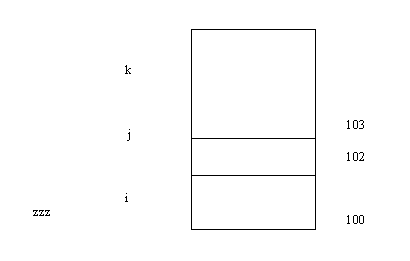
Structures are just a covering for a collection of variables. Nothing more!
Then we say:
printf("%d\n",sizeof(zzz));
This will give display 7. How? 2(int) + 1(char) + 4 (long) = 7 (zzz)
Next we say:
printf("%p\n",&zzz);
This displays 100.
We don’t stop at this. We execute the following statements:
printf("%p\n",&zzz.i);
printf("%p..%p\n",&zzz.j, &zzz.k);
zzz.i?? How does C interpret that? This means the address of variable i which is in a structure called zzz. The '.' is used as a separator between the structure name and its variable. Why the dot? When we are in a story telling mood we will throw light on this.
Thus, the first printf will display the same address as that of zzz ,100 (since it is the first member). The second print will display 102, 103.
Lastly we say:
zzz.i=10; zzz.i++;
printf("%d\n",zzz.i);
Here we are initializing the first member (i) of the structure to 10. Then we increment i, thus making it 11. The last printf displays: 11
The full program:
Program 150
main()
{
struct
{
int i;
char j;
long k;
}zzz;
printf("%d\n",sizeof(zzz));
printf("%p\n",&zzz);
printf("%p\n",&zzz.i);
printf("%p..%p\n",&zzz.j, &zzz.k);
zzz.i=10; zzz.i++;
printf("%d\n",zzz.i);
}
The actual output:
7 1BCC:0FF8 (we assumed this to be 100) 1BCC:0FF8 (we assumed this to be 100) 1BCC:0FFA..1BCC:0FFB (we assumed this to be 102, 103) 11
Remember why we started talking about structures in the first place. We needed a convenient way of displaying the number of records from the Dbase header file. Let us write a program that does just that:
Here we assume that you have created a database file in dbase and called it zz.dbf. Also, don't forget to include a few records into this file.
Program 151
#include <stdio.h>
main()
{
struct
{
char a;
char yr,mon, day;
long norec;
}zzz;
FILE *fp;
fp=fopen("zz.dbf","r+b");
fread(&zzz,8,1,fp);
printf("%ld\n",zzz.norec);
printf("%d..%d..%d\n",zzz.yr,zzz.mon,zzz.day);
printf("%d\n",zzz.a);
}
Like before we have created a structure called zzz. This time its members are:
char a; char yr,mon, day; long norec;
Notice, this is precisely the how the first 8 bytes of the dbase file look.
Then we open the database zzz.dbf. We say "r+b" because we want to open the file for reading and writing. Then we have the next set of interesting statements:
fread(&zzz,8,1,fp);
printf("%ld\n",zzz.norec);
printf("%d..%d..%d\n",zzz.yr,zzz.mon,zzz.day);
The first printf will print for us the number of records. We are taking zz.dbf, saying read bytes into the structure zzz. Notice that zzz looks like the first 8 bytes of the dbase header. So we are now reading 8 bytes into the area of memory named zzz. When we say zzz.norec, C does all the multiplication the user is kept away from the gory details.
The most important thing to keep in mind here is: the first 8 bytes of a Dbase database are 4 chars and a long. Our structure zzz also has the same members 4 chars, 1 long.
Lastly we say:
printf("%d\n",zzz.a);
This will tell us whether zz.dbf is a valid dbase database or not (remember the first byte of a Dbase database is always 3.) Thus, this program gives us some insight into the world of Dbase databases.
Now that we have seen how we display the bytes of a Dbase file from a C program, lets dig deeper. Now follow the following instructions very carefully:
Create a database file (z1.dbf) with one field. Then create database files (z2.dbf) with two fields, z3.dbf with three fields and z4.dbf with four fields respectively. Do not enter any data into these fields. Next, do a dir and check the size of the files. You will see:
File Size z1.dbf 66 z2.dbf 98 z3.dbf 130 z4.dbf 162
Every Dbase file that you create has a constant header of 32 bytes that is always present. For every field that you create in the database file, 32 bytes are added. After all the fields get over we have a 0D(13). Why 0D? That is a rule. No questions asked. No answers given. The last byte is 26. This is not a part of the header file. Thus, if we have 1 field the size of the file will be:
32 (Constant header) + 32 (bytes due to field) + 1 (0D) + 1 (26) = 66
This is how we get the size of the file z1.dbf. The size of the other files(z2.dbf, z3.dbf, z4.dbf) can be similarly explained.
In the last program we wrote a structure zzz. We will now modify this structure to look like this:
struct
{
char a;
char yr,mon,day;
long norec;
int sizeh;
int sizer;
}zzz;
The variable sizeh stores the number of bytes in the header file, sizer gives the number of records in the database file.
The size of this structure is 4(a,yr,mon,day) + 4(norec) + 2(sizeh) + 2(sizer) = 12.
Similar to the last program, this time we have:
#include <stdio.h>
main()
{
struct
{
char a;
char yr,mon, day;
long norec;
}zzz;
FILE *fp;
fp=fopen("z1.dbf","r+b");
fread(&zzz,12,1,fp);
printf("%d\n",zzz.sizeh)
}
Thus, if we had a database with two field, it would look like this:
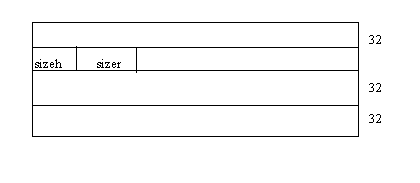
sizeh is the size of the header. In the case of the file with one field, sizeh will be 65. How? 32 bytes for the constant header, 32 bytes for the field header, and the 0D = 65. (The 26, is not a part of the header). Similarly, if we have a file with 2 fields sizeh will be 32+32+32+1=97.
Now we consider a database file z2.dbf with two fields. We make the size of the first field 4, the size of the second field 3. Name the first field as AAAAAAAAAA( 10 A’s), the second filed as BBBBBBBBB(10 B’s). We fix the data type of the first field as character, width 10, the second field’s data type as numeric and width 5.
The sizer will give you 8, which is one more than the individual field lengths.
We now resort to our program aaa.c. We will now look at bytes starting from 33 onwards( i.e. after the constant header). The first 10 bytes are the name of the field, which in our case are all 65 (ASCII equivalent of 10 A’s).
The other 2 pieces that are of significance to us are, the type and width of the field.
Byte 44 is 67, which is the ASCII value of C. C because the first field is of type character.
Byte 49 is 10, which is the width of the first field. Bytes 45, 46, 47, 48 are blank, they are not used.
1..3 2..97 3..12 4..2 5..0 6..0 7..0 8..0 9..97 10..0 11..16 12..0 1 3..0 14..0 15..0 16..0 17..0 18..0 19..0 20..0 21..0 22..0 23..0 24.. 0 25..0 26..0 27..0 28..0 29..0 30..0 31..0 32..0 33..65 34..65 35..6 5 36..65 37..65 38..65 39..65 40..65 41..65 42..65 43..0 44..67 45..0 46..0 47..0 48..0 49..10 50..0 51..0 52..0 53..0 54..0 55..0 56..0 5 7..0 58..0 59..0 60..0 61..0 62..0 63..0 64..0 65..66 66..66 67..66 6 8..66 69..66 70..66 71..66 72..66 73..66 74..66 75..0 76..78 77..0 78. .0 79..0 80..0 81..5 82..0 83..0 84..0 85..0 86..0 87..0 88..0 89..0 90..0 91..0 92..0 93..0 94..0 95..0 96..0 97..13 98..26
Bytes 65 onwards we have ten 66(ASCII value of B). Byte 76 is 78 which stands for N, since the type of the second field is numeric. Byte 81 is 5, which is the width of the second field. Bytes 77, 78, 79, 80 are blank, they are not used. Thus we have accounted for 10 (name of field) + 1 (blank) + 1 (type) + 4 (blank) +1 (width) = 17 bytes of the field header.
Now, on to the next task. In Dbase we have a command called: display structure. This displays the structure of a database file. We will now right a C program that does precisely that.
#include <stdio.h>
main()
{
struct
{
char a;
char yr,mon, day;
long norec;
int sizeh;
int sizer;
}zzz;
struct
{
char name[10];
char b;
char type;
char c[4];
char width;
}zzzh;
fp=fopen("z1.dbf","r+b");
fread(&zzz,12,1,fp);
printf("%d\n",zzz.sizeh);
}
Here we have introduced a new structure zzzh which looks like the bytes in the field header.
Then we say:
fread(&zzz,12,1,fp);
printf("%d..%d..%d\n",zzzh.yr,zzz.mon,zzz.day)
printf("%ld\n",zzzh.norec);
printf("%ld\n",zzzh.sizeh);
printf("%ld\n",zzzh.sizer);
We are reading 12 bytes of the database file into locations named zzz. The first printf will display the year, month, date when the file was created. The next printf will display for us the number of records in the database file, the last printf displays the number of records in the file.
Now we add:
int nof;
nof=(zzz.sizeh-33)/32;
printf("%d\n",nof);
nof will represent the number of fields. How? Let us assume that we are dealing with a file with 2 fields. Then what is the value of zzz.sizeh? It is 32+32+32+1=97. From this we subtract the number of bytes for the constant header(32) and the 0D (1). Thus zzz.sizeh will be 97-33=64. Thus, 64/32 would give us 2, which is the number of fields in the database file. Thus the printf displays the number of fields in the database.
Now that we have the number of fields, let us display the structure of the first field. We say:
fread(&zzzh,17,1,fp);
But this would be incorrect. Why? Because we have already said:
fread(&zzz,12,1,fp)
so the file pointer now points to 13. We want the file pointer to point to 33 and then we would have to pick the next 17 bytes.
Now there are two ways of getting the file pointer at the right position. First: we could say:
fseek(fp,32,0);
This would now mean that the file pointer is at 33, which is what we want. The other way to do this is to add the following statement to the first structure:
char z[20];
Now the structure is:
struct
{
char a;
char yr,mon, day;
long norec;
int sizeh;
int sizer;
char z[20];
}zzz;
Initially the size of the structure was 12. Now by adding this statement it has become 32. Understand that we do not use the bytes after the first 12. These, we put into a dummy array in order to position our file pointer at the right location.
Choose any of the above methods. Then we say:
fread(&zzzh,17,1,fp);
What if we used both the methods to position our file pointer. It might seem redundant, but what is important is that when we come to the fread statement, we will have the file pointer at the correct position. So, in this case, including both the statements will not make a difference.
Then we say:
printf("%s..%c..%d\n",zzzh.name,zzzh.type,zzzh.width);
This will print for us the name of the field, followed by its type (N for numeric, C for character...), and lastly the width. We have used ‘%s’ to display the name of the field since we keep reading the characters until the 0 is encountered, marking the end of the name.
Now we have written code for displaying the structure of one field. To extend this to more than 1 field we say:
for(i=1 ; i<=nof ; i++) fread(&zzzh,32,1,fp);
We have changed the fread statement and said 32, because each field is 32 bytes.
Also in the second structure we add the statement:
char z[15];
Now the second structure becomes 17 +15 = 32 bytes large and thus when C sees the fread statement it picks the next 32 bytes starting from byte number 33.
If we decide to keep the fread statement like this:
fread(&zzzh,17,1,fp);
the we would have to say:
fseek(fp,15,1);
Because of the 1 in the fseek, the file pointer would now move 15 ahead from its current location, which would make it point to 33.
Note that unlike previously we cannot have both the statements:
char z[15];
and fseek(fp,15,1);
because in that case the file pointer would go beyond 33 (it would point to 32+15), which is not what we want.
So we have successfully written a program that works like the command: display structure.
The final program:
#include <stdio.h>
main()
{
struct
{
char a;
char yr,mon, day;
long norec;
int sizeh;
int sizer;
}zzz;
struct
{
char name[10];
char b;
char type;
char c[4];
char width;
char z[15];
}zzzh;
int nof,i;
FILE *fp;
fp=fopen("c:\\dbaseiii\\zz.dbf","r+b");
fread(&zzz,12,1,fp);
printf("%d\n",zzz.sizeh);
printf("%d\n",zzz.norec);
printf("%d\n",zzz.sizer);
nof=(zzz.sizeh-33)/32;
printf("%d\n",nof);
fseek(fp,32,0);
for (i=1;i<=nof;i++)
{
fread(&zzzh,17,1,fp);
printf("%s..%c..%d\n",zzzh.name,zzzh.type,zzzh.width);
fseek(fp,15,1);
}
}
Our next stop are the Dbase statements: delete all and recall all.
We will write C programs that do the work of these Dbase programs. Before this, we need to understand a few things.
First, go to Dbase and create zz.dbf
Let this field have 2 fields (choose any names). We have chosen NAME and SURNAME. Fix the width of the first field to 3 and that of the second to 2.
Next, add the following records into the file:
aaa bb ccc dd eee ff
Now, if we say list at the Dbase command line we see:
Record # NAME SURNAME 1 aaa bb 2 ccc dd 3 eee ff
Note, that since we have chosen the lengths of the fields to be 3 and 2, we will not have to press enter when the above records are added into the file.
Now say:
goto 2
Dbase moves the file pointer of the file zz.dbf to the second record.
Record # NAME SURNAME 1 aaa bb 2 ccc dd 3 eee ff
Now we issue the command:
delete
and say: list
again. We see a ‘*’ in front of Record #2 in the file listing.
Record # NAME SURNAME
1 aaa bb 2 *ccc dd 3 eee ff
Now we say: goto 2 again
Then we say:
recall
followed by: list
The * in front of Record #2 has been removed.
Record # NAME SURNAME 1 aaa bb 2 ccc dd 3 eee ff
We once again go on to say: goto 2
Then: delete
The ‘*’ in front of the second record appears again!
Time to run the program aaa.c on the file zz.dbf.
The size of zz.dbf will be 32+64+1=97 bytes. Now if have a close look at bytes 98 through 104, this is what we see:
This means that the first byte of a record is always a blank. The last thing we did in Dbase was to mark Record #2 for deletion. Thus, in our case bytes 98 through 104 look like this:
We now resort to our program bbb.c. We now say:
bbb 98 32 zz.dbf
What we are doing here is to replace the byte 98 with a space. This has the effect of a recall statement of Dbase. Goto Dbase and do a list to see the change.
Then we say:
bbb 98 42 zz.dbf
42 is the ASCII value of ‘*’. This means that we are putting an ‘*’ into byte 98. This is analogous to issuing a delete statement in Dbase. Goto Dbase and do a list to see the change.
We are now in a position to write the C program that functions as a delete all and a recall all statement. delete all marks all records for deletion, recall all removes the ‘*’’s
#include <stdio.h>
main()
{
struct
{
char a;
char yr,mon, day;
long norec;
int sizeh;
int sizer;
}zzz;
struct
{
char name[10];
char b;
char type;
char c[4];
char width;
}zzzh;
FILE *fp;
fp=fopen("z1.dbf","rb");
fread(&zzz,12,1,fp);
printf("%d\n",zzz.sizeh);
printf("%d..%d..%d\n",zzzh.yr,zzz.mon,zzz.day)
printf("%ld\n",zzzh.norec);
printf("%ld\n",zzzh.sizeh);
printf("%ld\n",zzzh.sizer);
printf("%ld\n",zzzh.width);
}
At this stage we have all the information about the file zz.dbf, the number of records, the size of the header. In our case zzzh.sizeh will be 97, zzzh.width will be 6, zzzh.sizer will be 10 (assumption). We are displaying all the other information too!
We know that at the end of the statement:
fread(&zzz,12,1,fp);
the file pointer will be position 13. Then we say:
fseek(fp,zzz.sizeh,0);
The 0 means from the start of the file. Thus, because of the above statement the file pointer will be at location 98, which is the start of the first record. Then we say:
for(i=1 ; i<=zzz.norec ; i++)
{
fputc(‘*’, fp);
fseek(fp,zzz.sizer-1,1);
}
i is a global variable of type int.
This is an interesting for loop. Within the for loop, we put an ‘*’ at the current location of the file pointer. Then in the fseek we move the file pointer to the start of the next record. The file pointer moves relative to its most recent location because of the 1 in the fseek. In our case, byte 98 will be made an ‘*’, then we move the file pointer (6-1) locations, i.e. byte 104. This is also made a ‘*’. This continues for all the records in the file zz.dbf. The end result is that we have accomplished precisely what the Dbase delete all statement accomplishes.
If we want this program to work like a recall all we need to only make this small change in the for loop:
fputc(‘ ’, fp);
Now, we have a recall all program working.
We will now write the same programs using a different approach.
We now have an array of size 1000 of type char. Thus we say:
char z[1000];
Now we replace the above for loop with this new one:
for (i=1 ; i<= zzz.norec ; i++) fread (&z, zzz.sizer, 1, fp);
Now, ask yourself: Where is the file pointer. At 98! Relative to this position we move the file pointer by the value zzz.sizer. In our case, 6. Thus, the file pointer will be at 104. In doing so, we have innocently put an entire record into the array z. If there are 10 records in our Dbase file, this for loop will be executed 10 times, each time storing the entire record into the array. Then we say:
if (z[0] == ‘*’) z[0]=32;
In the if loop we check whether the first byte of the record in the array is an ‘*’. If it is, we replace it with a space. Then we say:
fseek(fp, -zzz.sizer,1); fwrite(&z, zzz.sizer,1,fp);
Now, understand this. In the array z, we have all the records in their entirety. We have checked the starting bytes of all the records to see if they are an ‘*’. If they are, we have put a space in that byte position. All this is done within the array. We have not yet written anything to disk. Now that we have replaced the all the ‘*’’s with spaces, we move the file pointer back to the first byte of the first record by saying:
fseek(fp, -zzz.sizer,1);
Then we write to disk by saying:
fwrite(&z, zzz.sizer,1,fp);
fwrite does exactly the opposite of fread. It writes the contents of the array (&a) onto the file zz.dbf. This now means that this program has removed all the ‘*’’s from the file, in other words, we have written a replace all program.
We have demonstrated two ways of wroing the replace all program. The former one is easier to understand, but does not behave intelligently. It keeps replacing the ‘*’ with a space, without any checking. The latter program first scans the entire file and only then makes the changes. If the file had 0 records, the latter program would stop immediately. Also, if the database file had 1 million records, the latter program will turn out to be by far the faster of the two. You have to understand that the faster the execution, the more complex the code.
#include <stdio.h>
main()
{
FILE *fp;
int i; char z[1000];
struct
{
char a;
char yr,mon,day;
long norec;
int sizeh;
int sizer;
}zz;
fp=fopen("c:\\dbaseiii\\zzz.dbf","r+b");
fread(&zz,12,1,fp);
fseek(fp,zz.sizeh,0);
for (i=1;i<=zz.norec; i++)
{
fread(&z,zz.sizer,1,fp);
if(z[0] == '*')
{
z[0] = 32;
fseek(fp,-zz.sizer,1);
fwrite(&z,zz.sizer,1,fp);
}
fseek(fp,0,1);
}
}
Notice the statement:
fseek(fp,1,0)
Which we have innocuously sneaked in after the if statement gets over. If you run your program without this statement, you will get no errors, everything will appear to be working fine, except that the program won't run. This statement is required because whenever you read and write to the same file, C looses track of the file pointer. The write doesn't work, because the file pointer goes haywire. So, to be on the safe side, we have the fseek making it explicit where the file pointer is. The bad part is that none of the statements: fseek, fread, fwrite, fgetc, fputc mention this in their respective help. It is only when the interaction of these statements that brings this issue to the fore.
Now we will write the program that does precisely what the pack program of Dbase does. As before we have a structure zzz that looks precisely like the first 8 bytes of the Dbase file. Then we have:
fpi = fopen("z.dbf","rb");
It is extremely important that we specify the "rb" and the "wb". Reason? What if we have 13 records in our file? What if it is the 13th day of the month? When C encounters these bytes, we want them to be interpreted as normal bytes. We do not want these to be interpreted in a special way. Hence the "rb" and "wb".
We will assume that the file z.dbf has 10 records in 2 fields 4 of which are marked for deletion and the remaining 6 are unmarked. Then we say:
fpo = fopen("z1.dbf",wb");
If now we say:
fread(&zzz,12,1,fpi);
We can very easily know the size of the header (97), the number of records (10) and the size of each record (6). These details are available to you.
Where is our file pointer at the end of the fread statement? At 13!! So now if we say:
fseek(fpi,0,0);
We have moved our file pointer to the start of file fpi.
Now we say:
int i;
Then
for(i=1 ; i<=zzz.sizeh ; i++)
This means that in our case the for loop will go on 97 times. The we say:
int j;
And include the statement:
j=fgetc(fpi); fputc(j,fpo);
in the for loop. Thus:
for(i=1 ; i<=zzz.sizeh ; i++)
{
j=fgetc(fpi);
fputc(j,fpo);
}
For those who are stingy with program lines, you could also write the for loop as:
for(i=1 ; i<=zzz.sizeh ; i++) fputc(fgetc(fpi),fpo);
This is just another way of writing the same thing. Don't get jittery when you see such statements.
What does this for loop do? The for loop goes on 97 times. This is the size of the header z.dbf. So effectively we are copying the header of z.dbf into z1.dbf.
Stop here and check the code you have written so far. When we say check, we mean actually type the code and run it. If there is an error in this part then writing any further code is futile. The error will get buried and the program will soon become a source of "code-phobia"
To run the program, go to dbaseiii and create the file z1.dbf. Add 2 fields to the file. And add 10 records. When this is done, the size of file z1.dbf will be 118, with the header being 97 bytes. Now that this done we create a file called z2.dbf. Since Dbase does not allow us to have a file with no fields we add 2 fields and give them some dummy field names like AA and BB. No records are added. Now run the program and go back to Dbase to see the result. The size of z2.dbf will be 97, meaning that our for loop is working just fine. Congratulations. Now the next level.
Where is the file pointer at the end of the for loop? At 98! In other words it is at the start of the data in the file. So, now if we say:
for(z=1; z<=zzz.norec; z++)
The for loop goes on till the number of records in the file. In our case since we have 10 records, this for loop will be executed 10 times. Then we have:
fread(a,zzz.sizer,1,fpi);
a is an array of size 1000. Why 1000? Because, the size of a record in a Dbase 3+ cannot exceed 1000 bytes.
fread finds the file pointer at the start of the first record. zzz.sizer will read six bytes ( the length of the record = field width's +1) and put them into the array a. Thus, we realize that this array will contain each record of the file one at a time. If now we write:
fwrite(a,zzz.sizer,1,fpo);
we are quietly writing the contents of the array into the file z2.dbf. So are we not reading and writing? Do we need a fseek to position the file pointer at the right place? NO! We are reading from a different file and writing to a different file. The fseek is needed only when the reading and writing involves the same file. If we now stop here, we have blindly copied the file z1.dbf to z2.dbf.
What we need to do is add a condition,which checks if the first byte of each record is a space. If it is, only then put the record into z2.dbf. Thus:
if (a[0]==' ')
We recollect that we have 10 records in z1.dbf out of which 4 are marked for deletion, 6 are not. zzz.sizer tells us there are 10 records. But it does not give us any indication about how many of these are marked for deletion and how many are unmarked. Since the aim of the pack program is to remove all records marked for deletion, our header should tell us the number of unmarked records (6) since those are the ones that need to be put into file z2.dbf. Hence we have:
long y;
and within the if we say:
y++;
So at the end of the loop, y will tell us the number of records to be put into the file z2.dbf (6, in our case). Of course, y has to first initialized to zero.
Now that we have the value of y, we say:
zzz.norec=y;
We are thus changing the value of the variable zzz.norec in memory. What we need to do is to write this to z2.dbf. Hence we have:
fwrite(&zzz,8,1,fpo);
We actually need to write only 4 bytes (which tell us the number of records) to the file z2.dbf. But where are we at the file fpo? So we need to say:
fseek(fpo,0,0);
It is imperative that we move the file pointer because if we don't the 8 bytes are written at the end of the file fpo. We want to write it at the start, hence the fseek.
The complete program :
#include <stdio.h>
main()
{
FILE *fpi, *fpo;
struct
{
char a;
char yr,mon,day;
long norec;
int sizeh;
int sizer;
}zzz;
int i;
int j;
long y;
long z;
char a[1000];
fpi = fopen("c:\\dbase\\z1.dbf","rb");
fpo = fopen("c:\\dbase\\z2.dbf","wb");
fread(&zzz,12,1,fpi);
fseek(fpi,0,0);
for(i=1 ; i<=zzz.sizeh ; i++)
{
j=fgetc(fpi);
fputc(j,fpo);
}
for(z=1; z<=zzz.norec; z++)
{
fread(a,zzz.sizer,1,fpi)
if (a[0]==' ')
{
y++;
fwrite(a,zzz.sizer,1,fpo
}
}
fseek(fpo,0,0);
zzz.norec=y;
fwrite(&zzz,8,1,fpo);
}
Feeling good! You should, if you have followed so far. Is this not what programming is all about! Good Fun!!
Carry on Programming!
The aim of the next program is as follows. We have an ASCII file. We also have a Dbase database. This Dbase has a header and then the data. Our aim is to convert the Dbase file into an ASCII file, so that when we say: type everything is displayed properly.
The structure zzz is identical to the previous program. The following statements are also the same as the previous programs:
fpi = fopen("c:\\dbase\\z1.dbf","rb");
fpo = fopen("c:\\dbase\\z2.dbf","wb");
fread(&zzz,12,1,fpi);
Then we say:
fseek(fpi,zzz.sizeh,0);
At the end of this statement the file pointer is at the start of the first record. Then the for loop looks like this:
for(z=1;z<=zzz.sizer;z++)
{
fread (&a, zzz.sizer,1,fpi);
}
Here again we put all records present in fpi into the array, one after another. Then we try this:
fwrite(a,zzz.sizer,1,fpo);
What we have attempted to do is to write the data to file fpo, skipping the header. We tell ourselves that the first byte of a record is either a * or a space. We do not need to put this into the output file. Thus we modify the fwrite to make it:
fwrite(a+1,zzz.sizer-1,1,fpo);
zzz.sizer-1 because we now write one byte less.
In a Dbase database all records are stored back to back, one after the other. In an ASCII file all records are separated from each other with an enter. In Dbase there are no enters because the header shows the size of the record. There is no header in an ASCII file. Thus, to demarcate the end of a record we should put an enter, thus making the output understandable. Thus we say:
fputc(13,fpo); fputc(10,fpo);
The entire program:
#include <stdio.h>
main()
{
FILE *fpi, *fpo;
struct
{
char a;
char yr,mon,day;
long norec;
int sizeh;
int sizer;
}zzz;
long z;
char a[1000];
fpi = fopen("c:\\dbase\\z1.dbf","rb");
fpo = fopen("c:\\dbase\\z2.dbf","wb");
fread(&zzz,12,1,fpi);
fseek(fpi,zzz.sizeh,0);
for(z=1;z<=zzz.sizer;z++)
{
fread (&a, zzz.sizer,1,fpi);
fwrite(a+1,zzz.sizer-1,1,fpo);
fputc(13,fpo);
fputc(10,fpo);
}
}
Question time: Are arrays a boon or a curse? You might not want to use extreme words but arrays are certainly a problem. Let us illustrate this:
main()
{
int i=6;
char a[6];
}
The statement : int i;
is valid. However, the statement:
char a[6] is not allowed.
Why? Because arrays have to be fixed in size.
Another reason why arrays are a problem: When we say:
main()
{
char a[5];
}
a is a number that tells us where the array starts in memory. We cannot say:
a++;
Not allowed sir! You cannot take the name of an array and add '++' in front of it, because the name of an array is what is called a constant. Its value cannot be changed. These are rules that are built into an array by the compiler.
The underlying problem with arrays is that arrays are not dynamic. This is a problem because now have to anticipate the amount of memory required and hence fix the size of the array. When we begin writing code, it is difficult to predict how much memory will be required. Is there a solution? Look at the next program:
#include <malloc.h>
main()
{
char *p;
p=malloc(100);
printf("%p\n",p);
p=malloc(10);
printf("%p\n",p);
}
malloc() is a function. You can give it a number or a variable. Depending on the value passed to malloc() it reserves those many memory locations. Thus, when we say:
p=malloc(100);
malloc() will allocate 100 memory locations and will return the address of start of the those 100 locations. P, will display for us, where these locations start in memory.
Now when we say:
p=malloc(10);
Like before, malloc() allocates 10 fresh memory locations. When we say, fresh we mean that the memory locations allocated by the past malloc() are not reused. Thus, the value returned by malloc() will be different each time.
Aah, now do you realize the convenience of malloc()? Malloc() is a function, it takes parameters. These parameters can be variables. So, now we are in a position to decide how much memory to ask for, when the program is running. Dynamism personified!
Treat this next program as a building block to understanding our ultimate aim of understanding linked lists:
int i;
main()
{
int j;
for (j=0;j<=5;j++)
abc();
}
abc()
{
if (i==0)
{
i++;
printf("%d..\n",i);
}
else
printf("%d\n",i);
}
Here i is a global variable, hence it is initialized to 0. The for loop is executed 6 times. Within the for loop, we have a call to function abc(). Thus, abc() gets called 6 times. The first time abc() is called, the value of I is 0 (global variable), hence the if statement is executed. Within the if statement we increment the value of i. Thus, in all future calls to function abc() the value of I will be 1, the if statement is false, the else part gets executed.
Output:
1.. 1 1 1 1 1
What are we trying to demonstrate in this program? Consider this scenario: We have a program in which a function is called a large number of times. We want some part of the code to be executed only once, while at all other times the remaining code in the program is to be executed. This program can be used as a schematic for this. Bear this in mind.
main()
{
int i;
for (i=0;i<=10;i++)
printf("%d..%d\n",i);
}
the for loop is executed 11 times and the printf displays 0 to 10. Now if we put:
0..876 1..876 2..876 3..876 4..876 5..876 6..876 7..876 8..876 9..876 10..876 if (i==3) break;
in the for loop, the output will be:
0..876 1..876 2..876
the moment I becomes 3, we have: break. break comes in the same color as for, hence we know it is understood by C. What does C do when it encounters break? It gets out of the first for or while loop it sees. There are quite a few situations where we need to come out of these iterative statements. break helps you do just that.
main()
{
char a[1000];
gets(a);
printf("%s\n",a);
}
When you run this program gets() says (in a booming voice): give me an address of memory. You decide to oblige and specify a, which is the starting address of an array in memory. As soon, as you give gets what it wants, it becomes meek. Now, gets waits for you to write something. Until you press enter, you remain at gets. When you press enter, the memory location (in our case a) will contain whatever you have typed, which is displayed by the next statement. What if you type more than the array can hold? Uh-oh!! You are then writing into "no-mans-memory". What will happen is unknown. Thus, whenever you want to accept input from the user, you use the gets function.
Look at this next program:
main()
{
char a[10];
printf("%s\n",a);
strcpy(a,"ABC");
printf("%s\n",a);
}
a is the starting address of an array.
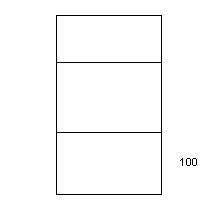
Like the black hole or the Bermuda triangle what the first printf displays, is a mystery.
Then we have:
strcpy(a,"ABC");
strcpy is the string copy statement. When you see this statement, you should quickly know:
strcpy( destination, source)
Thus the string ABC is put into array a. Pictorially:
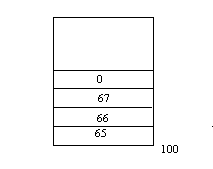 The last printf displays:ABC
Now we move one step ahead. We say:
struct zzz
{
int i,j,k;
}
main()
{
struct zzz a;
struct zzz b;
struct zzz *c;
a.i=1; a.j=2;
printf("%p..%d..%d\n",&a,a.i,a.j);
b.i=10; b.j=20;
printf("%p..%d..%d\n",&b,b.i,b.j);
printf("%d\n",sizeof(c));
c=&a;
printf("%p\n",c);
printf("%d\n",c->i);
c->j=3;
printf("%d\n",a.j);
c=&b;
printf("%p\n",c);
printf("%d\n",c->i);
c->j=4;
printf("%d\n",b.j);
}
The order of statements in which this program is explained has been changed, for better understanding.
Do you notice any change? For the first time we have written zzz, next to the word struct. (if you don't know we are talking about, flip back to check the way we defined structures). This is a big change because this is now called a structure tag. It is like a label. How much memory do you think gets allocated for this tag? Zero! Zilch!! Why? Because, we are only giving basic information about the structure, nothing else.
Then we say:
struct zzz a;
In simple English this means, a is a structure that looks like zzz. What is zzz? It is a structure tag that we just created. Now we can safely say:
a.i=1; a.j=2;
a is a structure that looks like zzz. It has 3 members i, j, k. Thus when we say:
printf("%p..%d..%d\n",&a,a.i,a.j);
we get:
1BE9:0FD6..1..2
Along the same lines, we have:
struct zzz b
Then when we say:
b.i=10; b.j=20;
printf("%p..%d..%d\n",&b,b.i,b.j);
The output is:
1BE9:0FD0..10..20
Thus a and b are structures that look like zzz. In other words whatever zzz stands for, now a and b stand for the same.
zzz stands for 3 int's i,j,k. Hence a and b also have 3 members, i, j,k all int's.
Now an interesting statement:
struct zzz *c;
say this in chorus: c is a pointer to a structure that looks like zzz. Pointers to anything are of size 4. Thus if we now say:
printf("%d\n",sizeof(c));
we see: 4
A snapshot of memory at this stage will look like this:
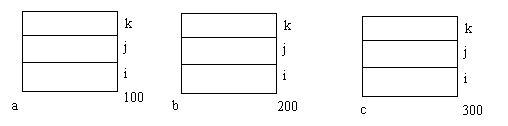
When you say c is a pointer to a structure that looks like zzz, it is your job to initialize the pointer. Pointers have to be by the programmer. So in the statement:
c=&a;
printf("%p\n",c);
this is what happens:
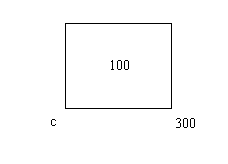
What begins at 100? A structure that looks like zzz (a). The next printf displays the location to which c points ( i.e. address of a).
You should have one thing very clear:
a is a structure that looks like zzz.
b is a structure that looks like zzz.
c is a pointer to a structure that looks like zzz.
Which structure c points to, is not specified. It is our responsibility as programmers to initialize this. It is like, when we say:
int *i;
We are not saying int i point to what? Here also, we have to initialize the pointer.
Next we see:
printf("%d\n",c->i);
Now, for the umpteenth time, we know that c is a pointer to a structure that looks like zzz, a is a is a structure that looks like zzz. When you have a name of a structure (a), according to the syntax of C we use a dot (.) to separate the structure name and its member. When you have a pointer to a structure (c), we have to use a -> sign to separate the structure name and its member.
Thus the above printf displays: 1. How? Remember we had made the value of a.i =1, and since c points to a, c->i is also 1.
Similarly when we say:
c->j=3;
printf("%d\n",a.j);
we are now making the second member of the structure to which p points equal to 3.
Hence we see: 3.
Then we have:
c=&b;
printf("%p\n",c);
this printf will display the address of b, because c now points to b. Hence when we say:
printf("%d\n",c->i);
this printf displays 10. Why? Because we had said: b.i=10. Now if we say:
c->j=4;
we are now making the second member of the structure to which p points equal to 4. Consequently when we say:
printf("%d\n",b.j);
it displays: 4.
Final output:
1BE9:0FD6..1..2 (100 .. 1.. 2) 1BE9:0FD0..10..20 (200 .. 10 .. 20) 4 1BE9:0FD6 (100) 1 3 1BE9:0FD0 (200) 10 4
struct zzz
{
char a[100];
struct zzz *b;
}
main()
{
struct zzz a;
printf("%d\n",sizeof(a));
}
This is a program to confuse you, and thereby make you understand. When we create a structure zzz, it has an array 100 large and a pointer to a structure that looks like zzz, which is an array 100 large and a pointer to an area of memory that is 104 bytes large which is made up of an array a[100] and a pointer to another area of memory which is an array 100 large and a pointer.
What?????? Are you all lost?? "Cut through this maze and tell me what does the printf display?" It displays:
104
This next program is another bigge. This program is a fitting culmination of the last few programs that we have understood by us. This program is the linked list program. Hold on to your seats.. here we go:
We first define a structure tag zzz that looks like this:
struct zzz
{
char a[100];
struct zzz *b;
};
Since this is a structure tag, no memory gets allocated. Then we say:
struct zzz *root, *new, *prev;
This means that root, new, prev are variables (pointers) that point to structures that look like zzz. Since these are global variables, all 3 are initialized to zero.
We have: char z[100];
Thus, z is an array that is 100 large. Then we have:
main()
{
gets(z);
while (strcmp (z,"QUIT"))
gets(z) is used to accept input from the user. Whatever the user types is stored into the array z. Then we have:
while (strcmp (z,"QUIT"))
When the user types QUIT strcmp becomes true and we exit out of the while loop. Till such time all the input from the user is stored into the array z and the while loop is executed. Within the while loop we have:
while (strcmp (z,"QUIT"))
{
abc();
gets(z);
}
pqr();
}
Thus, till the time the user types QUIT, the while loop is executed, meaning the function abc() is called. Within the loop also we have gets(z) which allows the user to keep typing characters (until such time as QUIT is typed).
When he user types QUIT, function pqr() is called. Now its time to peep into the functions:
abc()
{
if(root==0)
{
root = malloc(104);
strcpy(root->a,z);
root->b=0;
prev=root;
}
else
{
new = malloc(104);
strcpy(new->a,z);
new->b=0;
prev->b=new;
prev=new;
}
}
If the user types 10 words before typing QUIT, abc() gets called10 times. Within abc() we have:
if(root==0)
root is a global variable. Hence the first time abc() is called, we know for sure that root is definitely zero. Hence the if statement becomes true and we have:
root = malloc(104);
Thus malloc allocates 104 memory locations starting from 100 (assumption) . root now has the value 100. root now points to location 100. Since root points to a structure that looks like zzz, root gets the members of zzz. Thus, we have:
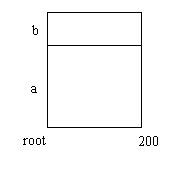
Then we say:
strcpy(root->a,z);
This means that we are copying the contents of the array z into locations starting from100. Thus, if the user typed Hello, it would be stored as:
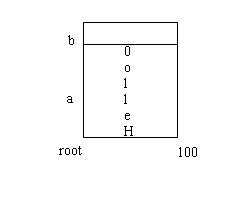
Then we say:
root->b=0;
Thus:
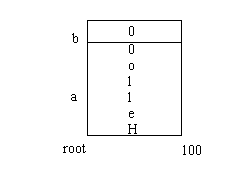
Next, suppose the user types Bad. At this point root is not 0, it is 100. Thus the if statement is false, the else will get executed. Here we have:
new = malloc(104);
malloc allocates 104 memory locations starting from 300 (assumption). Thus new points to the start of these 104 locations, i.e. 300. Now we have:
strcpy(new->a,z);
Thus Bad is now stored into the first member location of new. Pictorially:
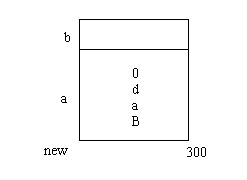
Like before we say:
new->b=0;
Thus we have:
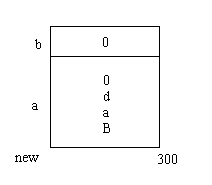
We now realize that the words Hello and Bad get stored in two separate areas of memory. What if we wanted to link these two separate areas of memory. How could that be done? Time for some jugglery: In the if statement we say:
prev=root;
This means prev now has the value 100. prev is a pointer. Thus by saying this we have now made prev (and root) point to location 100. Thus:
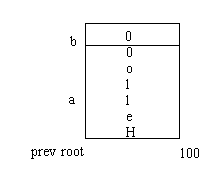
In the else part of the code we include:
prev->b=new;
What have we accomplished by doing this? Look at the above statement carefully. prev is 100. Thus we are saying:
100->b=new;
new is 300. Thus:
100->b=300;
Diagrammatically:
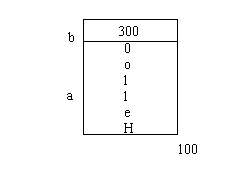
Then we say:
prev=new;
Now we have ensured that prev points to 300. Why? Read on ...
Next suppose the user typed Good. root is 100, hence the else part of the code is executed. Here again 104 locations are allocated by malloc(). new points to the start of these locations (say 500). Due to the statement:
strcpy(new->a,z);
new->b=0;
Good gets stored as follows:
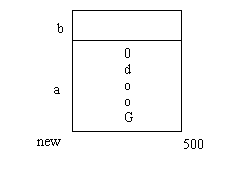
Then again we say:
new->b=0;
Thus:
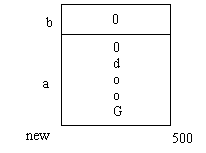
prev->b=new;
This is equivalent to saying:
300->b=500;
300 is the address of the last word the user typed.
Is not apparent that by putting the address of the place where the last word is stored, we have been able to successfully line the separate areas of memory. Thus, finally:
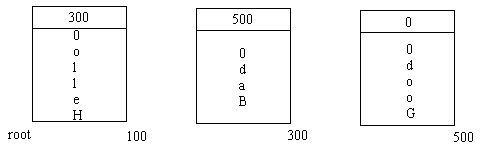
Are we forgetting something? Yes! What about the function pqr()? It looks like this:
pqr()
{
while (root!=0)
{
printf("%s\n",root->a);
root=root->b;
}
}
When is pqr() called? When the user types QUIT and we exit out of the while loop of main(). Thus when C enters pqr() the value of root, in our case will be 100. Thus the while loop is executed. Within the while loop we have:
printf("%s\n",root->a);
root=root->b;
This printf displays the contents of location root->a, i.e. 100->a, i.e. Hello. Next we say:
root=root->b;
Thus the value of root now becomes 200. This is not equal to zero. Hence the while loop is executed again. Then Bye gets displayed and root gets the value 500. This causes Good to be displayed. Now the value of root->b, i.e. 500->b is 0. We exit out of the while loop and the output is:
Hello (this is what the user types) Bad Good QUIT (this marks the end of input from the user) Hello (the output) Bad Good
The complete program:
#include <malloc.h>
struct zzz
{
char a[100];
struct zzz *b;
};
struct zzz *root, *new, *prev;
char z[100];
main()
{
gets(z);
while (strcmp (z,"QUIT"))
{
abc();
gets(z);
}
pqr();
}
abc()
{
if(root==0)
{
root = malloc(104);
strcpy(root->a,z);
root->b=0;
prev=root;
}
else
{
new = malloc(104);
strcpy(new->a,z);
new->b=0;
prev->b=new;
prev=new;
}
}
pqr()
{
while (root!=0)
{
printf("%s\n",root->a);
root=root->b;
}
}
Another program:
main()
{
printf("%d\n",GUJJU);
}
This will give us an error because C do not know what GUJJU is. Hence we now say:
#define GUJJU 420
main()
{
printf("%d\n",GUJJU);
}
Now, when sees GUJJU, it does a find and replaces GUJJU with 420.
Check this program out:
main()
{
int i,j char a[100];
i=10; j=20;
printf("%d..%d\n",i,j);
sprintf(a,"%d..%d\n",i,j);
printf("%s\n",a);
}
The first printf will display: 10..20 like it has done so often. Then we say:
sprintf(a,"%d..%d\n",i,j);
sprintf is a function that is used to write into an array. Thus, if Mr. Printf one day went on leave and you wanted to display something to the user, sprintf could come extremely handy. First we would write into an array and then using some other means display the output.
Output
10..20
10..20
#include <stdio.h>
main()
{
FILE *fp;
int i,j;
i=10; j=20;
printf("%d..%d\n",i,j);
fp=fopen("z.c","w");
fprintf(fp,"%d..%d\n",i,j);
}
The only statement that is worth commenting here is:
fprintf(fp,"%d..%d\n",i,j);
fprintf is a function that writes to a file. In our case it writes to file z.c. Thus the output of this program will be:
10..20
and also the file z.c will contain: 10..20