
4. The Other Tables
This chapter goes
on to delineate the remaining tables that have not been touched upon and
elucidated in the previous chapter. For this purpose, separate programs have
been created to explicate each of the disparate tables. Finally, in the last
chapter of the book they have all been put in a single program, wherein each
one of them has been cross-referenced.
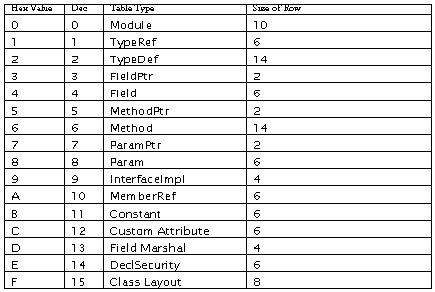
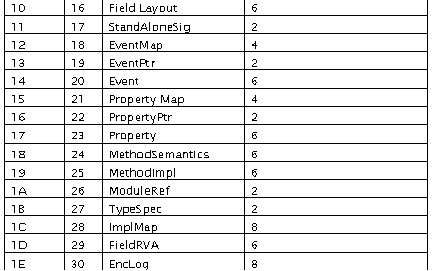
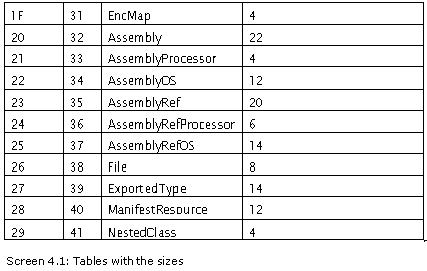
The first program
in this chapter explores the Fields table. Enter the following code in the file
b.cs and then compile it.
Fields
b.cs
public class zzz
{
public int i = 10;
protected internal string vijay = "hi";
public static void Main()
{
}
}
namespace nnn
{
public class yyy
{
protected long k = 100;
}
}
a.cs
using System.Reflection;
using System;
using System.IO;
using System.Configuration.Assemblies;
public class zzz
{
public void DisplayGuid(int st)
{
Console.Write("{");
Console.Write("{0}{1}{2}{3}", guid[st+2].ToString("X") , guid[st+1].ToString("X") , guid[st].ToString("X") ,
guid[st-1].ToString("X"));
Console.Write("-{0}{1}-",guid[st+3].ToString("X") , guid[st+4].ToString("X"));
Console.Write("{0}{1}-",guid[st+6].ToString("X") , guid[st+5].ToString("X"));
Console.Write("{0}{1}-",guid[st+7].ToString("X") , guid[st+8].ToString("X"));
Console.Write("{0}{1}{2}{3}{4}{5}",guid[st+9].ToString("X"),
guid[st+10].ToString("X"),guid[st+11].ToString("X"),
guid[st+12].ToString("X"),guid[st+13].ToString("X"),
guid[st+14].ToString("X"));
Console.Write("}");
}
public string GetString(int starting)
{
int i = starting;
while (strings[i] != 0 )
{
i++;
}
System.Text.Encoding e = System.Text.Encoding.UTF8;
string s = e.GetString(strings, starting , i - starting );
return s;
}
public static void Main ()
{
zzz a = new zzz();
a.abc();
}
string [] tablenames=new String[]{"Module" , "TypeRef" , "TypeDef" ,"FieldPtr","Field", "MethodPtr","Method","ParamPtr" , "Param", "InterfaceImpl", "MemberRef", "Constant", "CustomAttribute", "FieldMarshal", "DeclSecurity", "ClassLayout", "FieldLayout", "StandAloneSig" , "EventMap","EventPtr", "Event", "PropertyMap", "PropertyPtr", "Properties","MethodSemantics",
"MethodImpl","ModuleRef","TypeSpec","ImplMap","Field
RVA","ENCLog","ENCMap","Assembly","AssemblyProcessor",
"AssemblyOS","AssemblyRef","AssemblyRefProcessor",
"AssemblyRefOS","File","ExportedType","ManifestResource",
"NestedClass","TypeTyPar","MethodTyPar"};
int tableoffset ;
int [] rows;
int [] offset;
int [] ssize ;
byte [] metadata;
byte [] strings;
byte [] us;
byte [] guid;
byte [] blob;
long valid ;
byte [][] names;
long sm;
public void abc()
{
long startofmetadata;
FileStream s = new FileStream("C:\\mdata\\b.exe",FileMode.Open);
BinaryReader r = new BinaryReader (s);
s.Seek(360, SeekOrigin.Begin);
int rva,size;
rva = r.ReadInt32();
size = r.ReadInt32();
int where = rva%0x2000 + 512;
s.Seek(where + 4 + 4, SeekOrigin.Begin);
rva = r.ReadInt32();
where = rva%0x2000 + 512;
s.Seek(where, SeekOrigin.Begin);
startofmetadata = s.Position;
sm=startofmetadata ;
s.Seek(4 + 2 + 2 + 4 + 4 + 12 + 2, SeekOrigin.Current);
int streams = r.ReadInt16();
offset = new int[5];
ssize = new int[5];
names = new byte[5][];
names[0] = new byte[10];
names[1] = new byte[10];
names[2] = new byte[10];
names[3] = new byte[10];
names[4] = new byte[10];
int i = 0; int j ;
for ( i = 0 ; i < streams ; i++)
{
offset[i] = r.ReadInt32();
ssize[i] = r.ReadInt32();
j = 0;
byte bb ;
while ( true )
{
bb = r.ReadByte();
if ( bb == 0)
break;
names[i][j] = bb;
j++;
}
names[i][j] = bb;
while ( true )
{
if ( s.Position % 4 == 0 )
break;
byte b = r.ReadByte();
if ( b != 0)
{
s.Seek(-1, SeekOrigin.Current);
break;
}
}
}
for ( i = 0 ; i < streams ; i++)
{
if ( names[i][1] == '~' )
{
metadata = new byte[ssize[i]];
s.Seek(startofmetadata + offset[i] , SeekOrigin.Begin);
for ( int k = 0 ; k < ssize[i] ; k ++)
metadata[k] = r.ReadByte();
}
if ( names[i][1] == 'S' )
{
strings = new byte[ssize[i]];
s.Seek(startofmetadata + offset[i] , SeekOrigin.Begin);
for ( int k = 0 ; k < ssize[i] ; k ++)
strings[k] = r.ReadByte();
}
if ( names[i][1] == 'U' )
{
us = new byte[ssize[i]];
s.Seek(startofmetadata + offset[i] , SeekOrigin.Begin);
for ( int k = 0 ; k < ssize[i] ; k ++)
us[k] = r.ReadByte();
}
if ( names[i][1] == 'G' )
{
guid = new byte[ssize[i]];
s.Seek(startofmetadata + offset[i] , SeekOrigin.Begin);
for ( int k = 0 ; k < ssize[i] ; k ++)
guid[k] = r.ReadByte();
}
if ( names[i][1] == 'B' )
{
blob = new byte[ssize[i]];
s.Seek(startofmetadata + offset[i] , SeekOrigin.Begin);
for ( int k = 0 ; k < ssize[i] ; k ++)
blob[k] = r.ReadByte();
}
}
valid = BitConverter.ToInt64(metadata, 8);
tableoffset = 24;
rows = new int[64];
Array.Clear (rows, 0, rows.Length);
int cnt = 0;
for ( int k = 0 ; k <= 63 ; k++)
{
int tablepresent = (int)(valid >> k ) & 1;
if ( tablepresent == 1)
{
cnt = cnt+1;
rows[k] = BitConverter.ToInt32(metadata , tableoffset);
Console.WriteLine ("Table {0} present at ind {1} - {2}, Rows in table {3}",cnt,k,tablenames[k],rows[k]);
tableoffset += 4;
}
}
xyz();
}
public bool tablepresent(byte i)
{
int p = (int)(valid >> i) & 1;
byte [] sizes = {10,6,14,2,6,2,14,2,6,4,6,6,6,4,6,8,6,2,4,2,6,4,2,6,6,6,2,2,8,6,8,4,22,4,12,20,6,14,8,14,12,4};
for ( int j = 0 ; j < i ; j++)
{
int o = sizes[j] * rows[j];
tableoffset = tableoffset + o;
}
if ( p == 1)
return true;
else
return false;
}
public void xyz()
{
int new1 = tableoffset;
bool b = tablepresent(4);
int offs = tableoffset;
tableoffset=new1;
if ( b )
{
Console.WriteLine("");
Console.WriteLine("Field Details");
for ( int k = 1 ; k <= rows[4] ; k++)
{
FieldAttributes flags = (FieldAttributes )BitConverter.ToInt16 (metadata, offs);
offs += 2;
int name = BitConverter.ToInt16 (metadata, offs);
offs += 2;
int sig = BitConverter.ToInt16 (metadata, offs);
offs += 2;
Console.WriteLine("Row {0}",k );
Console.WriteLine("Flags: {0}", flags);
Console.WriteLine("Name : {0}", GetString(name));
int count = blob[sig];
Console.Write("Signature [{0}]:Count={1} ", sig , count);
if ( blob[sig+1] == 0x06)
{
Console.Write("Type {0}" , GetType(blob[sig+2]));
}
Console.WriteLine();
}
}
}
public string GetType(int b)
{
if ( b == 0x01)
return "void";
if ( b == 0x02)
return "boolean";
if ( b == 0x03)
return "char";
if ( b == 0x04)
return "byte";
if ( b == 0x05)
return "ubyte";
if ( b == 0x06)
return "short";
if ( b == 0x07)
return "ushort";
if ( b == 0x08)
return "int";
if ( b == 0x09)
return "uint";
if ( b == 0x0a)
return "long";
if ( b == 0x0b)
return "ulong";
if ( b == 0x0c)
return "float";
if ( b == 0x0d)
return "double";
if ( b == 0x0e)
return "string";
return "unknown";
}
}
Output
Table 1 present at ind 0 - Module, Rows in table 1
Table 2 present at ind 1 - TypeRef, Rows in table 2
Table 3 present at ind 2 - TypeDef, Rows in table 3
Table 4 present at ind 4 - Field, Rows in table 3
Table 5 present at ind 6 - Method, Rows in table 3
Table 6 present at ind 10 - MemberRef, Rows in table 2
Table 7 present at ind 12 - CustomAttribute, Rows in table 1
Table 8 present at ind 32 - Assembly, Rows in table 1
Table 9 present at ind 35 - AssemblyRef, Rows in table 1
Field Details
Row 1
Flags: Public
Name : i
Signature [10]:Count=2 Type int
Row 2
Flags: FamORAssem
Name : vijay
Signature [13]:Count=2 Type string
Row 3
Flags: Family
Name : k
Signature [24]:Count=2 Type long
An instance variable is also known as a field. The Field table holds an index of 4 in the valid table. The output shows a count of 3 rows, since the file contains 3 fields spread over 2 classes named zzz and yyy.
The Field table comprises of the following columns:

The first column
in the Field table is the FieldAttributes flags. The enum of FieldAttributes displays
the string assigned to the number. The second column in the table refers to the
name of the field. It is an index to the data contained in the strings stream.
The output clearly displays the fact that the fields i and vijay of class zzz
are placed earlier, suffixed with the field k from the class yyy in the
namespace nnn. This sequence is of utmost significance, as shall be
demonstrated by us shortly.
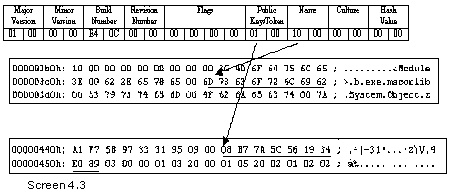
The last field is
an index into the Blob heap. It starts with a count byte of 2, thereby indicating
that the field signature has a size of 2 bytes. The first byte in the signature
of a method establishes the calling convention. Similarly, the first byte in
the signature is always 0x06, thereby indicating that it is a field signature.
This primarily serves as a sanity check.
This value is
followed by the signature byte. It refers to the type of the field. To
ascertain its value, we have introduced the function GetType, which returns the
data type. As a consequence of this function, the output appropriately reflects
the data type of the fields. Section 22.1.15 describes the bits representation
of each type. We have saved up the explanation of the especially complicated
ones for a rainy day.
Let us revert to
the flags byte. The 'protected' accessibility modifier, which allows access
only to derived classes, is known as 'Family' in the IL world. The 'internal'
access modifier, which restricts access to the same assembly, is christened as
'Assembly' in the IL word.
Life surely would
have been significantly more cushy if C# had also resorted to terminology
similar to that of IL.
Had we called off
our explanation at this juncture, it would have become impossible for us to
expose you to the cross-linkages between the tables. So, we have augmented the
program with the requisite code essential for the Typedef details.
After calling the
xyz function, call the aaa function also, as in xyz(); aaa();
Place the
following code prior to the GetType function.
a.cs
public void aaa()
{
int new1 = tableoffset;
bool b = tablepresent(2);
int offs = tableoffset;
tableoffset = new1;
if ( b )
{
Console.WriteLine("TypeDef Details");
for ( int k = 1 ; k <= rows[2] ; k++)
{
TypeAttributes flags = (TypeAttributes)BitConverter.ToInt32 (metadata, offs);
offs += 4;
int name = BitConverter.ToInt16 (metadata, offs);
offs += 2;
int nspace = BitConverter.ToInt16 (metadata, offs);
offs += 2;
int cindex = BitConverter.ToInt16 (metadata, offs);
offs += 2;
int findex = BitConverter.ToInt16 (metadata, offs);
offs += 2;
int mindex = BitConverter.ToInt16 (metadata, offs);
offs += 2;
Console.WriteLine("Row:{0}" , k);
Console.WriteLine("Flags : {0}" , flags);
Console.WriteLine("Name : {0}" , GetString(name));
Console.WriteLine("NameSpace : {0}" , GetString(nspace));
Console.Write("Extends:");
int u = cindex & 3;
if (u == 0)
Console.Write("TypeDef");
if (u == 1)
Console.Write("TypeRef");
if (u == 2)
Console.Write("TypeSpec");
Console.Write("[{0}]", cindex >> 2);
Console.WriteLine();
Console.WriteLine("FieldList Field[{0}]", findex);
Console.WriteLine("MethodList Method[{0}]", mindex);
}
}
}
Output
TypeDef Details
Row:1
Flags : Class
Name : <Module>
NameSpace :
Extends:TypeDef[0]
FieldList Field[1]
MethodList Method[1]
Row:2
Flags : AutoLayout, AnsiClass, NotPublic, Public, BeforeFieldInit
Name : zzz
NameSpace :
Extends:TypeRef[1]
FieldList Field[1]
MethodList Method[1]
Row:3
Flags : AutoLayout, AnsiClass, NotPublic, Public, BeforeFieldInit
Name : yyy
NameSpace : nnn
Extends:TypeRef[1]
FieldList Field[3]
MethodList Method[3]
The output of the
above program now exhibits the data contained in the TypeDef table, wherein, 3
rows of the table are displayed. Each row of the Field table is owned by one
row in the TypeDef table. This is so because the TypeDef table defines a class
and the fields belong to a class.
There is no
indication as to which Type or class owns the field in the Field table. To
determine these linkages, the TypeDef table is examined. The first row
represents the global or pseudo class, which can be ignored for the moment. The
second row represents the zzz class. The FieldList column in this row points to
the first row of the Fields table.
Since the first
row in the Fields table represents the variable i, it is logical to conclude
that the variable i belongs to the zzz class.
The third row of
the TypeDef table represents the class yyy in the namespace nnn. The value for
the FieldList field points to the third row of the Field table. Thus, we can
safely presume that the first two rows are owned by the class zzz, whereas,
from the third row onwards, the fields belong to the class yyy. A row in the
Field table can be owned by only one class from the TypeDef table.
This forward
pointer method helps in determining the owner of the Field table. Employing
this approach, the Fields in a class can be established by reading the
FieldList column in the row. All rows in the Fields table belong to one type,
until we reach the value given in the FieldList column of the next row. A point
to be noted here is that, there can be zero or multiple rows in the Field
table. The type encompasses all of them.
This behaviour is
akin to a parent-child or one-many relationship wherein, a parent type can have
multiple children fields, whereas, a child field can possess only one parent
type.
If there exist
two instance variables of fields with the same name, but located in different
classes, it results in the creation of two separate rows in the Field table,
each owned by a different TypeDef row. The same rule is applicable to methods
also.
Method Table
Row 1
Name : Main
Row 2
Name : .ctor
Row 3
Name : .ctor
We have displayed
only the method names of every row in the method table, since our primary focus
at present is on the Field table. Since there are two classes in the file, two
constructors are visible. Hence, the method name of .ctor is also displayed
twice.
Both the rows 2
and 3 represent a constructor. So, how do we ascertain as to which class each
constructor belongs to? Bear in mind that while espying the type that lodges
the constructors, you should always begin with the TypeDef table, and not with
either the Field table or the Method table. This approach is at variance with
the one pursued for the MethodRef table, which has a TypeRef field that reveals
the class namespace data.
The type zzz uses
a field named MethodList, which has an index value of 1. The second class i.e.
yyy has the MethodList with a value of 3. Thus, the first two rows of the
Method table belong to the class zzz, while the third row forms a part of the
class yyy.
Constant Table
b.cs
public class zzz
{
const int i1 = 20;
const string vijay = "hi";
public static void Main()
{
}
}
a.cs
public void xyz()
{
int new1=tableoffset;
bool b = tablepresent(11);
int offs = tableoffset;
tableoffset = new1;
if ( b )
{
for ( int k = 1 ; k <= rows[11] ; k++)
{
byte dtype = metadata[offs];
offs += 2;
int parent = BitConverter.ToInt16 (metadata, offs);
offs += 2;
int value = BitConverter.ToInt16 (metadata, offs);
offs += 2;
Console.WriteLine("Row {0}" , k);
Console.WriteLine("Type {0}" , GetType(dtype));
int tag = parent& 0x03;
int rid = (int) ((uint) parent >> 2);
Console.Write("Parent: ");
if ( tag == 0)
Console.Write("FieldDef");
if ( tag == 1)
Console.Write("ParamDef");
if ( tag == 2)
Console.Write("Property");
Console.WriteLine("[{0}]",rid);
int count = blob[value];
Console.WriteLine("Value Blob[{0}] Count {1}",value , count );
for ( int l = 1 ; l <= count ; l++)
{
Console.Write("{0} " , blob[value+l].ToString("X"));
}
Console.WriteLine();
}
}
}
Output
Row 1
Type int
Parent: FieldDef[1]
Value Blob[13] Count 4
14 0 0 0
Row 2
Type string
Parent: FieldDef[2]
Value Blob[21] Count 4
68 0 69 0
Field Details
Row 1
Flags: -32687
Name : i1
Signature [10]:Count=2 Type int
Row 2
Flags: -32687
Name : vijay
Signature [18]:Count=2 Type string
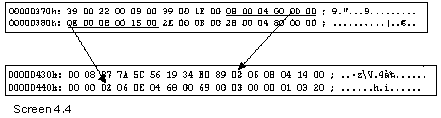
The Constant
table has the following columns:

The constant
table is at the 11th position in the valid fields, and as its name indicates,
it stores the constants that are created in the module.
A constant is
also a field; therefore, a corresponding entry gets appended to the Field
table. The tables, fields and constants have been displayed, to enable you to
refer to them.
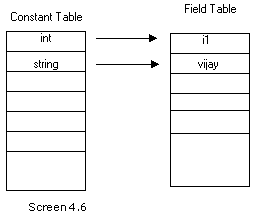
The first field
in the table refers to the data type of constant. It is a single byte;
therefore, the next byte, which contains a value of zero, is used as a padding
byte. The trusted GetType function is used to display the type as a readable
string.
The next field
parent is a HasConst coded index, where the first two bits encode a table and
can either be a Field, or a Param or a Property table.
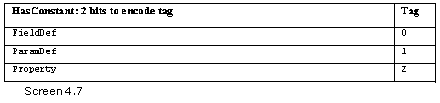
The residual six
bits store the index. In this case, both the constants are an index to the
Field Table.
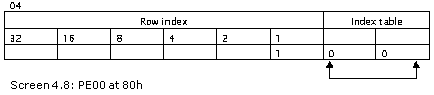
The Field table
stores the name and the signature. The signature field in the Field table
provides the same information as does the type. However, the flags field
displays a number and not a string. Thus, the name and the flags of the
constant emanate from the Field table.
The last field
stores the actual value assigned to the constant. The first byte in this field
is the length. If it is an integer, the next four bytes are picked up; however,
if it is a string, the length of the string in Unicode is utilized, and not
ASCII. The Blob heap is used by the compiler to store the value of the
constant.
It is for this
very reason that the constants need to be determined at compile time, and not
at run time.
Nested Classes
b.cs
public class zzz
{
class yyy
{
public int j,k;
class xxx
{
public int i;
}
}
public static void Main()
{
}
}
a.cs
public void xyz()
{
int new1=tableoffset;
bool b = tablepresent(41);
int offs = tableoffset;
tableoffset = new1;
if ( b )
{
for ( int k = 1 ; k <= rows[41] ; k++)
{
int nestedclass= BitConverter.ToInt16 (metadata, offs);
offs += 2;
int enclosingclass= BitConverter.ToInt16 (metadata, offs);
offs += 2;
Console.WriteLine("Row {0}",k);
Console.WriteLine("Nested Class TypeDef[{0}]" , nestedclass);
Console.WriteLine("Enclosing Class TypeDef[{0}]" , enclosingclass);
}
}
}
Output
Row 1
Nested Class TypeDef[3]
Enclosing Class TypeDef[2]
Row 2
Nested Class TypeDef[4]
Enclosing Class TypeDef[3]
TypeDef Details
Row:1
Flags : Class
Name : <Module>
NameSpace :
Extends:TypeDef[0]
FieldList Field[1]
MethodList Method[1]
Row:2
Flags : AutoLayout, AnsiClass, NotPublic, Public, BeforeFieldInit
Name : zzz
NameSpace :
Extends:TypeRef[1]
FieldList Field[1]
MethodList Method[1]
Row:3
Flags : AutoLayout, AnsiClass, NotPublic, NestedPrivate, BeforeFieldInit
Name : yyy
NameSpace :
Extends:TypeRef[1]
FieldList Field[1]
MethodList Method[3]
Row:4
Flags : AutoLayout, AnsiClass, NotPublic, NestedPrivate, BeforeFieldInit
Name : xxx
NameSpace :
Extends:TypeRef[1]
FieldList Field[3]
MethodList Method[4]
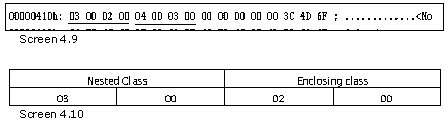
In the b.cs file,
the class zzz encloses the class yyy, which is perfectly legal in the C# world.
This concept of enclosing one class within another is termed as 'nesting
classes'. The class yyy in turn, contains a nested class named xxx. This too is
permissible.
For every nested
class, one row gets added to the table Nested Classes, which has an index
position of 41. In terms of size, this is the smallest of the tables
encountered so far. It contains only two indexes. Both these indexes point to
the TypeDef table, which in turn, defines a class.
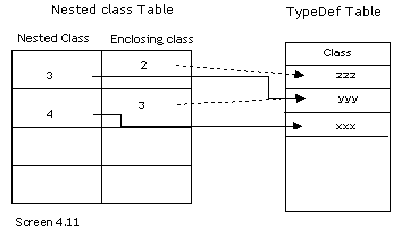
The TypeDef table
contains four rows. Thus, a total of four classes dwell within the file. Apart
from one pseudo class, there exist three more classes, which have obviously
been created in the file b.cs. Thus, in the TypeDef table, a nested class is a
class in its own right.
It is the flags
field in the TypeDef table that identifies the class as a nested one, since the
NestedPrivate bit is set ON. Further, the three classes are depicted as
extending from the class System.Object.
Reverting to the
Nested classes table, the first field in the table is the name of the nested
class. Therefore, row 1 refers to the third index into the TypeDef table of
class yyy and the second row points to the fourth row of class xxx.
The second field
in the table is the Enclosing field, which identifies the main class that
encloses the nested one. Since the class yyy is nested within the class zzz,
the field shows a value of 2, thereby referring to the second row in the
TypeDef table. The second class xxx is shown nested within the class yyy, or in
the third row.
Thus, the nested
classes table is simple to comprehend, as it only stores references to a class
and its enclosing class. Both of them index the TypeDef table.
A nested class is
defined as being lexically within the text of the enclosing class. However,
when no nested class exists in the program module, the nested classes table bit
is marked off, thus banishing all traces of the table and the fact that it ever
existed.
The two fields of
the nested classes must reference a valid row in the TypeDef table, or else it
is treated as an error. Furthermore, the Enclosing Class field cannot reference
a valid row in the TypeRef table, which shows the type references. Moreover, if
the Nested Class and Enclosing class share the same values, a warning is
emitted, but not an error.
No two rows can
possibly possess the same value for the nested class field. This is the case
only with the enclosing type, since multiple nested classes can be enclosed
within a single class. A single type may have innumerable nested classes within
it, but the inverse is not permitted.
Param Table
b.cs
public class zzz {
public static void Main()
{
}
public void abc()
{
}
public long pqr( int i , out byte z)
{
z = 10;
return 0;
}
public bool xyz( ref byte j , string k , long u)
{
return true;
}
}
a.cs
public void xyz()
{
int new1=tableoffset;
bool b = tablepresent(8);
int offs = tableoffset;
tableoffset= new1;
if ( b )
{
for ( int k = 1 ; k <= rows[8] ; k++)
{
short pattr = BitConverter.ToInt16 (metadata, offs);
offs += 2;
int sequence = BitConverter.ToInt16 (metadata, offs);
offs += 2;
int name = BitConverter.ToInt16 (metadata, offs);
offs += 2;
Console.WriteLine("Row {0}" , k);
Console.WriteLine("ParamAttributes {0} Bytes {1}" , GetParamAttributes(pattr) , pattr.ToString("X") );
Console.WriteLine("Sequence {0}" , sequence );
Console.WriteLine("Name {0}" , GetString(name));
}
}
}
public string GetParamAttributes(short a)
{
if ( a == 0x00)
return "None";
if ( (a & 0x01) == 0x01)
return "[In]";
if ( (a & 0x02) == 0x02)
return "[Out]";
if ( (a & 0x04) == 0x04)
return "[Optional]";
if ( (a & 0x1000) == 0x1000)
return "[Default]";
if ( (a & 0x2000) == 0x2000)
return "[Field Marshal]";
if ( (a & 0xcfe0) == 0xcfe0)
return "[Field Marshall]";
return "Unknown";
}
public void aaa()
{
int new1=tableoffset;
bool b = tablepresent(6);
int offs = tableoffset;
tableoffset=new1;
if ( b )
{
for ( int k = 1 ; k <= rows[6] ; k++)
{
int rva = BitConverter.ToInt32 (metadata, offs);
offs += 4;
MethodImplAttributes impflags = (MethodImplAttributes )BitConverter.ToInt16 (metadata, offs);
offs += 2;
int flags = (int)BitConverter.ToInt16 (metadata, offs);
offs += 2;
int name = BitConverter.ToInt16 (metadata, offs);
offs += 2;
int signature = BitConverter.ToInt16 (metadata, offs);
offs += 2;
int param = BitConverter.ToInt16 (metadata, offs);
offs += 2;
Console.WriteLine("Row {0}",k );
Console.WriteLine("RVA :{0}", rva.ToString("X"));
Console.WriteLine("Name : {0}", GetString(name));
Console.WriteLine("ImpFlags :{0}",impflags );
Console.WriteLine("Flags :{0}",flags.ToString("X"));
Type t = typeof( System.Reflection.MethodAttributes );
FieldInfo[] f = t.GetFields(BindingFlags.Public | BindingFlags.Static);
for ( int i = 0; i < f.Length; i++ )
{
int fv = (int)f[i].GetValue(null);
if ( (fv & flags) == fv)
Console.Write( "{0} " , f[i].Name );
}
Console.WriteLine();
Console.WriteLine("Signature: #Blob[{0}]",signature);
byte count = blob[signature];
Console.Write("Blob:{0} Count:{1} Bytes ", signature , count);
for ( int l = 1 ; l <= count ; l++)
{
Console.Write("{0} " , blob[signature+l].ToString("X"));
}
Console.WriteLine();
Console.WriteLine("ParamList: Param[{0}]",param);
Console.WriteLine();
}
}
}
Output
Row 1
ParamAttributes None Bytes 0
Sequence 1
Name i
Row 2
ParamAttributes [Out] Bytes 2
Sequence 2
Name z
Row 3
ParamAttributes None Bytes 0
Sequence 1
Name j
Row 4
ParamAttributes None Bytes 0
Sequence 2
Name k
Row 5
ParamAttributes None Bytes 0
Sequence 3
Name u
Row 1
RVA :2050
Name : Main
ImpFlags :Managed
Flags :96
PrivateScope FamANDAssem Family Public Static HideBySig ReuseSlot
Signature: #Blob[10]
Blob:10 Count:3 Bytes 0 0 1
ParamList: Param[1]
Row 2
RVA :2060
Name : abc
ImpFlags :Managed
Flags :86
PrivateScope FamANDAssem Family Public HideBySig ReuseSlot
Signature: #Blob[14]
Blob:14 Count:3 Bytes 20 0 1
ParamList: Param[1]
Row 3
RVA :2070
Name : pqr
ImpFlags :Managed
Flags :86
PrivateScope FamANDAssem Family Public HideBySig ReuseSlot
Signature: #Blob[18]
Blob:18 Count:6 Bytes 20 2 A 8 10 5
ParamList: Param[1]
Row 4
RVA :2088
Name : xyz
ImpFlags :Managed
Flags :86
PrivateScope FamANDAssem Family Public HideBySig ReuseSlot
Signature: #Blob[25]
Blob:25 Count:7 Bytes 20 3 2 10 5 E A
ParamList: Param[3]
Row 5
RVA :209C
Name : .ctor
ImpFlags :Managed
Flags :1886
PrivateScope FamANDAssem Family Public HideBySig ReuseSlot SpecialName RTSpecialName
Signature: #Blob[14]
Blob:14 Count:3 Bytes 20 0 1
ParamList: Param[6]
The file b.cs now
contains three functions, viz. abc with no parameters, pqr with two parameters
and xyz with three parameters. The parameters assigned to the methods get
stored in the Param Table, which has an index position of 8 in the valid field.
Since there are a total of 5 parameters, the Param table displays a count of 5
rows.

The Param table
has the following three fields:

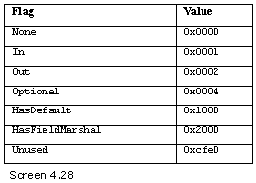
The first field of
FlagAttributes describes the attributes assigned to the function parameters.
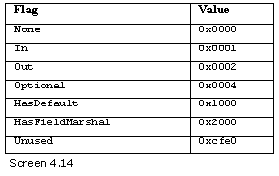
For this purpose,
a special function named GetParamAttributes is provided, whose sole task is to
return a string, depending upon the bit that is switched ON in the flag byte.
The second field
is a sequence number, while the third field is the name of the parameter.
Let us first take
a closer peek at the method table. The Rows 2 and 3 stand for the methods abc
and pqr, respectively. They both point to Row 1 of the ParamList. It appears
deceptive at this stage, since the method abc does not take any parameters,
while the method pqr takes two parameters. The constructor in Row 1 also takes
no parameters, and yet, it points to the first row in the parameter list.
However, as we
have learnt in the previous chapter, the second byte of the Blob heap must be
examined to determine the actual number of parameters that the function is
being passed. Neither the constructor nor the abc function takes any
parameters, since the value specified in the second byte is 0.
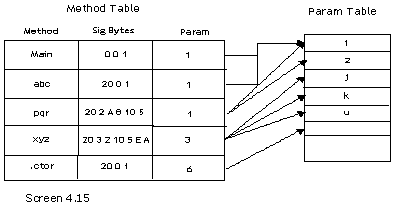
The pqr method
takes two parameters. Thus, in the Param Table, the parameters for the function
are present from the first row onwards. The sequence number identifies the
ordering of the parameters, which is why the first parameter i has a value of
1, the second parameter z has a value of 2, and so on.
The fourth row of
the method table represents the method xyz. The number of parameters in the
Blob heap is shown as 3, thereby referring to the third row in the Param table.
The third row in the Param table has the parameter named j with the sequence
number as 1. The next row for parameter k has a sequence number of 2.
The sequence
number thus provides the order or the sequence of the parameters. It starts
with 1, and thereafter, gets reset to 1 for every new method. The fitting
approach is that the method table's Blob field is read first, in order to
determine the number of parameters and its type. Then, depending upon the value
in the Params field, the appropriate row in the Params table is accessed. The
Params table provides the name of the parameter, its attribute and the order in
the param list. Thereafter, contingent on the number of parameters in the Blob
field, the next set of rows is picked up from the Params table.
The number of
parameters can be re-ascertained by examining the value in the sequence number.
For reasons unknown, the attribute bits are not set accurately.
The IN parameter
is the default in C#. The OUT parameter is employed when the calling function
is authorized to modify the value of the parameters. Ref is a variation in C#.
It is considered to be a variant of IN. Therefore, it does not display the
attribute of OUT. However, as per our interpretation, Ref is a variant of OUT.
You may blame this misconception on our lack of insight. Another possibility
could be that the C# compiler may be taking a break.
Conceptually,
every row in the method table owns one row in the param table, with the
singular exception of Row 1. A row cannot have two owners in the method table.
Thus, if there are two functions abc and pqr with one parameter, i.e. an int i,
there will be two identical rows in the param table. This is not considered
erroneous at all, since duplicate rows are acceptable.
The sequence
number can be zero, signifying the owner's methods return type. The sequence
numbers are arranged as per increasing sequence values. Resultantly, there will
be omissions in the sequence numbers, which is perfectly valid.
The parameters in
the .Net world cannot have default values. So, the HasDefault flag will always
be zero.
Properties
Table
b.cs
public class zzz
{
public int aa
{
set
{
}
get
{
return 10;
}
}
public string bb
{
set
{
}
get
{
return "hi";
}
}
public static void Main()
{
}
}
public class yyy
{
public byte cc
{
set
{
}
get
{
return 10;
}
}
}
a.cs
public void xyz()
{
int new1=tableoffset;
int old = tableoffset;
bool b = tablepresent(21);
int offs = tableoffset;
Console.WriteLine("Properties Map Table ");
if ( b )
{
for ( int k = 1 ; k <= rows[21] ; k++)
{
short parent = BitConverter.ToInt16 (metadata, offs);
offs += 2;
short propertylist = BitConverter.ToInt16 (metadata, offs);
offs += 2;
Console.WriteLine("Row {0}" , k);
Console.WriteLine("Parent TypeDef[{0}]" , parent);
Console.WriteLine("PropertyList Property[{0}]" , propertylist );
}
}
Console.WriteLine("Properties Table");
tableoffset = old;
b = tablepresent(23);
offs = tableoffset;
if ( b )
{
for ( int k = 1 ; k <= rows[23] ; k++)
{
PropertyAttributes flags = (PropertyAttributes )BitConverter.ToInt16 (metadata, offs);
offs += 2;
int name= BitConverter.ToInt16 (metadata, offs);
offs += 2;
int type = BitConverter.ToInt16 (metadata, offs);
offs += 2;
Console.WriteLine("Row {0}" , k);
Console.WriteLine("Flags [{0}]" , flags);
Console.WriteLine("Name {0}" , GetString(name));
int count = blob[type];
Console.Write("Type BLOB[{0}] Count={1} " , type , count);
for ( int l = 1 ; l <= count ; l++)
{
Console.Write("{0} " , blob[type+l].ToString("X"));
}
Console.WriteLine();
}
}
Console.WriteLine("MethodSematics Table");
tableoffset = old;
b = tablepresent(24);
offs = tableoffset;
if ( b )
{
for ( int k = 1 ; k <= rows[24] ; k++)
{
short methodsemanticsattributes = BitConverter.ToInt16 (metadata, offs);
offs += 2;
int methodindex = BitConverter.ToInt16 (metadata, offs);
offs += 2;
int association = BitConverter.ToInt16 (metadata, offs);
offs += 2;
Console.WriteLine("Row {0}" , k);
Console.WriteLine("Semantics {0} ", GetMethodSemantics(methodsemanticsattributes));
Console.WriteLine("Method Method[{0}]", methodindex );
int tag = association & 0x01;
Console.Write("Association ");
if ( tag == 0 )
Console.Write("Events");
if ( tag == 1 )
Console.Write("Properties");
int riid = association >> 1;
Console.WriteLine("[{0}]",riid);
}
}
tableoffset=new1;
}
public string GetMethodSemantics(short a)
{
string s = "";
if ( (a & 0x01) == 0x01)
s = s + "Setter";
if ( (a & 0x02) == 0x02)
s = s + "Getter";
if ( (a & 0x04) == 0x04)
s = s + "Other";
if ( (a & 0x08) == 0x08)
s = s + "Event Addon";
if ( (a & 0x10) == 0x10)
s = s + "Event Remove";
if ( (a & 0x20) == 0x20)
s = s + "Event Fire";
return s;
}
Output
Properties Map Table
Row 1
Parent TypeDef[2]
PropertyList Property[1]
Row 2
Parent TypeDef[3]
PropertyList Property[3]
Properties Table
Row 1
Flags [None]
Name aa
Type BLOB[36] Count=3 28 0 8
Row 2
Flags [None]
Name bb
Type BLOB[40] Count=3 28 0 E
Row 3
Flags [None]
Name cc
Type BLOB[53] Count=3 28 0 5
MethodSematics Table
Row 1
Semantics Getter
Method Method[2]
Association Properties[1]
Row 2
Semantics Setter
Method Method[1]
Association Properties[1]
Row 3
Semantics Getter
Method Method[4]
Association Properties[2]
Row 4
Semantics Setter
Method Method[3]
Association Properties[2]
Row 5
Semantics Getter
Method Method[8]
Association Properties[3]
Row 6
Semantics Setter
Method Method[7]
Association Properties[3]
As always, let us
commence with the b.cs file. In the class zzz, there exist two properties, viz.
aa and bb; while in the class yyy, there exists a single property named cc.
In a.cs, prior to
exhibiting the values in the Property table, we initially display the details
of the table Properties Map. This table is at the 21st position in the valid
table.
The value of the
tableoffset variable is also stored in the variable old, apart from new1.
The PropertyMap
table possesses the following two columns:
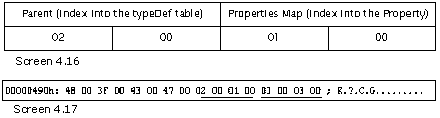
The first field
is called the parent, which is an index into the TypeDef table. Since there are
two classes that contain properties within them, two rows come into view. The
first row points to the second row in the TypeDef table zzz. The parent field
in the second row points to the third row in the TypeDef table yyy.
The second field
of the Properties Map table indexes into the Properties table. The table is
displayed below.
The Property (
0x17 ) table has the following columns:
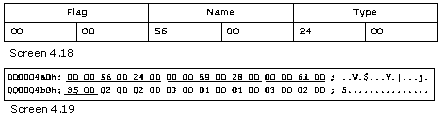
The Properties
Table is the 23rd bit in the valid field. The first field in this table is an
Enum of PropertyAttributes. The second is the name of the property. The third
field is a series of bytes in the Blob.
Let us revert to
the Properties Map table. The first row for the class zzz has an index value of
1 in the Properties table, whereas, the second row has the index value of 3.
Since the value is not 2, it means that the first two rows of the properties
table are owned by TypeDef[2], or the class zzz.
The properties
table includes one row for each property. Thus, one link is
TypeDef-PropertyMap-Property. Now, let us examine the rows in the Method Table.
Method Table
Row 1
Name : set_aa
Signature: #Blob[10]
Blob:10 Count:4 Bytes 20 1 1 8
ParamList: Param[1]
Row 2
Name : get_aa
Signature: #Blob[15]
Blob:15 Count:3 Bytes 20 0 8
ParamList: Param[2]
Row 3
Name : set_bb
Signature: #Blob[19]
Blob:19 Count:4 Bytes 20 1 1 E
ParamList: Param[2]
Row 4
Name : get_bb
Signature: #Blob[24]
Blob:24 Count:3 Bytes 20 0 E
ParamList: Param[3]
Row 5
Name : Main
Row 6
Name : .ctor
Row 7
Name : set_cc
Signature: #Blob[44]
Blob:44 Count:4 Bytes 20 1 1 5
ParamList: Param[3]
Row 8
Name : get_cc
Signature: #Blob[49]
Blob:49 Count:3 Bytes 20 0 5
ParamList: Param[4]
Row 9
Name : .ctor
Signature: #Blob[32]
Blob:32 Count:3 Bytes 20 0 1
ParamList: Param[4]
Param Table
Row 1
Name value
Row 2
Name value
Row 3
Name value
This table is
adorned with nine functions. Hey, wait a minute! We expected only three functions,
viz. a Main and a constructor each for the classes zzz and yyy. Now, the moment
of truth has dawned upon us. For each occurrence of a property called aa, two
methods get created: one called set_aa for the set accessor, and the other
known as get_aa, for the get accessor.
Since three
properties prevail within the file, a total of 6 functions get created; and in
the wake of it, 6 rows get added to the method table.
Although the C#
programming language is capable of comprehending properties, they subsist in
the form of functions in the IL world. Thus, all properties get transformed
into simple function calls. The set function or the set accessor is passed one
parameter, as the signature represents this introduction. This parameter named
'value' is the row 1 in the Param table.
The people who
designed the C# compiler chose to call the parameter by no other name but
'value'.
The set_aa
function is passed a parameter called 'value', with the type being set to the
type of the property, as indicated by the signature. The get accepts no
parameters, and even though the ParamList field makes a mention of an index in
the param table, it can safely be ignored. The signature of the method is to be
read first. The Param table owns only a single parameter called value, despite
the existence of three rows, one for each property.
So far so good,
but the link between the Properties table and the method table is conspicuous
by its absence. This relation is perceptible in a table called the
MethodSematics, which has a bit position of 24 in the valid field.
The
MethodSemantics table has the following columns:
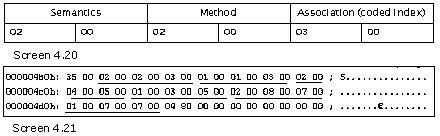
This table
commences with a two-byte attributes mask. We have created a function called
GetMethodSemantics, which checks if the bits are ON or not. The whole idea
behind creating functions is that they may be of utility in the future too.
In this function,
the coding is done using a slightly unusual technique. On most occasions, a
combination of bits may be ON. Till now, an inspection was being carried out in
order to verify if a specific bit was ON or not, and accordingly, a value was
returned. However, this approach proves ineffective if we aspire to establish
whether multiples bits are ON or not.
Innovation is the
order of the day! Accordingly, in the function, we keep adding or concatenating
to the string 's' in case the bit is ON. The final outcome is that the
attribute flag furnishes information as to whether it is a 'getter' or a
'setter' function. The possible values for this mask are stipulated below.
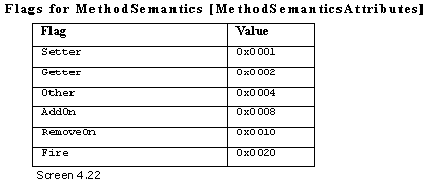
The second field in
the semantics table points to a row in the method table. Thus, the first row in
the MethodSematics table is a 'getter'. It refers to Row 2 in the method table,
which represents the function get_aa.
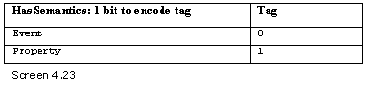
The last field
called 'association' is a link to the properties table. It wields a coded index
of 1 bit, thereby resulting in a value of 1. Since the first row of the
properties table is the property aa, it associates the getter flag with this
property.
Thus, the
deficient link between the method and the properties is established with the
help of the MethodSematics table. The field association is considerably more
complex and it deals with events as well. We shall inquire into it in a little
while from now.
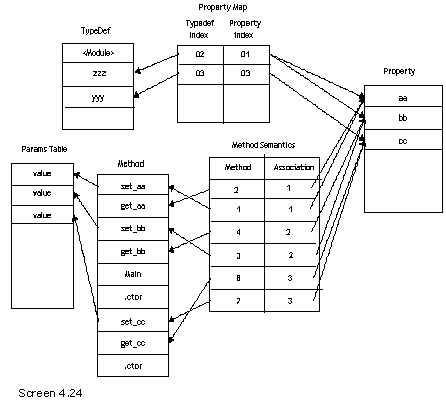
To sum up, the
PropertiesMap table talks about the classes in the typedef table, which own
properties in the Properties Table.
Thereafter, the
Methods table merely lists the methods that are created as an outcome of the
properties. It is the MethodSematics table that links up the Properties and the
Methods table, by pointing each of them to the function and the property.
FieldLayout
Table
b.cs
using System.Runtime.InteropServices;
[StructLayoutAttribute(LayoutKind.Explicit)]
public class zzz
{
[FieldOffset(2)] int i;
[FieldOffset(20)] long j;
public static void Main()
{
}
}
a.cs
public void xyz()
{
bool b = tablepresent(16);
int offs = tableoffset;
if ( b )
{
for ( int k = 1 ; k <= rows[16] ; k++)
{
int offset = BitConverter.ToInt32 (metadata, offs);
offs += 4;
int fieldindex = BitConverter.ToInt16 (metadata, offs);
offs += 2;
Console.WriteLine("Row {0}" , k);
Console.WriteLine("Offset:{0}" , offset);
Console.WriteLine("Field :Field[{0}]" , fieldindex );
}
}
}
Output
Row 1
Offset:2
Field :Field[1]
Row 2
Offset:20
Field :Field[2]
Field Table
Row 1
Name : i
Signature [10]:Count=2 Type int
Row 2
Name : j
Signature [13]:Count=2 Type long
In the normal
course, by default, memory locations are allocated to the fields present in a
class or structure by the runtime. Under specific circumstances, we are
required to determine these memory locations manually. To accomplish this, an
attribute named StructLayoutAttribute in the program, has to be prefixed to the
class name, which acquires the value of Explicit from an enum named
LayoutKind.
It is the
attribute FieldOffset that contains the offset and the field, which is the
ultimate authority that determines the layout. In b.cs, we have specified the
first field i to be laid out at a starting position of 2, in place of 0.
Further, we have also stipulated the fact that the second field, which normally
starts at the end of the first field, should start at offset 20 instead. The
FieldOffset attribute must be placed on each of the instance members.
On each occasion
that the fields are laid out manually, rows get supplemented to the FieldLayout
table. They have an index position of 16 in the valid table. The FieldLayout
table has the following columns:
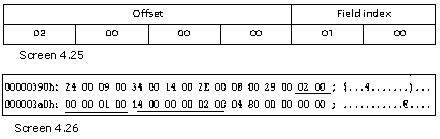
The first field
is an int, which stores the offset. The second field is an index into the Field
table. Thus, the first row points to the first field i in the Field table,
while the second row in the FieldLayout refers to the field j.
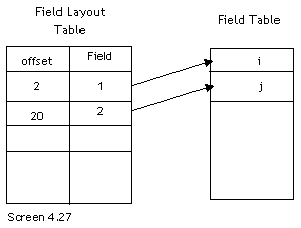
It is as
straightforward as this!
Events and
Delegates
b.cs
public class zzz
{
public static void Main()
{
}
}
public delegate void pqr(int p);
The above example
defines a delegate called pqr at the namespace level. A delegate is brought
into play to call methods unconventionally, in a type-safe manner. They go hand
in glove with Events. Let us scrutinize the assorted tables that are created.
TypeRef Table
Row[1]
Name :Object,0x20
Namespace :System,0x19
Row[2]
Name :MulticastDelegate,0x2B
Namespace :System,0x19
Row[3]
Name : IAsyncResult,0x53
Namespace :System,0x19
Row[4]
Name : AsyncCallback,0x60
Namespace :System,0x19
Row[5]
Name :DebuggableAttribute,0x97
Namespace :System.Diagnostics,0x84
The TypeRef table
reveals the fact that 5 types are being referred to in the assembly. The first
and the last types are invariably present. However, with the creation of a
delegate, all the three types, viz. MulticastDelegate, IAsyncResult and
AsyncCallback, which belong to the System namespace, get augmented. These
references have come about as a result of the code being introduced by the
delegate class.
TypeDef Table
Row:1
Flags : Class
Name : <Module>
Row:2
Flags : AutoLayout, AnsiClass, NotPublic, Public, BeforeFieldInit
Name : zzz
Row:3
Flags : AutoLayout, AnsiClass, NotPublic, Public, Sealed
Name : pqr
NameSpace :
Extends:TypeRef[2]
FieldList Field[1]
MethodList Method[3]
In the previous
chapter, we examined the rows in the TypeDef table. The pseudo and zzz types
are created, just as before. With the ushering in of the delegate, a new row
with the type name of pqr, gets supplemented to the table. This becomes a first
class type, to which the flag Sealed gets added, thereby preventing access to
all other classes to derive from it.
The Extends field
reveals the type that pqr is derived from. It points to the second row in the
TypeRef table, i.e. the class MulticastDelegate. Thus, it can be competently
established that a delegate class derives from the MulticastDelegate class.
Now, we take a
look at the Method table from the third row onwards, to unfurl the methods that
a delegate class introduces.
Methods Table
Row 1
Name : Main
Row 2
Name : .ctor
Row 3
Name : .ctor
ImpFlags :Runtime
PrivateScope FamANDAssem Family Public HideBySig ReuseSlot SpecialName RTSpecialName
Signature: #Blob[18]
Blob:18 Count:5 Bytes 20 2 1 1C 18
ParamList: Param[1]
Row 4
Name : Invoke
ImpFlags :Runtime
PrivateScope FamANDAssem Family Public Virtual HideBySig ReuseSlot
Signature: #Blob[24]
Blob:24 Count:4 Bytes 20 1 1 8
ParamList: Param[3]
Row 5
Name : BeginInvoke
ImpFlags :Runtime
PrivateScope FamANDAssem Family Public Virtual HideBySig VtableLayoutMask ReuseSlot NewSlot
Signature: #Blob[29]
Blob:29 Count:8 Bytes 20 3 12 D 8 12 11 1C
ParamList: Param[4]
Row 6
Name : EndInvoke
ImpFlags :Runtime
PrivateScope FamANDAssem Family Public Virtual HideBySig VtableLayoutMask ReuseSlot NewSlot
Signature: #Blob[38]
Blob:38 Count:5 Bytes 20 1 1 12 D
ParamList: Param[7]
Param Table
Row 1
Name object
Row 2
Name method
Row 3
Name p
Row 4
Name p
Row 5
Name callback
Row 6
Name object
Row 7
Name result
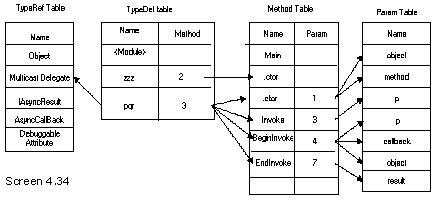
The third row in
the method table is a constructor. Since none of these functions have been
entered manually, the ImpFlags for all the four functions are Runtime. This is
the first occasion on which we have encountered this flag. We shall explicate
the other flags of Virtual and NewSlot a little later.
The signature of
the constructor reveals two parameters. On inspecting the params table, we
discover that the row 1 is a parameter called object, and the row 2 is a
parameter named method. In the same
vein, the second function of Invoke has one parameter called 'p'. The third
function in the delegate is BeginInvoke, which accepts three parameters i.e.
'p', callback and object. Finally, we come upon the EndInvoke function that
takes one parameter named result.
By now, it would
have become amply evident to you that reading metadata tables is becoming
progressively easier.
b.cs
using System;
public class zzz
{
public event EventHandler a;
public static void Main()
{
}
}
In the file b.cs,
the field 'a' is declared to be of type event. The EventHandler delegate is
present in the System namespace. Let us take a look at the rows inserted in the
metadata tables.
TypeRef Table
Row[1]
Name :Object,0x20
Row[2]
Name :EventHandler,0x2B
Namespace :System,0x19
Row[3]
Name :DebuggableAttribute,0x67
Row[4]
Name :Delegate,0x83
Namespace :System,0x19
There are two
extra type refs that get introduced at rows 2 and 4, viz. the EventHandler
delegate that the event uses, and the Delegate type. We shall revert to them in
no time.
The TypeDef table
contains the rows of the pseudo class and the zzz class. Hence, they have not
been displayed. An event, unlike a delegate, is basically treated as a field.
Therefore, a row gets added to the Field table.
Field Table
Row 1
Flags: Private
Name : a
Signature [10]:Count=3 Type unknown
However, the
signature assigned to the field is an obscure one. This is because we have not implemented
all the types, objects in particular.
Method Table
Row 1
Name : add_a
ImpFlags :Synchronized
Flags :886
PrivateScope FamANDAssem Family Public HideBySig ReuseSlot SpecialName
Signature: #Blob[14]
Blob:14 Count:5 Bytes 20 1 1 12 9
ParamList: Param[1]
Row 2
Name : remove_a
ImpFlags :Synchronized
Flags :886
PrivateScope FamANDAssem Family Public HideBySig ReuseSlot SpecialName
Signature: #Blob[14]
Blob:14 Count:5 Bytes 20 1 1 12 9
ParamList: Param[2]
Row 3
Name : Main
Row 4
Name : .ctor
With the
introduction of events in the program, two rows get added to the method table,
viz. add_a and remove_a. We will handle the residual Flag bits in a single
stroke, a little later.
The add_a
function takes one parameter whose name is 'value', as verified by the params
table. The second method named remove_a also takes a parameter called 'value'.
Thus, an event
eventually disintegrates into two methods, i.e. add_eventname and
remove_eventname.
MemberRef
Row 1
Name:.ctor
Row 2
Class:TypeRef[4]
Name:Combine
Signature #BLOB[34] Count 8 0 2 12 11 12 11 12 11
Row 3
Class:TypeRef[4]
Name:Remove
Signature #BLOB[34] Count 8 0 2 12 11 12 11 12 11
Row 4
Name:.ctor
The MemberRef
table unveils the fact that the event refers to the two methods named Combine
and Remove. These methods index into row 4 of the TypeRef table, which
represents the System.Delegate class. The signature shall be explained in the
subsequent chapters, since it is too convoluted to be handled at this point in
time.
a.cs
public void xyz()
{
int old = tableoffset;
bool b = tablepresent(20);
int offs = tableoffset;
if ( b )
{
Console.WriteLine("Event");
for ( int k = 1 ; k <= rows[20] ; k++)
{
short attr = BitConverter.ToInt16 (metadata, offs);
offs += 2;
int name = BitConverter.ToInt16 (metadata, offs);
offs += 2;
int coded = BitConverter.ToInt16 (metadata, offs);
offs += 2;
Console.WriteLine("Row {0}" , k);
Console.WriteLine("Event Flags: {0}" , GetEventsAttributes(attr));
Console.WriteLine("Name: {0}" , GetString(name));
Console.Write("Event Type: ");
int tag = coded & 0x03;
if ( tag == 0 )
Console.Write("TypeDef");
if ( tag == 1 )
Console.Write("TypeRef");
if ( tag == 2 )
Console.Write("TypeSpec");
int riid = coded >> 2;
Console.WriteLine("[{0}]" , riid);
}
}
tableoffset = old;
b = tablepresent(18);
offs = tableoffset;
if ( b )
{
Console.WriteLine("EventMap Table");
for ( int k = 1 ; k <= rows[18] ; k++)
{
short index = BitConverter.ToInt16 (metadata, offs);
offs += 2;
short eindex = BitConverter.ToInt16 (metadata, offs);
offs += 2;
Console.WriteLine("Row {0}" , k);
Console.WriteLine("Parent TypeDef[{0}]" , index);
Console.WriteLine("EventList Event[{0}]" , eindex);
}
}
}
public string GetEventsAttributes(short a)
{
string s = "";
if ( (a & 0x0200) == 0x0200)
s = s + "Special Name";
if ( (a & 0x0400) == 0x0400)
s = s + "RTSpecialName";
if (s.Length == 0)
return "None";
else
return s;
}
Output
Event
Row 1
Event Flags: None
Name: a
Event Type: TypeRef[2]
EventMap Table
Row 1
Parent TypeDef[2]
EventList Event[1]
MethodSematics
Row 1
Semantics Event Addon
Method Method[1]
Association Events[1]
Row 2
Semantics Event Remove
Method Method[2]
Association Events[1]
TypeDef Table
Row:1
Name : <Module>
Row:2
Name : zzz
Each time that we
add an event to our code, two tables get added to our metadata. To begin with,
events are conceptually treated as properties. The first table is the Event
Table, with an id of 20.
The Event table
has the following columns:
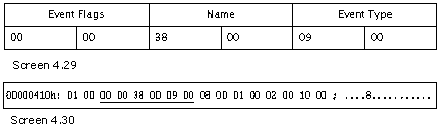
The first field
is always a flag field, which has either none or one of the two bits ON.
The flag value of
0x0200 is a special event, whereas, the second value of 0x0400 solicits the
runtime to treat the event as special, thus handling the event in a special
manner.
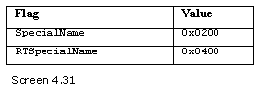
The function
GetEventAttributes returns the event attributes in a string form. The second
field is the name of the event, which in our case is 'a'. The third field is a
TypeDefOrRef coded index, wherein two bits determine whether the table is a
TypeDef or TypeRef or TypeSpec. In this case, it is an index to the 2nd row of
the TypeRef table, which represents the class EventHandler in the System
namespace.
Every event must
necessarily be of some delegate type. The second table is the EventMap table,
which has an id of 18.
The EventMap
table has the following columns:
The first field
is an index into the TypeDef table. It has a value of 2, thereby pointing to
the second row, which has the class name of zzz in the table. The event 'a' has
been created in the class zzz. The second field in the EventMap table is an
index into the event table. It refers to the event index in the event table.
Finally, the
MethodSematics class links the methods and the events together. You may recall
that the MethodSemantics table encompasses the columns of Semantics, Method and
Association.
The first field
of MethodSemanticsAttributes may either be Addon or Remove. It is followed by
an index to the method table. Thereafter, we come across add_a and remove_a,
and finally, we encounter the Event index in the event table, to which the
above methods are linked. This table acts as a conduit between properties and
events, and their methods.
b.cs
using System;
public delegate int pqr();
public class zzz
{
public event EventHandler a;
public event pqr b;
public event EventHandler c;
public static void Main()
{
}
}
public class yyy
{
public event pqr b1;
public event EventHandler c1;
}
public class xxx
{
}
Output
Event
Row 1
Name: a
Row 2
Name: b
Row 3
Name: c
Row 4
Name: b1
Row 5
Name: c1
EventMap Table
Row 1
Parent TypeDef[3]
EventList Event[1]
Row 2
Parent TypeDef[4]
EventList Event[4]
In the above
example, we have merely added three events to the class zzz and two events to
the class yyy. The Event table stores the five events, while the Event Map
table stores the classes that contain these events. The class xxx does not
contain any events, which explains its absence in Event Map table.
Associating an
event with a class is indeed a tricky and a sticky issue, since a count of the
events is not stored anywhere. The Event Map table has to be accessed to
determine the Event row in the EventList. The difference between the event
index for the first row and that of the second row establishes the number of
events that exist in the first class.
Pinvoke Table
b.cs
using System.Runtime.InteropServices;
using System;
public class zzz
{
[DllImport("user32.dll")]
public static extern int MessageBox(int hWnd, String text, String caption, uint type);
public static void Main()
{
}
}
a.cs
public void xyz()
{
int old = tableoffset;
bool b = tablepresent(26);
int offs = tableoffset;
if ( b )
{
Console.WriteLine("ModuleRef");
for ( int k = 1 ; k <= rows[26] ; k++)
{
short name = BitConverter.ToInt16 (metadata, offs);
offs += 2;
Console.WriteLine("Row {0}" , k);
Console.WriteLine("Name {0}" , GetString(name));
}
}
tableoffset = old;
b = tablepresent(28);
offs = tableoffset;
if ( b )
{
Console.WriteLine("ImplMap");
for ( int k = 1 ; k <= rows[28] ; k++)
{
short attr = BitConverter.ToInt16 (metadata, offs);
offs += 2;
short cindex = BitConverter.ToInt16 (metadata, offs);
offs += 2;
short name = BitConverter.ToInt16 (metadata, offs);
offs += 2;
short scope = BitConverter.ToInt16 (metadata, offs);
offs += 2;
Console.WriteLine("Row {0}" , k);
Console.WriteLine("Mapping Flags :{0}", GetPInvokeAttributes(attr));
Console.Write("MemberForwarded:");
int tag = cindex & 0x01;
if ( tag == 0 )
Console.Write("Field");
if ( tag == 1 )
Console.Write("Method");
int riid = cindex >> 1;
Console.WriteLine("[{0}]" , riid);
Console.WriteLine("Name :{0}" , GetString(name));
Console.WriteLine("Import Scope :ModuleRef[{0}]" , scope);
}
}
}
public string GetPInvokeAttributes(short a)
{
string s = "";
if ( (a & 0x0001) == 0x0001)
s = s + "NoMangle ";
if ( (a & 0x0006) == 0x0006)
s = s + "CharSetMask ";
if ( (a & 0x0000) == 0x0000)
s = s + "CharSetNotSpec ";
if ( (a & 0x0002) == 0x0002)
s = s + "CharSetAnsi ";
if ( (a & 0x0004) == 0x0004)
s = s + "CharSetUnicode ";
if ( (a & 0x0004) == 0x0004)
s = s + "CharSetAuto ";
if ( (a & 0x0040) == 0x0040)
s = s + "SupportsLastError ";
if ( (a & 0x0700) == 0x0700)
s = s + "CallConvMask ";
if ( (a & 0x0100) == 0x0100)
s = s + "CallConvWinapi ";
if ( (a & 0x0200) == 0x0200)
s = s + "CallConvCdecl ";
if ( (a & 0x0300) == 0x0300)
s = s + "CallConvStdcall ";
if ( (a & 0x0400) == 0x0400)
s = s + "CallConvThiscall ";
if ( (a & 0x0500) == 0x0500)
s = s + "CallConvFastcall ";
return s;
}
Output
ModuleRef
Row 1
Name user32.dll
ImplRef
Row 1
Mapping Flags :CharSetNotSpec CallConvWinapi
MemberForwarded:Method[1]
Name :MessageBox
Import Scope :ModuleRef[1]
TypeRef Table
Row[3]
Name :DllImportAttribute,0x89
Namespace :System.Runtime.InteropServices,0x6A
Method Table
Row 1
RVA :0
Name : MessageBox
ImpFlags :PreserveSig
PrivateScope FamANDAssem Family Public Static HideBySig ReuseSlot PinvokeImpl
Signature: #Blob[10]
Blob:10 Count:7 Bytes 0 4 8 8 E E 9
ParamList: Param[1]
In the above
example, there is a method named MessageBox that takes four parameters. It is
composed of two ints and two strings. The code of this method is not placed
within open and close braces; instead, it terminates with a semicolon.
Moreover, there is an attribute named DllImport placed above this function.
Code is normally
placed in a Dynamic Link Library (DLL). The code that runs Windows is also
posited in dlls, such as User32.dll and Kernerl32.dll. This code has mainly
been written in the C programming language. In the days of yore, there were functions
infinite that were penned down in the C language, and then, compiled into the
Intel assembler, but not in IL. We can gain access to this code either from our
C# program or from any other .Net application.
In order to
execute this code, the PInvoke functionality of the .Net world was introduced.
The addition of the DllImport attribute results in the addition of a row to the
ModuleRef table, which has a bit position of 26. The ModuleRef table has only
one column i.e. Name, which is an index into the String heap.
Currently, this
table has a single row. The index into the string table furnishes the name of
the DLL as user32.dll.
Yet another table
that is affected by the interop service is the ImplMap table. This table is at
a bit position of 28. It contains the details of the method present in the DLL.
The ImplMap table
has the following columns:
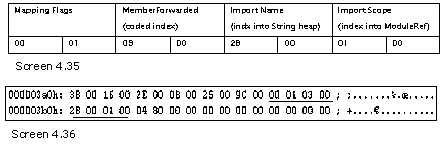
The first field
is the flags or the attribute field, which is resolved with the help of a
function called GetPInvokeAttributes.
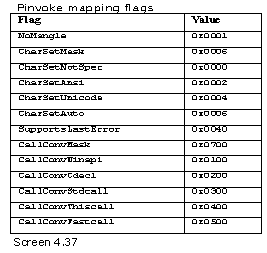
The Charset value
represents the character set that is employed. The standard of Unicode is an
international standard, which facilitates the representation of any language in
the world, on the computer. This standard is also known as I18n, since there
are 18 characters between the letters I and N in the word
'InternationalizatioN'.
The calling
convention takes a look at parameters that are posited on the stack and
thereafter, it elects the parameter that would be conferred with the onus of
cleaning up the stack.
The Winapi
calling convention has been used while developing Windows, where the parameters
are pushed on the stack in the reverse order. Further, it is the 'called'
function that scours the stack clean or restores it back to its original
location, when the function is called.
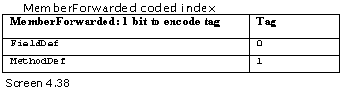
The second field
in the implmap table is the MemberForwarded. It is a coded index. Thus, the
first two bits resolve the dilemma of whether it is an index to the Field or to
the Method table. The field export is not supported.
The first method
in the methoddef table has an RVA of zero, since the code for the function is
present in the dll named User32.dll, and not within the current file. The
Flags, in no uncertain terms, indicate the fact that the method has the
PinvokeImpl bit set ON. Also, the Signature states that the method will be
called with four parameters, and that the offset in the param table begins at
1.
The last field is
an offset in the ModuleRef table, which provides the name of the DLL where the
method resides.
Interfaces
b.cs
public class zzz : yyy ,xxx
{
void yyy.abc()
{
}
void xxx.abc()
{
}
public static void Main()
{
}
}
interface yyy
{
void abc();
}
interface xxx
{
void abc();
}
a.cs
public void xyz()
{
int old = tableoffset;
bool b = tablepresent(9);
int offs = tableoffset;
if ( b )
{
Console.WriteLine("InterfaceImpl");
for ( int k = 1 ; k <= rows[9] ; k++)
{
short classindex = BitConverter.ToInt16 (metadata, offs);
offs += 2;
short interfaceindex = BitConverter.ToInt16 (metadata, offs);
offs += 2;
Console.WriteLine("Row {0}" , k);
Console.WriteLine("Class TypeDef[{0}]" , classindex );
Console.WriteLine("Interface {0}[{1}]" , GetTypeDefOrRefTable(interfaceindex) , GetTypeDefOrRefValue(interfaceindex));
}
}
tableoffset = old;
b = tablepresent(25);
offs = tableoffset;
if ( b )
{
Console.WriteLine("MethodImpl");
for ( int k = 1 ; k <= rows[25] ; k++)
{
short classindex = BitConverter.ToInt16 (metadata, offs);
offs += 2;
short codedbody = BitConverter.ToInt16 (metadata, offs);
offs += 2;
short codeddef = BitConverter.ToInt16 (metadata, offs);
offs += 2;
Console.WriteLine("Row {0}" , k);
Console.WriteLine("Class TypeDef[{0}]" , classindex );
Console.WriteLine("MethodBody {0}[{1}]" , GetMethodDefTable(codedbody ) , GetMethodDefValue(codedbody ));
Console.WriteLine("MethodDeclaration {0}[{1}]" , GetMethodDefTable(codeddef ) , GetMethodDefValue(codeddef ));
}
}
}
public int GetMethodDefValue(short a)
{
return a >> 1;
}
public string GetMethodDefTable(short a)
{
string s = "";
short tag = (short)(a & (short)0x01);
if ( tag == 0)
s = s + "MethodDef";
if ( tag == 1)
s = s + "MethodRef";
return s;
}
public int GetTypeDefOrRefValue(short a)
{
return a >> 2;
}
public string GetTypeDefOrRefTable(short a)
{
string s = "";
short tag = (short)(a & (short)0x03);
if ( tag == 0)
s = s + "TypeDef";
if ( tag == 1)
s = s + "TypeRef";
if ( tag == 2)
s = s + "TypeRef";
return s;
}
Output
InterfaceImpl
Row 1
Class TypeDef[4]
Interface TypeDef[2]
Row 2
Class TypeDef[4]
Interface TypeDef[3]
MethodImpl
Row 1
Class TypeDef[4]
MethodBody MethodDef[3]
MethodDeclaration MethodDef[1]
Row 2
Class TypeDef[4]
MethodBody MethodDef[4]
MethodDeclaration MethodDef[2]
TypeDef Table
Row:2
Flags : AutoLayout, AnsiClass, NotPublic, ClassSemanticsMask, Abstract
Name : yyy
Row:3
Flags : AutoLayout, AnsiClass, NotPublic, ClassSemanticsMask, Abstract
Name : xxx
Row:4
Name : zzz
Method Table
Row 1
RVA :0
Name : abc
Row 2
RVA :0
Name : abc
Row 3
RVA :2050
Name : yyy.abc
Row 4
RVA :2060
Name : xxx.abc
Row 5
Row 6
The b.cs file has
two interfaces named yyy and xxx, which in turn have one function each, bearing
the same name of abc. The class zzz is then derived from the two interfaces.
Since the function names are identical, the method name abc in the class must
be preceded with the name of the interface.
Let us now pore
over the tables that get created. The first table that gets affected is the
InterfaceImpl, which has a bit index of 9 in the valid table.
The InterfaceImpl
table has the following columns:
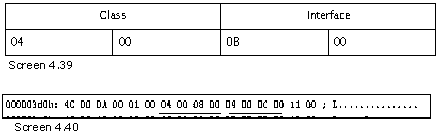
The first field
is an offset to the TypeDef table. Row 4 in this table refers to the class name
zzz itself. The second parameter is a 2-bit coded index of TypeDefOrRef.
Hereinafter, a function is used to decode the coded index, which checks the
bits and returns the table name. Another function is utilized to right shift
and return the index value.
The TypeDefOrRef
coded index indexes into one of the following three tables: TypeDef, TypeRef or
TypeSpec.
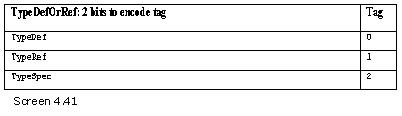
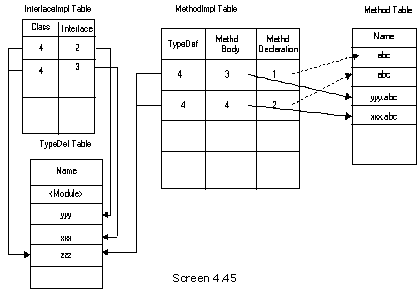
In the first row,
the index value points to the second row of the TypeDef table. The second row
has an entry for the interface yyy. The second row of the InterfaceImpl also
points to the fourth row in the TypeDef table, i.e. class zzz; but the
interface index is now Row 3 of the TypeDef table, which is interface xxx.
Thus, every class
that derives from an interface, has one row in the InterfaceImpl table. Since
we derive from two interfaces, two rows are present. The interface is a type in
the TypeDef table with the Abstract and ClassSemanticsMask bits ON.
The second table
that gets populated is the MethodImpl table at the bit index of 25. The
MethodImpl table has the following columns:
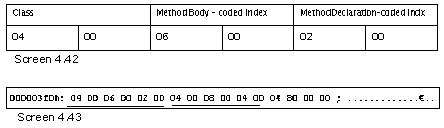
The first field
is an index to the TypeDef table. As the methods are present in the class zzz,
both rows point to this class or row 4, in the TypeDef table. The next two
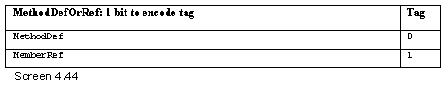
fields use the same MethodDefOrRef coded index, which has a single bit that
chooses from amongst the two, i.e. a MethodDef (which is a definition), and a
MethodRef (which is a reference to a method).
Two functions,
which are similar to the intefaceimpl table, are implemented to return the
string and the value. The MethodBody index points to the third method in the
method table, i.e. yyy.abc, while the MethodDeclaration points to the first
function i.e. abc.
This function has
an RVA of zero, since it belongs to the interface yyy. This is so because the
field of MethodList in the TypeDef table has a value of 1.
The second row of
the MethodImpl table has the MethodBody index to the fourth row or the xxx.abc
method. The MethodDeclaration field is the function abc from the interface xxx.
Thus, the
methodimpl table provides information about the original function in the
MethodDeclaration field, which gets overridden by the function in the
MethodBody field in the class zzz.
If the interface
encompasses 100 methods, each would then be overridden in the class zzz,
thereby resulting in the addition of 100 rows in the MethodImpl table.
StandAloneSig
Table :
b.cs
public class zzz
{
public static void Main()
{
int i;
string j;
}
public void abc()
{
bool b;
}
}
a.cs
public void xyz()
{
int old = tableoffset;
bool b = tablepresent(17);
int offs = tableoffset;
if ( b )
{
Console.WriteLine("StandAloneSig");
for ( int k = 1 ; k <= rows[17] ; k++)
{
short index = BitConverter.ToInt16 (metadata, offs);
offs += 2;
Console.WriteLine("Row {0}" , k);
byte count = blob[index];
Console.Write("Signature BLOB[{0}] Count {1} " , index , count );
if (blob[index+1] == 0x07 )
{
for ( int l = 3 ; l <= count ; l++)
{
Console.Write("{0} " , GetType(blob[index+l]));
}
Console.WriteLine();
}
}
}
}
Output
StandAloneSig
Row 1
Signature BLOB[24] Count 4 int string
Row 2
Signature BLOB[29] Count 3 boolean
In the file b.cs,
the function Main possesses two local variables, an int and a string. The
function abc in turn has one local variable of type bool.
Each time that a
local variable is created in a method, one row gets added to the StandAloneSig
table, which holds the position of 17 in the valid field. This table has a
field called signature, which is an index into the Blob heap.
This index starts
out with the count followed by the reserved number 7. We have already
encountered this in one of the earlier examples. Next is the count of the
number of parameters and the actual data types. The GetType function is again
exploited to decipher the data types.
Signatures that
are stored in the Blob heap can be indexed from numerous other tables. We could
be faced with an eventuality wherein, a signature in a Blob heap has no
metadata table indexing it. One such case presents itself when there are
variables present in a function. In due course, we would be evincing the
procedure employed to access these signatures.
Security and
Unsafe
b.cs
public class zzz
{
public static void Main()
{
}
static public unsafe void abc( int j)
{
}
public unsafe void pqr()
{
}
}
>csc b.cs /unsafe
a.cs
public void xyz()
{
int old = tableoffset;
bool b = tablepresent(14);
int offs = tableoffset;
if ( b )
{
Console.WriteLine("DeclSecurity");
for ( int k = 1 ; k <= rows[14] ; k++)
{
int action = BitConverter.ToInt16 (metadata, offs);
offs += 2;
int coded = BitConverter.ToInt16 (metadata, offs);
offs += 2;
int bindex = BitConverter.ToInt16 (metadata, offs);
offs += 2;
Console.WriteLine("Row {0}" , k);
Console.WriteLine("Action {0}" , action);
Console.WriteLine("Parent: {0}[{1}]" , GetDeclSecurityTable(coded), GetDeclSecurityValue(coded));
int count = blob[bindex];
Console.WriteLine("Permission Set BLOB[{0}] Count={1}" , bindex , count);
for ( int l = 1 ; l <= count ; l++)
{
Console.Write("{0}" , (char)blob[bindex+l]);
}
Console.WriteLine();
}
}
}
public int GetDeclSecurityValue(int a)
{
return a >> 2;
}
public string GetDeclSecurityTable(int a)
{
string s = "";
short tag = (short)(a & (short)0x03);
if ( tag == 0)
s = s + "TypeDef";
if ( tag == 1)
s = s + "MethodDef";
if ( tag == 2)
s = s + "Assembly";
return s;
}
Output
DeclSecurity
Row 1
Action 8
Parent: Assembly[1]
Permission Set BLOB[47] Count=130
?<PermissionSet class="System.Security.PermissionSet"
TypeRef Table
Row[1]
Row[2]
Name :SecurityPermissionAttribute,0x5A
Namespace :System.Security.Permissions,0x3E
Row[3]
Name :SecurityAction,0x76
Namespace :System.Security.Permissions,0x3E
Row[4]
Row[5]
Name :UnverifiableCodeAttribute,0xC0
Namespace :System.Security,0xB0
The b.cs program
now contains two methods that have been tagged with the 'unsafe' parameter.
Whenever pointers are used in the program code, it is mandatory for the
'unsafe' modifier to be implemented. Furthermore, while compiling the above
program, the /unsafe option is to be added to the compiler. The use of a single
unsafe method adds one row to the DeclSecurity Table that has a bit index of
14.
The DeclSecurity
table has the following columns:


Besides the
DeclSecurity table, the TypeRef table also gets augmented with three rows,
thereby resulting in three references. All the three attributes are located
within the Security namespace.
The first field
in the DeclSecurity table is a short, which stands for Actions. The value
assigned to it originates from the enum SecurityAction in the
System.Security.Permissions namespace.
The values from 0 to 0xff are reserved for use by future standards. Since the
current value is 8, we are incapable of explaining the Action that it
represents, at this stage.
The second field
is a 2-bit coded index of HasDeclSecurity that points to one of the following
three entities, viz. TypeDef, MethodDef or Assembly.
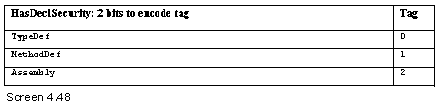
This field is
called the parent. Since the value of Assembly has been assigned, the security
permissions apply to the entire assembly. The last parameter is an index into
the Blob heap. The value is a Unicode string System.Security.PermissionSet,
which is a valid serialized CLI object graph.
Resources
a.txt
sonal=mukhi
vijay=ram
A text file named
a.txt is created to store the string resource. A resource is merely a
name-value pair. There are a total of two names, i.e. sonal and vijay, with the
values of mukhi and ram. These resources are put away in our exe file and retrieved
later, using some API.
Now, run the
Resgen program as in Resgen a.txt to create a file named a.resources.
Thereafter, create one more text file named b.txt that contains the line
net=yes, and then, run the Resgen program on it too, as in Resgen b.txt.
Now, to add both
resource files to the exe file, issue the following command:
b.cs
public class zzz {
public static void Main()
{
}
}
Csc b.cs /res:a.resources /res:b.resources
The /res command
option adds the resources to the exe file. Now, let us explore the metadata
tables that get impinged on.
a.cs
public void xyz()
{
int old = tableoffset;
bool b = tablepresent(40);
int offs = tableoffset;
if ( b )
{
Console.WriteLine("ManifestResource");
for ( int k = 1 ; k <= rows[40] ; k++)
{
int offset = BitConverter.ToInt32 (metadata, offs);
offs += 4;
int flags = BitConverter.ToInt32 (metadata, offs);
offs += 4;
short name = BitConverter.ToInt16 (metadata, offs);
offs += 2;
short coded = BitConverter.ToInt16 (metadata, offs);
offs += 2;
Console.WriteLine("Row {0}" , k);
Console.WriteLine("Offset {0}" , offset);
Console.WriteLine("Flags {0}" , GetManifestResource(flags));
Console.WriteLine("Name {0}" , GetString(name));
Console.WriteLine("Implementation: {0}[{1}]" , GetManifestResourceTable(coded), GetManifestResourceValue(coded));
}
}
}
public int GetManifestResourceValue(int a)
{
return a >> 2;
}
public string GetManifestResourceTable(int a)
{
string s = "";
short tag = (short)(a & (short)0x03);
if ( tag == 0)
s = s + "File";
if ( tag == 1)
s = s + "AssemblyRef";
if ( tag == 2)
s = s + "ExportedType";
return s;
}
public string GetManifestResource(int a)
{
string s="";
if ( (a & 0x007) == 0x007)
s = s + "VisibilityMask ";
if ( (a & 0x001) == 0x001)
s = s + "Public ";
if ( (a & 0x002) == 0x002)
s = s + "Private ";
return s;
}
Output
ManifestResources
Row 1
Offset 0
Flags Public
Name a.resources
Implementation: File[0]
Row 2
Offset 348
Flags Public
Name b.resources
Implementation: File[0]
Each time a
resource is added to the exe file using the /res option, a row gets added to
the ManifestResource table, whose bit index is 40 in the valid field.
The
ManifestResource table has the following columns:
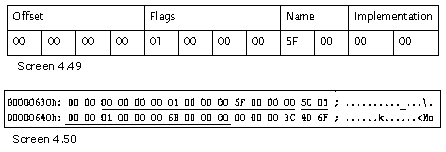
The first field
is an offset to the location, where the resource is stored in the executable
file. This offset is obtained from the Resource data directory in the
ImageOptional header.
The COR header
contains an entry for the resources, along with their offset.
The first
resource is stored at an offset of zero from this value. The size of our file
a.resources is 342 bytes. As a result of the accumulation of bytes for the
header, the second resource reveals an offset value of 348. The second resource
begins immediately after the first. Thus, the offset field contains the byte
offset from where the resource begins.
The second field
is a flags field, which renders information about whether the resource is
'public' or 'exported' from the assembly, or if it is 'private' to the
assembly.
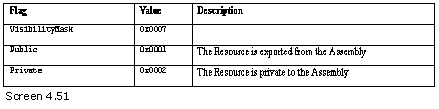
Using the
function GetManifestResource, the relevant string is returned.
The third field
is the name of the resource file. The fourth field is an Implementation code
index, which points to the File or AssemblyRef table.
The documentation
clearly states that if the implementation is an index into the File table, the
index value must be zero. A zero index in a table signifies that the index is
invalid.
Exported Type
c.cs
public class yyy
{
public int i;
}
namespace ccc
{
public class xxx
{
public string j;
}
}
>csc /t:module c.cs
This gives us a file c.netmodule
b.cs
public class zzz
{
public static void Main()
{
}
}
csc /AddModule:c.netmodule b.cs
a.cs
public void xyz()
{
int old = tableoffset;
bool b = tablepresent(39);
int offs = tableoffset;
tableoffset = old;
if ( b )
{
Console.WriteLine(tablenames[39]);
for ( int k = 1 ; k <= rows[39] ; k++)
{
TypeAttributes flags = (TypeAttributes)BitConverter.ToInt32 (metadata, offs);
offs += 4;
int typedefindex = BitConverter.ToInt32 (metadata, offs);
offs += 4;
int name = BitConverter.ToInt16 (metadata, offs);
offs += 2;
int nspace = BitConverter.ToInt16 (metadata, offs);
offs += 2;
short coded = BitConverter.ToInt16 (metadata, offs);
offs += 2;
Console.WriteLine("Row {0}" , k);
Console.WriteLine("Flags {0}" , flags);
Console.WriteLine("TypeDef TYPEDEF[{0}]" , typedefindex );
Console.WriteLine("TypeName {0}" , GetString(name));
Console.WriteLine("NameSpace {0}" , GetString(nspace));
Console.WriteLine("Implementation {0}[{1}] " , GetImplementationTable(coded) , GetImplementationValue(coded));
}
}
}
public int GetImplementationValue( short a)
{
return a >> 2;
}
public string GetImplementationTable( short a)
{
string s = "";
int tag = a & 0x03;
if ( tag == 0 )
s = s + "File";
if ( tag == 1 )
s = s + "AssemblyRef";
if ( tag == 2 )
s = s + "ExportedType";
return s;
}
Output
ExportedType
Row 1
Flags AutoLayout, AnsiClass, NotPublic, Public, BeforeFieldInit
TypeDef TYPEDEF[33554434]
TypeName yyy
NameSpace
Implementation File[1]
Row 2
Flags AutoLayout, AnsiClass, NotPublic, Public, BeforeFieldInit
TypeDef TYPEDEF[33554435]
TypeName xxx
NameSpace ccc
Implementation File[1]
Two classes are
created in the file c.cs. They are subsequently compiled into a module using
the module option, along with the /target option of the compiler. This results
in the creation of a module file having an extension of .netmodule. Thereafter,
the file b.cs is compiled using the .AddModule option of the compiler.
This results in
the addition of two rows to the exported type table having a bit index of 39 in
the valid field.
The ExportedType
table has the following columns:
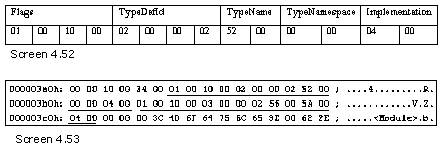
The first field
is the flags attribute, which is of type TypeAttributes. It displays the normal
flags that every class possesses. The second field is slightly more complex. It
is known as TypeDefId. The value is an index into a TypeDef table of another
module in the assembly. However, it is to be used merely as a reference.
Before proceeding
further, it is imperative to verify if the other table also contains the same
name and namespace. In this case, the
value shown is exceedingly large; and as a result, we could not accomplish
anything worthwhile. The third is the name of the class. The fourth is the name
of the namespace. The fifth is an implementation coded index that points to the
first row of the file table.
Thus, to
summarize, the exported type table holds a row only for a type that is defined
within other modules of our assembly, and is exported. These types are
obviously marked as 'public'.